XCP-ng
    • Categories
    • Recent
    • Tags
    • Popular
    • Users
    • Groups
    • Register
    • Login

    XO logs to external syslog

    Scheduled Pinned Locked Moved Xen Orchestra
    19 Posts 7 Posters 5.2k Views 8 Watching
    Loading More Posts
    • Oldest to Newest
    • Newest to Oldest
    • Most Votes
    Reply
    • Reply as topic
    Log in to reply
    This topic has been deleted. Only users with topic management privileges can see it.
    • julien-fJ Offline
      julien-f Vates 🪐 Co-Founder XO Team @lawrencesystems
      last edited by

      @lawrencesystems There was a typo in our blog post (and our sample config), the section should be logs.transport.syslog and not log.transport.syslog.

      Also, you should not change the config in xo-server's directory, only in /etc/xo-server/.

      I have fixed both issues for you, you only need to restart xo-server 🙂

      Keep me posted.

      lawrencesystemsL 1 Reply Last reply Reply Quote 0
      • lawrencesystemsL Offline
        lawrencesystems Ambassador @julien-f
        last edited by

        @julien-f
        I rebooted and I have tested both tcp:// and udp:// and it's not sending anything. Also checked using ss -t to and I don't see any TCP connection going to the logging server. Support # is 44423

        julien-fJ 1 Reply Last reply Reply Quote 0
        • julien-fJ Offline
          julien-f Vates 🪐 Co-Founder XO Team @lawrencesystems
          last edited by

          @lawrencesystems There is a bug, a dependency is missing: https://github.com/vatesfr/xen-orchestra/commit/ccafc15b669cf71ab1ec68cdc81d887bc829b2b2

          I've installed the correct dependency on your appliance, please restart xo-server and keep me posted 🙂

          Keep in mind that you should be able to edit the log config without having to restart xo-server 🙂

          0 julien-f committed to vatesfr/xen-orchestra
          fix(xo-server): split-log → split-host
          
          Introduced by ed7ff1fad
          
          Fixes https://xcp-ng.org/forum/post/54503
          lawrencesystemsL D 2 Replies Last reply Reply Quote 0
          • lawrencesystemsL Offline
            lawrencesystems Ambassador @julien-f
            last edited by

            @julien-f

            Thanks, that fixed it! 🙂

            julien-fJ 1 Reply Last reply Reply Quote 1
            • julien-fJ Offline
              julien-f Vates 🪐 Co-Founder XO Team @lawrencesystems
              last edited by

              @lawrencesystems Thank you for your report!

              1 Reply Last reply Reply Quote 0
              • D Offline
                dan89 @julien-f
                last edited by

                @julien-f I am still not seeing syslog traffic either.
                My XOA is patched to the latest release and I am defining [logs.transport.syslog] in my config file.

                1 Reply Last reply Reply Quote 0
                • olivierlambertO Offline
                  olivierlambert Vates 🪐 Co-Founder CEO
                  last edited by

                  @chromerooster we are about to release a patch version on latest this week. It will fix it 🙂 So hang on!

                  1 Reply Last reply Reply Quote 1
                  • olivierlambertO Offline
                    olivierlambert Vates 🪐 Co-Founder CEO
                    last edited by

                    It is released! Kudos to the XO team (and @Danp for spotting another quirk)

                    1 Reply Last reply Reply Quote 0
                    • T ThasianXi referenced this topic on
                    • P Online
                      Pilow
                      last edited by

                      Hi,

                      Does this work nowadays in XOA ? I'm on latest update, did modify /etc/xo-server/config.toml like so (last lines) :
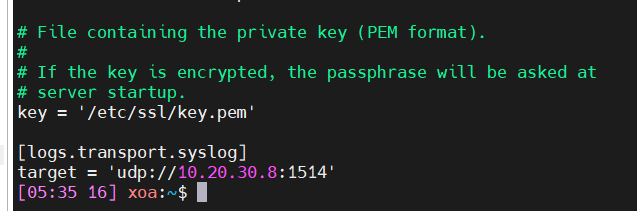
                      cf95a01c-88d1-4eaa-a8f2-5d7accf5d87c-image.png
                      But bothing comes from XOA to my Graylog server (I have all 7 XCP hosts okay to this same server)

                      Xo-server restarted... XOA rebooted... still nothing incoming.

                      ForzaF 1 Reply Last reply Reply Quote 0
                      • olivierlambertO Offline
                        olivierlambert Vates 🪐 Co-Founder CEO
                        last edited by

                        Ping @julien-f if you remember/have more info on this

                        1 Reply Last reply Reply Quote 0
                        • ForzaF Offline
                          Forza @Pilow
                          last edited by

                          @Pilow did you try tcp?

                          P 1 Reply Last reply Reply Quote 0
                          • P Online
                            Pilow @Forza
                            last edited by

                            @Forza I didn't try, as my default Graylog Input was UDP and worked with the hosts...

                            But guys, that was it. In TCP mode, it's working. Rapidly set up a TCP input, and voila.
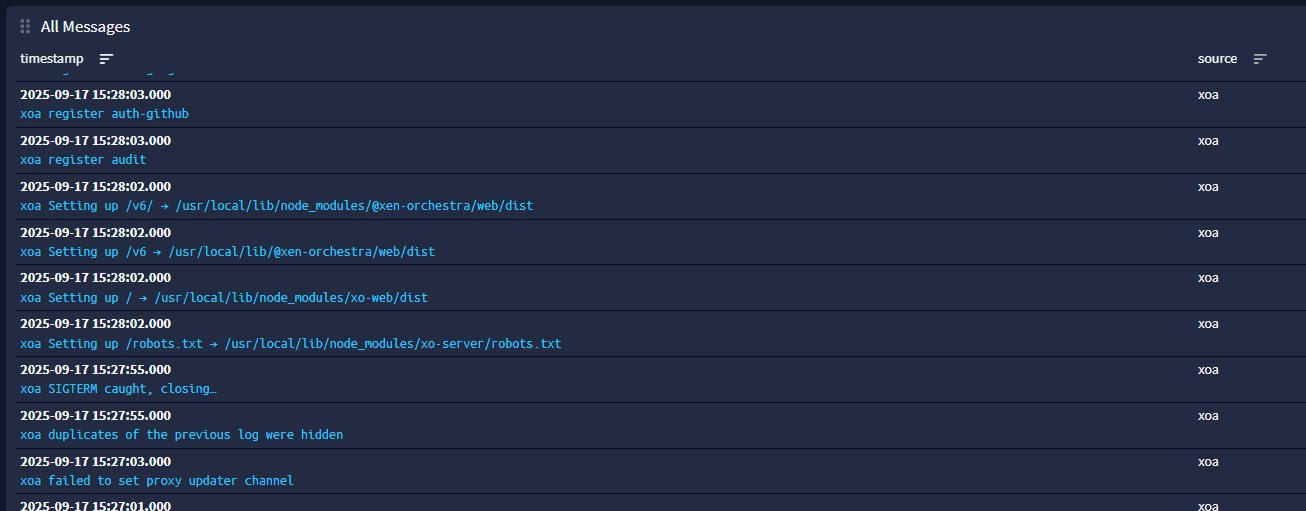
                            42411fc9-af86-4838-a870-ca9ca6307234-image.png

                            1 Reply Last reply Reply Quote 2

                            Hello! It looks like you're interested in this conversation, but you don't have an account yet.

                            Getting fed up of having to scroll through the same posts each visit? When you register for an account, you'll always come back to exactly where you were before, and choose to be notified of new replies (either via email, or push notification). You'll also be able to save bookmarks and upvote posts to show your appreciation to other community members.

                            With your input, this post could be even better 💗

                            Register Login
                            • First post
                              Last post