XCP-ng 8.3 updates announcements and testing
-
Ok, so what's the scoop here? Safe to roll this out or wait a few days? I just saw the notice in my XO that there are updates and I don't want to wreck my system right now after fixing a few other "issues".
[edit] I see this is just the certificate update so pushing it out and listening to servers reboot.
-
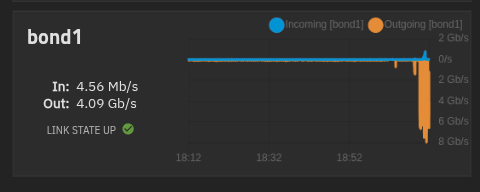
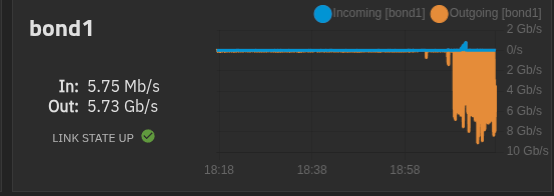
I reinstalled the updates, and confirm backups work with NBD disablled in backup job. - I missed the part about NBD in the notes..
However the task stay at 0% while i can see traffic on my trunas..


-
jr-m4 said:
Updated two dev-pools successfully!
new-xcp-dev: 2x Dell Inc. PowerEdge R650xs
old-xcp-dev: 3x Dell Inc. PowerEdge R350 (HA)I even mistankenly did a wrong updating order on old-xcp-dev. And neglected to disable HA before updating, leading to two hosts being updated and promoting the next master. And by chance the last master was the non-updated one. Here I disabled HA, but couldn't promote another master (not unexpected)... Post update, and everything seems to be good anyways. And HA re-enabled successfully
Note:
No further testing other than the hosts booting and showing good life signs have been done, yet.I'm now also seeing issues with backups being stuck for multiple hours.
Update: Correction. I'm now having issues with almost everything on both pools.- migrations
- snapshots
- changing status e.g. rebooting or hard shut down of VMs
-
@lmolina @olivierlambert Sorry, but this update got ugly fast. CR backups got stuck. Migrations got stuck. VMs would not start any more. After reverting all the patches and rebooting all hosts I had several VMs that would not start again (including primary XO) because the VDIs stuck marked as activating. It took some time to fix them but at least there was no data loss. Some backups lost their snapshots and had to revert to full backups again.
-
Some message formats changed between the two releases, so VMs started before the update (with an 11.3 tapdisk and tapback) can’t understand some of the changed commands. Rebooting XCP-ng or doing an RPU should work. Since not every command is affected, restarting tapback is usually enough: systemctl restart tapback.service
We're going to work to avoid that. -
Rebooting hosts and/or VMs doesn't solve the problems.
As @andrew said. This one got ugly. But this is also why we test stuffUpdate:
Doing a "Rescan all disks" on the SR (lvmohba), seems to help out a little bit. But not everything.
Some VMs were able to be started again. But others are still showing problems and erroring out"The VDI is not available [opterr=['MAP_DUPLICATE_KEY', 'VDI', 'sm_config', 'OpaqueRef:7---------2c1b', 'activating']]", -
@jr-m4 I had this issue on one of the pools i tested on as well and was able to fix the issue by following the fix here:
https://xcp-ng.org/forum/topic/10603/sr_backend_failure_46-the-vdi-is-not-available-not-detached-cleanly/3 -
@flakpyro Hello,
It would be preferred to use another method.
You can use theresetvdis.pyscript in the/opt/xensource/sm/to reset values instead,
usingvdi-forgetis unadvised in this case, it can cause issues by losing information that are stored in XAPI about VDIs./opt/xensource/sm/resetvdis.py single <VDI UUID> -
@flakpyro Hello,
It would be preferred to use another method.
You can use theresetvdis.pyscript in the/opt/xensource/sm/to reset values instead,
usingvdi-forgetis unadvised in this case, it can cause issues by losing information that are stored in XAPI about VDIs./opt/xensource/sm/resetvdis.py single <VDI UUID>I was just about to look at maybe doing what @flakpyro suggested. More likely I would've just restored from backup. As this is dev-instances, and non-important.
But your
resetvdis.pysuggestion solved it entirely! Thanks for the quick tip! -
Now trying to see if pool works with generic operations.
Trying to do a RPR on new-xcp-dev. And I'm met with
Ofcourse there are no backups being run. They are even disabled right now. And the only active task happening is "Garbage collection" on the main SR.
pool.rollingReboot
{
  "pool": "1f16dad2---------------6c8b8b7",
  "bypassBackupCheck": false,
  "shutdownPinnedVms": false
}
{
  "code": "CANNOT_EVACUATE_HOST",
  "params": [
    "VM_LACKS_FEATURE,OpaqueRef:aa5210c4-a------------1b80-9bca5d0d0f8d|OPERATION_BLOCKED,OpaqueRef:c7a08---------------a0--------------9306,VM migration is blocked during backup"
  ],
  "call": {
    "duration": 23,
    "method": "host.assert_can_evacuate",
    "params": [
      "* session id *",
      "OpaqueRef:0145019c-2a32-13bb-5951-3bca9e59e63a"
    ]
  },
  "message": "CANNOT_EVACUATE_HOST(VM_LACKS_FEATURE,OpaqueRef:aa52-----------------------9bca5d0d0f8d|OPERATION_BLOCKED,OpaqueRef:c7a0------------------------306,VM migration is blocked during backup)",
  "name": "XapiError",
  "stack": "XapiError: CANNOT_EVACUATE_HOST(VM_LACKS_FEATURE,OpaqueRef:aa521-------------------8d|OPERATION_BLOCKED,OpaqueRef:c7a08c--------------------------9306,VM migration is blocked during backup)
    at XapiError.wrap (file:///opt/xen-orchestra/packages/xen-api/_XapiError.mjs:16:12)
    at file:///opt/xen-orchestra/packages/xen-api/transports/json-rpc.mjs:38:21
    at runNextTicks (node:internal/process/task_queues:65:5)
    at processImmediate (node:internal/timers:541:9)"
}



Hello! It looks like you're interested in this conversation, but you don't have an account yet.
Getting fed up of having to scroll through the same posts each visit? When you register for an account, you'll always come back to exactly where you were before, and choose to be notified of new replies (either via email, or push notification). You'll also be able to save bookmarks and upvote posts to show your appreciation to other community members.
With your input, this post could be even better 💗
Register Login