XCP-ng 8.3 updates announcements and testing
-
@lmolina Latest update candidate edk2 fix applied without issue to my four host home lab pool. I tested one BitLocker encrypted Windows 11 VM with full shutdown and restart. What surprised me is that the VM booted back up fine. I was expecting that anything that changed the Tiano UEFI guest firmware might bork BitLocker unless it was suspended prior to applying the hypervisor host fix. (e.g. PowerShell Suspend-BitLocker -MountPoint "C:" -RebootCount 0 suspends BitLocker for an infinite number of guest reboots until it is explicitly resumed.) Apparently, this particular update doesn't alter any part of the guest firmware that causes a noticeable change to BitLocker. As a result, the boot volume unlocks and boots normally. Note that a firmware update on a physical machine generally is noticed by BitLocker. This is the reason the OEM's firmware installer suspends BitLocker with RebootCount 1 before performing the update's finishing reboot.
-
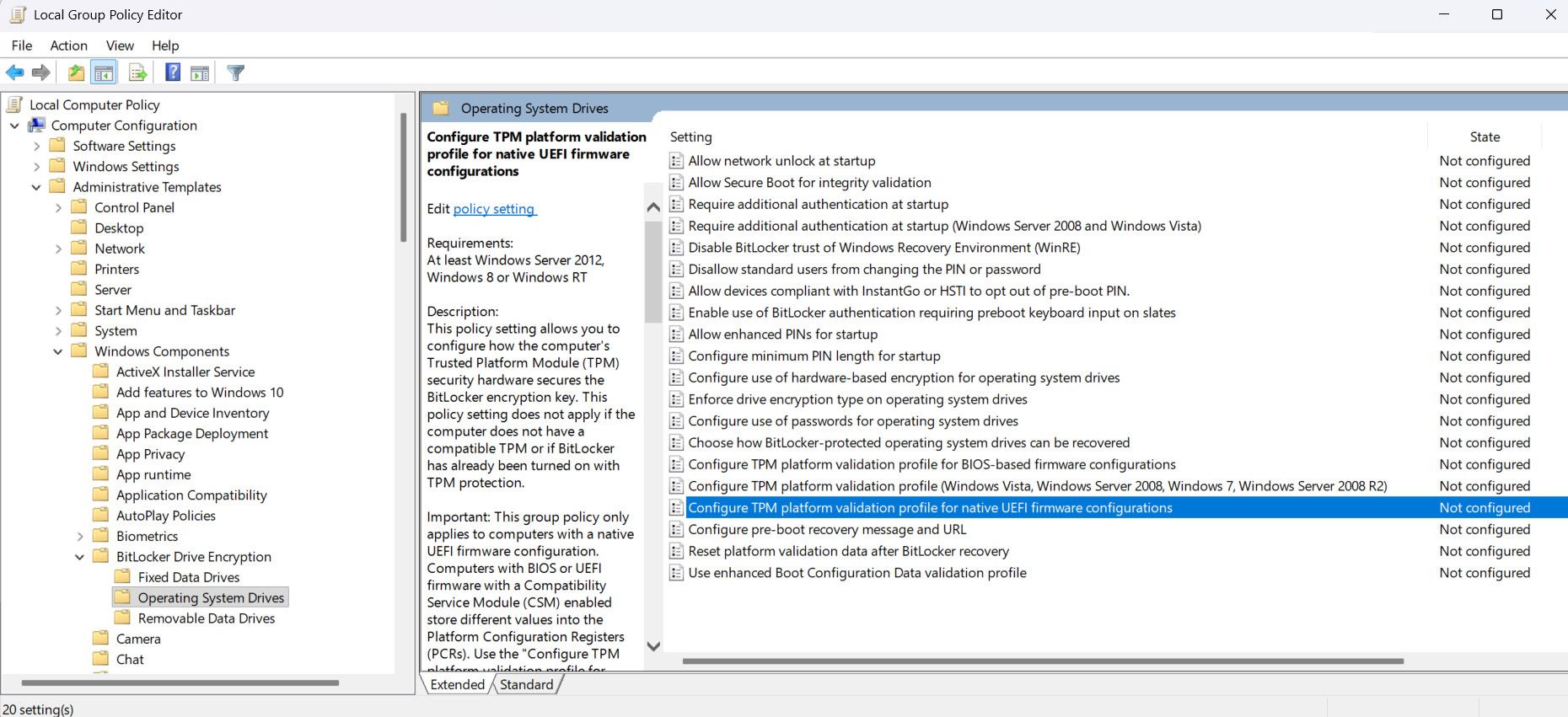
@XCP-ng-JustGreat Windows VMs will pass the Measured Boot check even after an edk2 update if BitLocker is set up to only use Secure Boot for integrity validation (see the "Configure TPM platform validation profile for native UEFI firmware configurations" policy, PCRs 7 and 11)
-
@dinhngtu Thank you for bringing the TPM platform validation profile to my attention. I see that there is yet another nuance to the firmware boot process I didn't fully understand. I'm going to dig into those TPM group policies to see what that's all about. (Later on . . .) Found them, here:
-
New
kernelversion inxcp-ng-testingfor the next XCP-ng 8.3 LTS security updateWe're adding a new kernel version to the security update we're planning for tomorrow.
What changed
kernel:- Security fixes in the Xen netback and blkback drivers, XSA-526, XSA-527 and XSA-528.
- Synchronization with XenServer release 4.19.19-8.0.49. In this release, the XCP-ng patches for CVE-2026-98432 (possible race condition occurring during concurrent processing of re-transmitted TCP connection requests) have been removed as they are now part of the XenServer release. Also included are patches for CVE-2026-31431, a vulnerability in the Linux kernel's cryptographic interface known as "Copy Fail" that could allow unprivileged accounts to gain root privileges. As a mitigation, the authencesn module was disabled in the previous XCP-ng kernel release. It is now re-enabled. Finally, it includes patches for CVE-2021-47103, a use-after-free vulnerability in the TCP IP protocol.
- Fixes for the following CVEs are also included:
- CVE-2026-31659
- CVE-2026-31678
- CVE-2026-43502
- CVE-2026-52912
- CVE-2026-52923
- CVE-2026-52924
- CVE-2026-68376
- CVE-2026-74480
- CVE-2026-74957
- CVE-2026-80714
- CVE-2026-52929
- CVE-2026-63834
- CVE-2026-43042
- CVE-2026-72255
Versions
kernel: 4.19.19-8.0.46.14.xcpng8.3 -> 4.19.19-8.0.49.3.xcpng8.3
Test on XCP-ng 8.3
yum clean metadata --enablerepo=xcp-ng-testing,xcp-ng-candidates
yum update --enablerepo=xcp-ng-testing,xcp-ng-candidates
reboot
The usual update rules apply: pool coordinator first, etc.
What to test
As usual, normal use and anything else you want to test.
Test window before official release of the updates
1 day
We would like to thank users who shared feedback since our last call for testing:
@acebmxer, @Andrew, @XCP-ng-JustGreat -
installed no issues to report. Cold booted windows 11 vm and linux vm. Backup job ran also with no issues.
Running transaction Updating : kernel-4.19.19-8.0.49.3.xcpng8.3.x86_64 1/2 Cleanup : kernel-4.19.19-8.0.46.14.xcpng8.3.x86_64 2/2 Verifying : kernel-4.19.19-8.0.49.3.xcpng8.3.x86_64 1/2 Verifying : kernel-4.19.19-8.0.46.14.xcpng8.3.x86_64 2/2 -
@vxgmichel Update installed and running. Rolling pool reboot failed waiting to evacuate an empty host, I can't blame the update.
-
@vxgmichel Installed to my test systems and all seems to be working well so far.
-
@vxgmichel The new dom0 kernel version installed fine on my lab pool and everything appears to be running well.
-
@vxgmichel Installed on 10 lab hosts (mostly older hardware - Dell, HP, Fujitsu), no issues.
-
@vxgmichel Update installed and running. Rolling pool reboot failed waiting to evacuate an empty host, I can't blame the update.
Interesting. Worth a report to XO team?
-
Installed on my test hosts, no issues.
-
Updates are live now
Thank you everyone for your tests and your feedback!
This includes updates that you have tested, as well as security updates that were under embargo.
Check out the blog post for the full list of fixes and any post-update steps: https://xcp-ng.org/blog/2026/11/10/november-2026-security-updates-3-for-xcp-ng-8-3-lts/
If you installed the kernel from our last call for testing, please read on. You can check with
rpm -q kernel.The released kernel is not the
4.19.19-8.0.49.3you tested, but4.19.19-8.0.46.16. Its release number is lower, so a regular update will leave your hosts on4.19.19-8.0.49.3. We identified some issues in4.19.19-8.0.49.3.To downgrade and install
kernel-4.19.19-8.0.46.16, run the following commands:yum clean metadata yum downgrade --setopt=protected_packages= kernel-4.19.19-8.0.46.16.xcpng8.3 yum update rebootThe usual update rules apply: pool coordinator first, etc.
We expect to release a new kernel in a few days, and it will install as a normal update from either version.
-
=======================================================================================================================================================
 Package                      Arch                         Version                                          Repository                            Size
=======================================================================================================================================================
Downgrading:
 kernel                       x86_64                       4.19.19-8.0.46.16.xcpng8.3                       xcp-ng-updates                        29 M

Transaction Summary
=======================================================================================================================================================
Downgrade  1 Package

Total download size: 29 M
Is this ok [y/d/N]: y
Downloading packages:
kernel-4.19.19-8.0.46.16.xcpng8.3.x86_64.rpm                                                                                    |  29 MB  00:00:07
Running transaction check
Running transaction test
Transaction test succeeded
Running transaction
  Installing : kernel-4.19.19-8.0.46.16.xcpng8.3.x86_64                                                                                            1/2
depmod: WARNING: /lib/modules/4.19.0+1/kernel/crypto/authencesn.ko needs unknown symbol memcpy_sglist
  Cleanup    : kernel-4.19.19-8.0.49.3.xcpng8.3.x86_64                                                                                             2/2
  Verifying  : kernel-4.19.19-8.0.46.16.xcpng8.3.x86_64                                                                                            1/2
  Verifying  : kernel-4.19.19-8.0.49.3.xcpng8.3.x86_64                                                                                             2/2

Removed:
  kernel.x86_64 0:4.19.19-8.0.49.3.xcpng8.3

Installed:
  kernel.x86_64 0:4.19.19-8.0.46.16.xcpng8.3
Updated: forkexecd.x86_64 0:26.1.21-1.4.xcpng8.3 message-switch.x86_64 0:26.1.21-1.4.xcpng8.3 qcow-stream-tool.x86_64 0:26.1.21-1.4.xcpng8.3 rrdd-plugins.x86_64 0:26.1.21-1.4.xcpng8.3 sm-cli.x86_64 0:26.1.21-1.4.xcpng8.3 squeezed.x86_64 0:26.1.21-1.4.xcpng8.3 varstored-guard.x86_64 0:26.1.21-1.4.xcpng8.3 vhd-tool.x86_64 0:26.1.21-1.4.xcpng8.3 wsproxy.x86_64 0:26.1.21-1.4.xcpng8.3 xapi-core.x86_64 0:26.1.21-1.4.xcpng8.3 xapi-nbd.x86_64 0:26.1.21-1.4.xcpng8.3 xapi-rrd2csv.x86_64 0:26.1.21-1.4.xcpng8.3 xapi-storage-script.x86_64 0:26.1.21-1.4.xcpng8.3 xapi-tests.x86_64 0:26.1.21-1.4.xcpng8.3 xapi-xe.x86_64 0:26.1.21-1.4.xcpng8.3 xcp-networkd.x86_64 0:26.1.21-1.4.xcpng8.3 xcp-rrdd.x86_64 0:26.1.21-1.4.xcpng8.3 xenopsd.x86_64 0:26.1.21-1.4.xcpng8.3 xenopsd-cli.x86_64 0:26.1.21-1.4.xcpng8.3 xenopsd-xc.x86_64 0:26.1.21-1.4.xcpng8.3 Complete! -
@gduperrey Updates installed. RPU mostly worked... Every host was updated. All VMs moved and returned.
Waiting before re-enabling the load balancertask is stuck waiting... -
I did a RPR early this morning just to start fresh and then kicked off an RPU 15 minutes ago. The RPU evacuated all the VMs from the master successfully but the RPU is stuck at 0% (as seen in Pool Tasks). I will allow the process to time out (or restart XO if the wait is too long), promote another node to master, and retry the RPU.
-
Did my 3 host production pool, only glitches were a few users that were logging in right as vms were migrating. Had a compressed day and had to just Yolo this morning instead of waiting until slower times. Getting paranoid about exploits, and it was Windows patch day too, so just jammed a bunch of stuff together this morning.
-
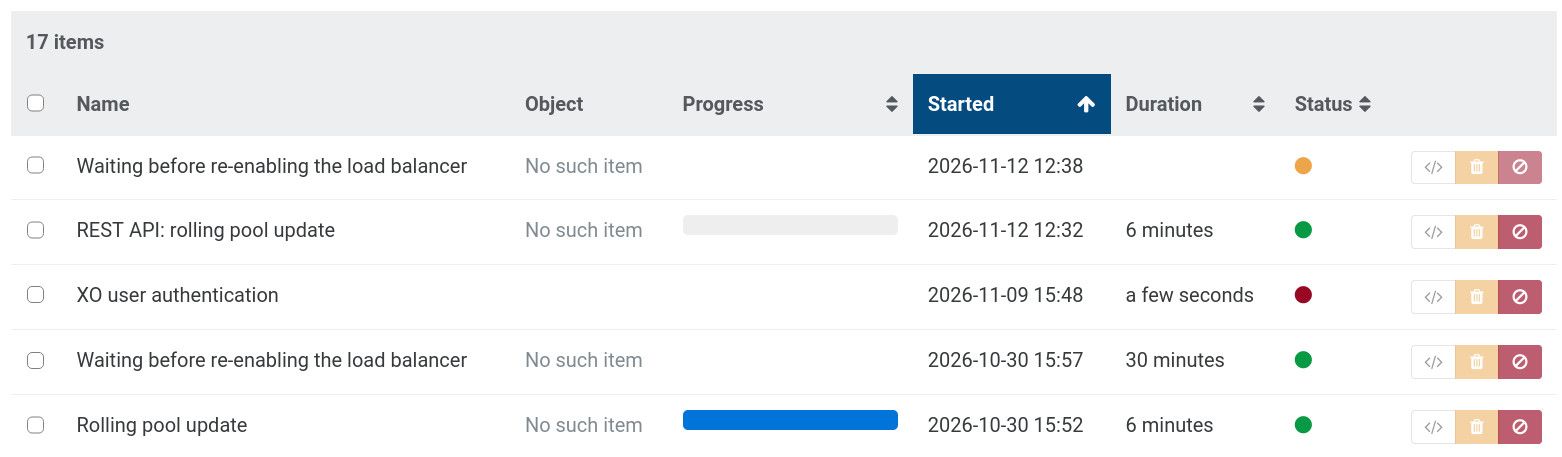
Waiting before re-enabling the load balancer task is stuck waiting...
Was it stuck for longer than 30 minutes? If it simply appeared in the task list with a pending status for less than 30 minutes that's actually expected. I ran an RPU on some hosts of my own and made a screenshot for comparison, you can see how the task should look when it's pending and when it's completed.
This task has been introduced in XO 6.7.0 (2026-07-30) by the way, so it's fairly new:
[RPU] Re-enable the load balancer after a configurable safe delay (30 minutes by default) when a rolling pool update ends (PR #10111)
Please let us know if you notice something wrong with it.
-
The RPU evacuated all the VMs from the master successfully but the RPU is stuck at 0% (as seen in Pool Tasks).
Thanks for the report, we have an item in our issue tracker that matches your description. It should be fixed in the upcoming
26.1.23-2.1xapi version that will be part of the next maintenance update. Please let us know if it keeps happening after the next maintenance update. -
@Andrew could you send us logs over a support ticket so we can understand why the RPR failed ? Thanks
-
@vxgmichel I may have found our problem. Looks like an XCP-ng update may have slipped an unwanted site back into our /etc/yum.repos.d/xcp-ng.repo. When I first deployed XCP-ng, I had to remove the "http://mirrors.xcp-ng.org/8/8.3/base/x86_64/" entry for updates to work as it was too troublesome to get it working through our outbound proxy managed by another team. I have re-removed that site and things are working again. It was not fun trying to figure that out in the midst of a vulnerability.
diff /etc/yum.repos.d/xcp-ng.repo /etc/yum.repos.d/xcp-ng.repo.orig
<- baseurl=http://updates.xcp-ng.org/8/8.3/base/x86_64/
-> baseurl=http://mirrors.xcp-ng.org/8/8.3/base/x86_64/ http://updates.xcp-ng.org/8/8.3/base/x86_64/<- baseurl=http://updates.xcp-ng.org/8/8.3/updates/x86_64/
-> baseurl=http://mirrors.xcp-ng.org/8/8.3/updates/x86_64/ http://updates.xcp-ng.org/8/8.3/updates/x86_64/






Hello! It looks like you're interested in this conversation, but you don't have an account yet.
Getting fed up of having to scroll through the same posts each visit? When you register for an account, you'll always come back to exactly where you were before, and choose to be notified of new replies (either via email, or push notification). You'll also be able to save bookmarks and upvote posts to show your appreciation to other community members.
With your input, this post could be even better 💗
Register Login