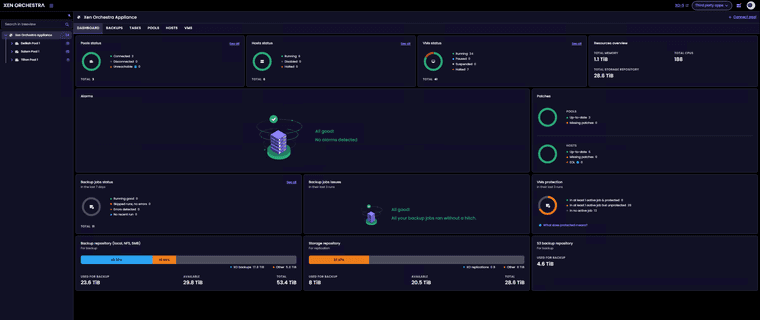
Finally just finished our migration from VMware to XCP-NG.
VMs - 34 mix windows server and ubuntu linux.
Pools - 3
Host - 6
Dell R660 - 2
Dell R640 - 4
 A
Offline
A
Offline
Finally just finished our migration from VMware to XCP-NG.
VMs - 34 mix windows server and ubuntu linux.
Pools - 3
Host - 6
Dell R660 - 2
Dell R640 - 4
Installed patches on home lab. No initial issues found. Existing Windows 11 vm no issues with it on basic vm functions. Created new Windows 11 vm with 26h2 iso no issues. Also installed guest tools in both vms.

Installed...
Updated:
  blktap.x86_64 0:3.55.5-9.4.xcpng8.3                forkexecd.x86_64 0:26.1.16-1.2.xcpng8.3
  message-switch.x86_64 0:26.1.16-1.2.xcpng8.3       qcow-stream-tool.x86_64 0:26.1.16-1.2.xcpng8.3
  rrdd-plugins.x86_64 0:26.1.16-1.2.xcpng8.3         sm.x86_64 0:3.2.12-23.5.xcpng8.3
  sm-cli.x86_64 0:26.1.16-1.2.xcpng8.3               sm-fairlock.x86_64 0:3.2.12-23.5.xcpng8.3
  squeezed.x86_64 0:26.1.16-1.2.xcpng8.3             varstored-guard.x86_64 0:26.1.16-1.2.xcpng8.3
  vhd-tool.x86_64 0:26.1.16-1.2.xcpng8.3             wsproxy.x86_64 0:26.1.16-1.2.xcpng8.3
  xapi-core.x86_64 0:26.1.16-1.2.xcpng8.3            xapi-nbd.x86_64 0:26.1.16-1.2.xcpng8.3
  xapi-rrd2csv.x86_64 0:26.1.16-1.2.xcpng8.3         xapi-storage-script.x86_64 0:26.1.16-1.2.xcpng8.3
  xapi-tests.x86_64 0:26.1.16-1.2.xcpng8.3           xapi-xe.x86_64 0:26.1.16-1.2.xcpng8.3
  xcp-networkd.x86_64 0:26.1.16-1.2.xcpng8.3         xcp-rrdd.x86_64 0:26.1.16-1.2.xcpng8.3
  xenopsd.x86_64 0:26.1.16-1.2.xcpng8.3              xenopsd-cli.x86_64 0:26.1.16-1.2.xcpng8.3
  xenopsd-xc.x86_64 0:26.1.16-1.2.xcpng8.3
We pushed the tested packages along a xen security update to the xcp-ng-updates repository, check blog post for summary and related advisories:
https://xcp-ng.org/blog/2026/07/28/july-2026-updates-1-for-xcp-ng-8-3-lts/
Just updated my homelab hosts.
[10:45 xcp-ng-disjqdnc ~]# yum clean metadata
Loaded plugins: fastestmirror
Cleaning repos: xcp-ng-base xcp-ng-updates
6 metadata files removed
4 sqlite files removed
0 metadata files removed
[10:45 xcp-ng-disjqdnc ~]# yum update
Loaded plugins: fastestmirror
Loading mirror speeds from cached hostfile
Excluding mirror: updates.xcp-ng.org
 * xcp-ng-base: mirrors.xcp-ng.org
Excluding mirror: updates.xcp-ng.org
 * xcp-ng-updates: mirrors.xcp-ng.org
xcp-ng-base/signature                                                                                                |  473 B  00:00:00
xcp-ng-base/signature                                                                                                | 3.0 kB  00:00:00 !!!
xcp-ng-updates/signature                                                                                             |  473 B  00:00:00
xcp-ng-updates/signature                                                                                             | 3.0 kB  00:00:00 !!!
(1/2): xcp-ng-base/primary_db                                                                                        | 3.9 MB  00:00:00
(2/2): xcp-ng-updates/primary_db                                                                                     | 1.6 MB  00:00:01
Resolving Dependencies
--> Running transaction check
---> Package xen-dom0-libs.x86_64 0:4.17.6-9.3.xcpng8.3 will be updated
---> Package xen-dom0-libs.x86_64 0:4.17.6-9.3.1.xcpng8.3 will be an update
---> Package xen-dom0-tools.x86_64 0:4.17.6-9.3.xcpng8.3 will be updated
---> Package xen-dom0-tools.x86_64 0:4.17.6-9.3.1.xcpng8.3 will be an update
---> Package xen-hypervisor.x86_64 0:4.17.6-9.3.xcpng8.3 will be updated
---> Package xen-hypervisor.x86_64 0:4.17.6-9.3.1.xcpng8.3 will be an update
---> Package xen-libs.x86_64 0:4.17.6-9.3.xcpng8.3 will be updated
---> Package xen-libs.x86_64 0:4.17.6-9.3.1.xcpng8.3 will be an update
---> Package xen-tools.x86_64 0:4.17.6-9.3.xcpng8.3 will be updated
---> Package xen-tools.x86_64 0:4.17.6-9.3.1.xcpng8.3 will be an update
--> Finished Dependency Resolution

Dependencies Resolved

============================================================================================================================================
 Package                          Arch                     Version                                   Repository                        Size
============================================================================================================================================
Updating:
 xen-dom0-libs                    x86_64                   4.17.6-9.3.1.xcpng8.3                     xcp-ng-updates                   704 k
 xen-dom0-tools                   x86_64                   4.17.6-9.3.1.xcpng8.3                     xcp-ng-updates                   2.0 M
 xen-hypervisor                   x86_64                   4.17.6-9.3.1.xcpng8.3                     xcp-ng-updates                   2.4 M
 xen-libs                         x86_64                   4.17.6-9.3.1.xcpng8.3                     xcp-ng-updates                    66 k
 xen-tools                        x86_64                   4.17.6-9.3.1.xcpng8.3                     xcp-ng-updates                    47 k

Transaction Summary
============================================================================================================================================
Upgrade  5 Packages

Total download size: 5.2 M
Is this ok [y/d/N]: y
Downloading packages:
Delta RPMs disabled because /usr/bin/applydeltarpm not installed.
(1/5): xen-dom0-tools-4.17.6-9.3.1.xcpng8.3.x86_64.rpm                                                               | 2.0 MB  00:00:00
(2/5): xen-dom0-libs-4.17.6-9.3.1.xcpng8.3.x86_64.rpm                                                                | 704 kB  00:00:00
(3/5): xen-libs-4.17.6-9.3.1.xcpng8.3.x86_64.rpm                                                                     |  66 kB  00:00:00
(4/5): xen-hypervisor-4.17.6-9.3.1.xcpng8.3.x86_64.rpm                                                               | 2.4 MB  00:00:00
(5/5): xen-tools-4.17.6-9.3.1.xcpng8.3.x86_64.rpm                                                                    |  47 kB  00:00:00
--------------------------------------------------------------------------------------------------------------------------------------------
Total                                                                                                       2.9 MB/s | 5.2 MB  00:00:01
Running transaction check
Running transaction test
Transaction test succeeded
Running transaction
  Updating   : xen-libs-4.17.6-9.3.1.xcpng8.3.x86_64                                                                                   1/10
  Updating   : xen-hypervisor-4.17.6-9.3.1.xcpng8.3.x86_64                                                                             2/10
  Updating   : xen-dom0-libs-4.17.6-9.3.1.xcpng8.3.x86_64                                                                              3/10
  Updating   : xen-tools-4.17.6-9.3.1.xcpng8.3.x86_64                                                                                  4/10
  Updating   : xen-dom0-tools-4.17.6-9.3.1.xcpng8.3.x86_64                                                                             5/10
  Cleanup    : xen-dom0-tools-4.17.6-9.3.xcpng8.3.x86_64                                                                               6/10
  Cleanup    : xen-tools-4.17.6-9.3.xcpng8.3.x86_64                                                                                    7/10
  Cleanup    : xen-dom0-libs-4.17.6-9.3.xcpng8.3.x86_64                                                                                8/10
  Cleanup    : xen-hypervisor-4.17.6-9.3.xcpng8.3.x86_64                                                                               9/10
  Cleanup    : xen-libs-4.17.6-9.3.xcpng8.3.x86_64                                                                                    10/10
  Verifying  : xen-dom0-tools-4.17.6-9.3.1.xcpng8.3.x86_64                                                                             1/10
  Verifying  : xen-dom0-libs-4.17.6-9.3.1.xcpng8.3.x86_64                                                                              2/10
  Verifying  : xen-hypervisor-4.17.6-9.3.1.xcpng8.3.x86_64                                                                             3/10
  Verifying  : xen-libs-4.17.6-9.3.1.xcpng8.3.x86_64                                                                                   4/10
  Verifying  : xen-tools-4.17.6-9.3.1.xcpng8.3.x86_64                                                                                  5/10
  Verifying  : xen-libs-4.17.6-9.3.xcpng8.3.x86_64                                                                                     6/10
  Verifying  : xen-dom0-tools-4.17.6-9.3.xcpng8.3.x86_64                                                                               7/10
  Verifying  : xen-hypervisor-4.17.6-9.3.xcpng8.3.x86_64                                                                               8/10
  Verifying  : xen-tools-4.17.6-9.3.xcpng8.3.x86_64                                                                                    9/10
  Verifying  : xen-dom0-libs-4.17.6-9.3.xcpng8.3.x86_64                                                                               10/10

Updated:
  xen-dom0-libs.x86_64 0:4.17.6-9.3.1.xcpng8.3 xen-dom0-tools.x86_64 0:4.17.6-9.3.1.xcpng8.3 xen-hypervisor.x86_64 0:4.17.6-9.3.1.xcpng8.3
  xen-libs.x86_64 0:4.17.6-9.3.1.xcpng8.3      xen-tools.x86_64 0:4.17.6-9.3.1.xcpng8.3
Updates applied...
Updated:
  forkexecd.x86_64 0:26.1.11-1.2.xcpng8.3                         kexec-tools.x86_64 1:2.0.15-21.1.xcpng8.3
  message-switch.x86_64 0:26.1.11-1.2.xcpng8.3                    qcow-stream-tool.x86_64 0:26.1.11-1.2.xcpng8.3
  rrdd-plugins.x86_64 0:26.1.11-1.2.xcpng8.3                      sm-cli.x86_64 0:26.1.11-1.2.xcpng8.3
  squeezed.x86_64 0:26.1.11-1.2.xcpng8.3                          varstored-guard.x86_64 0:26.1.11-1.2.xcpng8.3
  vhd-tool.x86_64 0:26.1.11-1.2.xcpng8.3                          wsproxy.x86_64 0:26.1.11-1.2.xcpng8.3
  xapi-core.x86_64 0:26.1.11-1.2.xcpng8.3                         xapi-nbd.x86_64 0:26.1.11-1.2.xcpng8.3
  xapi-rrd2csv.x86_64 0:26.1.11-1.2.xcpng8.3                      xapi-storage-script.x86_64 0:26.1.11-1.2.xcpng8.3
  xapi-tests.x86_64 0:26.1.11-1.2.xcpng8.3                        xapi-xe.x86_64 0:26.1.11-1.2.xcpng8.3
  xcp-networkd.x86_64 0:26.1.11-1.2.xcpng8.3                      xcp-rrdd.x86_64 0:26.1.11-1.2.xcpng8.3
  xenopsd.x86_64 0:26.1.11-1.2.xcpng8.3                           xenopsd-cli.x86_64 0:26.1.11-1.2.xcpng8.3
  xenopsd-xc.x86_64 0:26.1.11-1.2.xcpng8.3

Complete!
Will continue to test.
@rzr Installed latest update and no issues to report. I dont hvae any 2tb+ drives in my vms. converting from vhd to qcow2 and backups all working.
installed updates will report back.
Update - I had migrated vms back over to vhd prior to update release. I have migrated 2 vms back over to qcow2 and the initial backup ran successfull. Ran a second delta backup and that as well was successful with out issues. Backups happen very quickly now. But it appears the % and progress bar are working.
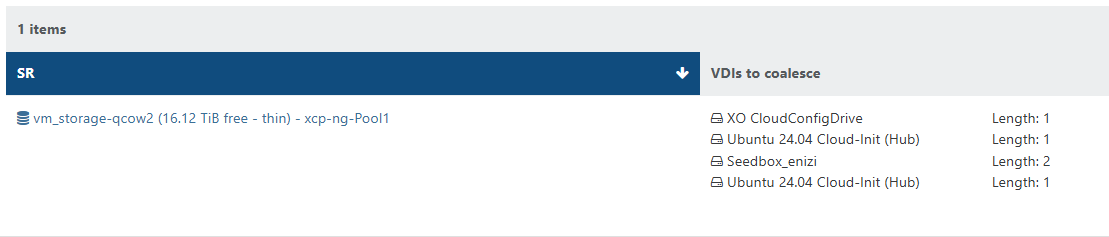
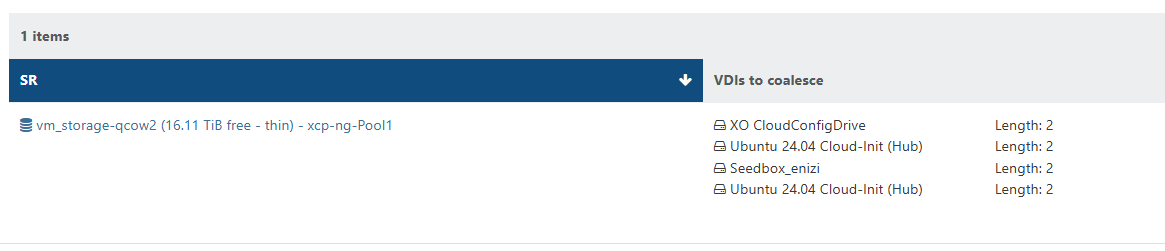
When CBT is enabled on the vm vdi. They show up as needing to be coalesced. VMs without CBT enabled the vdis are coalesced.
Will continue to monitor.
Once the coalesence hits 2 for the vm. The vm is skipped form future backups until cleared. (shutting down the vm will allow the coalescence to happen.
2026-04-23T19_52_34.694Z - backup NG.txt

@olivierlambert Created new topic.
Updated my to AMD Ryzen host in my home lab. No issues with update will monitor and report back any issues.
v0.6.0 — log collection is in. This was the piece the first post said was next, and it works end to end now.
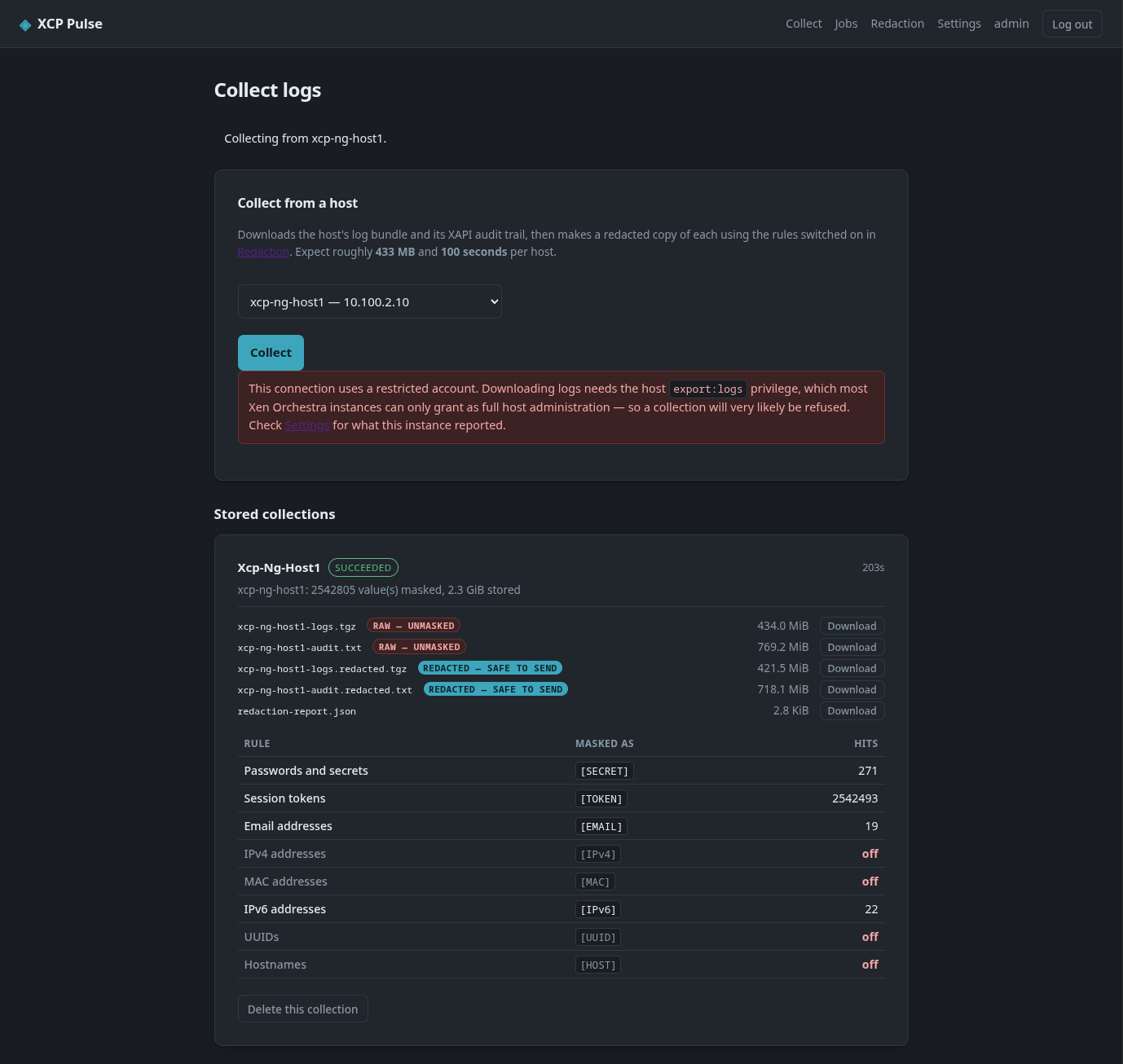
A new Collect page runs a per-host collection as a background job: it pulls logs.tgz and the XAPI audit trail from Xen Orchestra, keeps the raw copies, and produces a redacted copy of each. On my own XCP-ng 8.3 pool that came to 434 MiB for the bundle and 769 MiB for the audit trail, 2.3 GiB stored across the five files, with 2,542,805 values masked — almost all of them session tokens.
The download is streamed a megabyte at a time and never held in memory, and every chunk is a cancellation point, so Cancel actually stops a transfer rather than waiting it out. A failed or cancelled download deletes its partial file instead of leaving a half-written bundle sitting there looking like a collection.
Both copies are kept and marked redacted — safe to send or raw — unmasked. Redaction is lossy, and the raw copy is the only thing that can answer "what did that used to say?" afterwards. Each collection writes the same redaction report the preview page produces, so you can see which rules fired — and which were switched off — before anything leaves the box. In the screenshot I had IPv4, MAC, UUIDs and hostnames turned off, and they show as off rather than as zero hits. That is deliberate: a partly-masked bundle should be obvious before you attach it to a ticket.
There is also a retention policy. The newest n collections are kept whatever their age, and only what is left is judged on age — a long gap in collecting can't empty the store. It shows you what a cleanup would delete and how much space that returns before you press the button.
Expect bugs. This is still very much a work in progress and it has only ever run against my own pool. If you try it in a different environment, assume things will break — please tell me what did. Known issues right now:
Two more things worth flagging if you try this.
logs.tgz sends no Content-Length, so a reverse proxy that buffers will happily hand you a truncated archive with HTTP 200. Mine did. It now detects that and reports the bundle as cut short rather than as a protocol error, and repacks whatever did arrive instead of throwing the lot away. If you are behind Nginx Proxy Manager, proxy_buffering off; and proxy_max_temp_file_size 0; are what fixed the stall for me.
The account requirement from the first post has not changed — the log download needs export:logs on host, and on the instance I measured that is only reachable via Administrator. Inventory still works fine on Read only.
Next up: individual log categories pulled out of the cached bundle (~35 MB instead of 434 MiB), date ranges, and then findings.
https://github.com/acebmxer/xcp_pulse
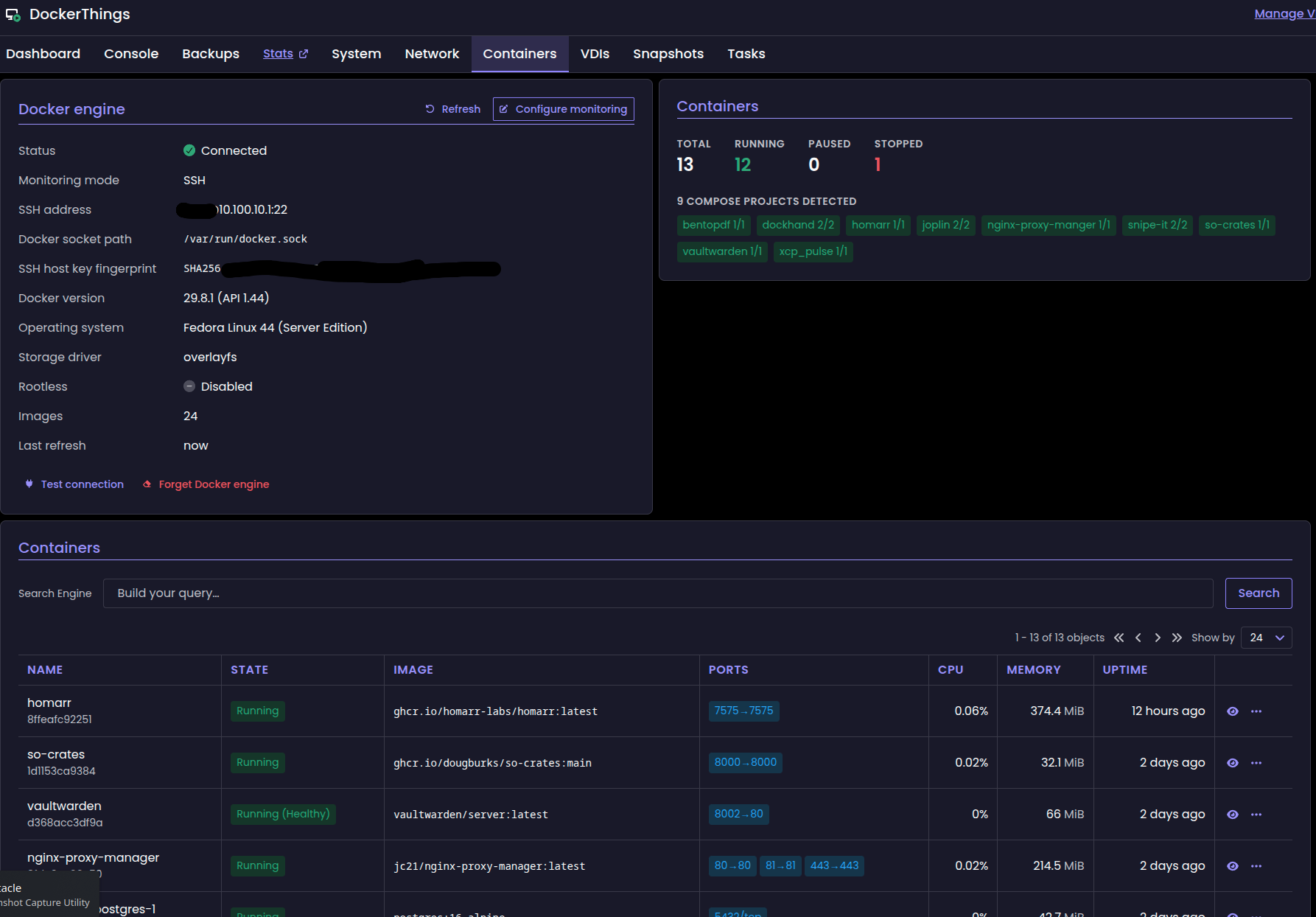
Ok i redeployed as a separate xo... I was able to get one of the two vms i had trouble with initially. The one that is not connecting is a Fedora vm running docker.
This test i used same ssh key for all three vms and user name.
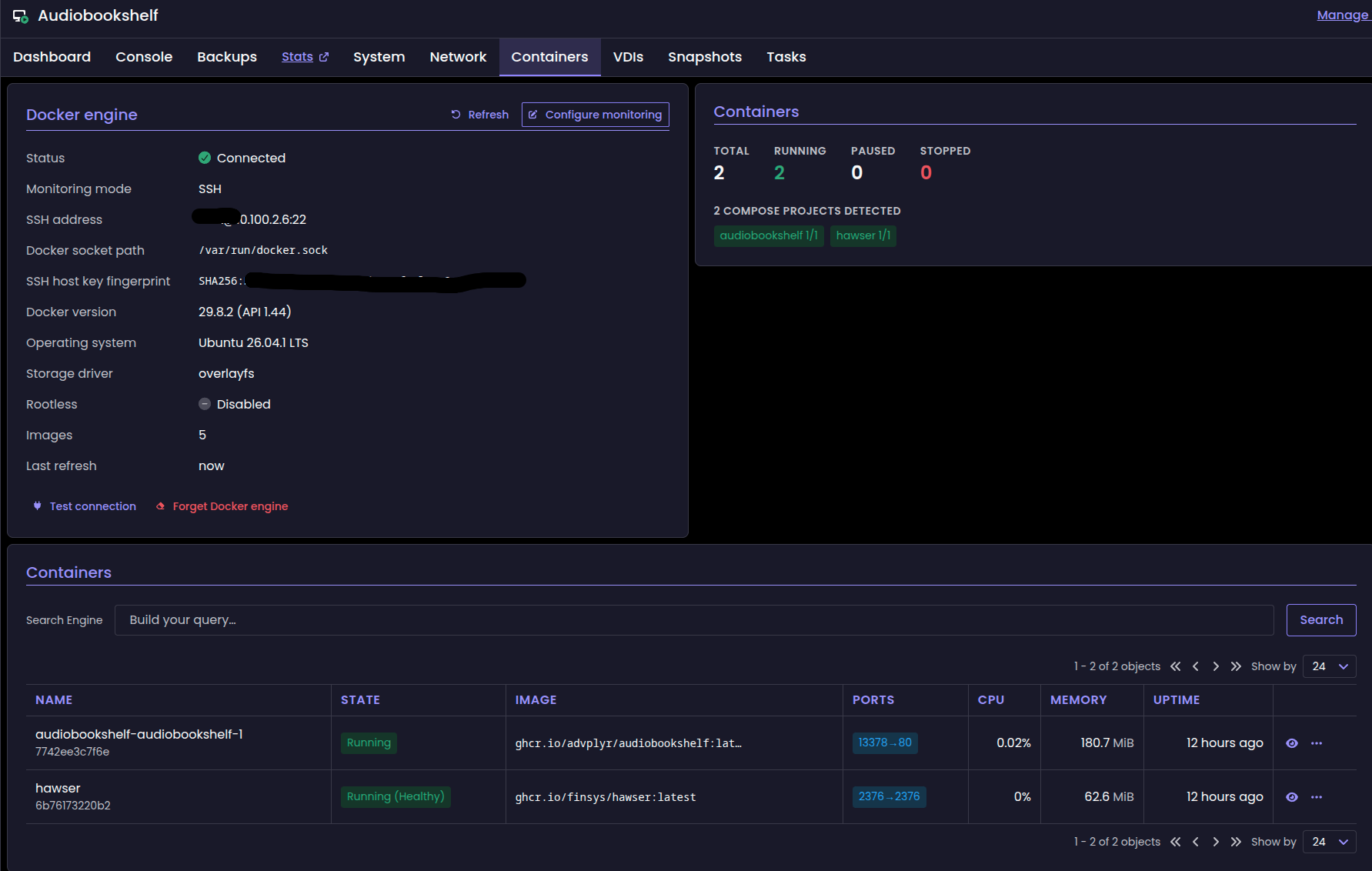
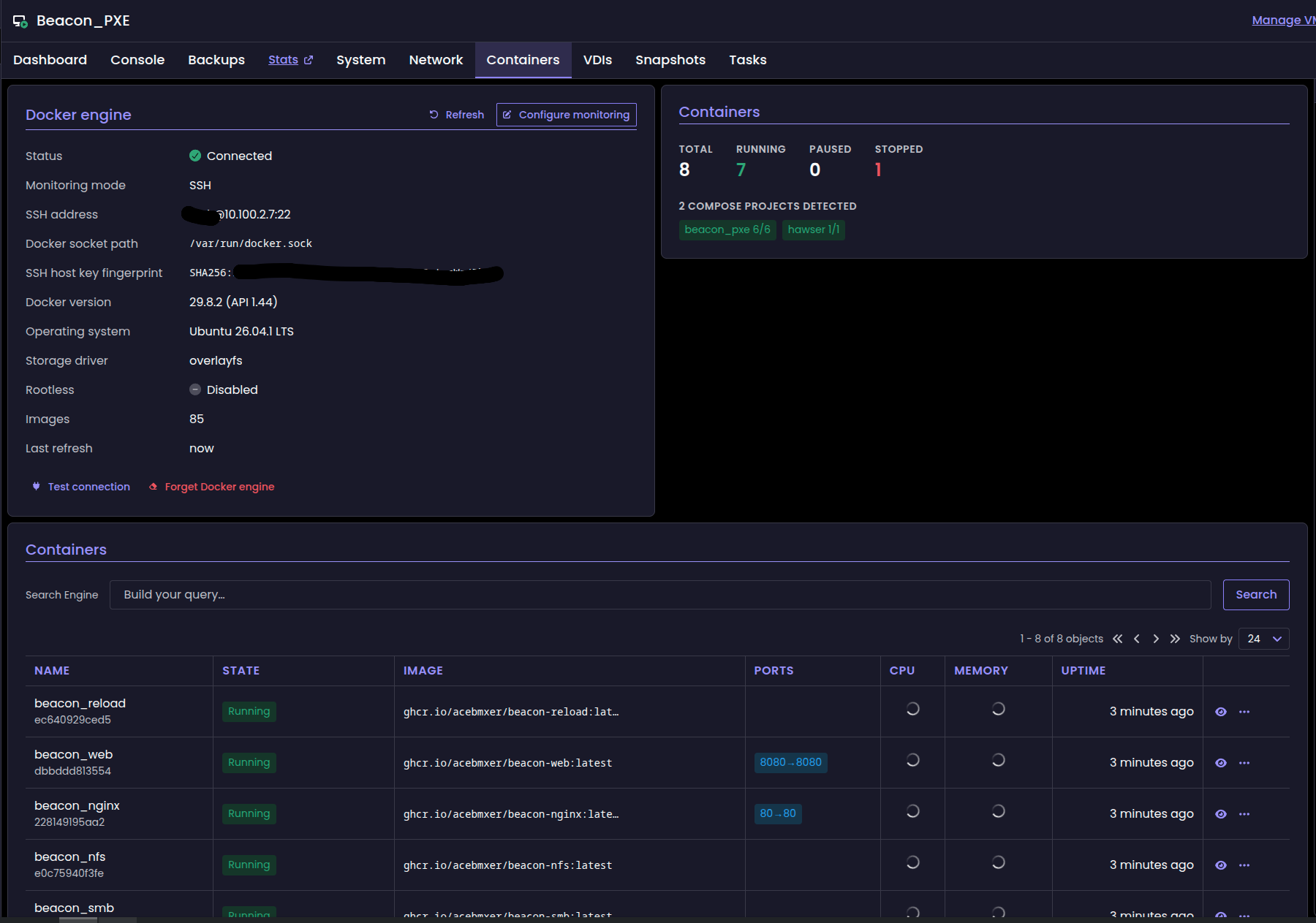
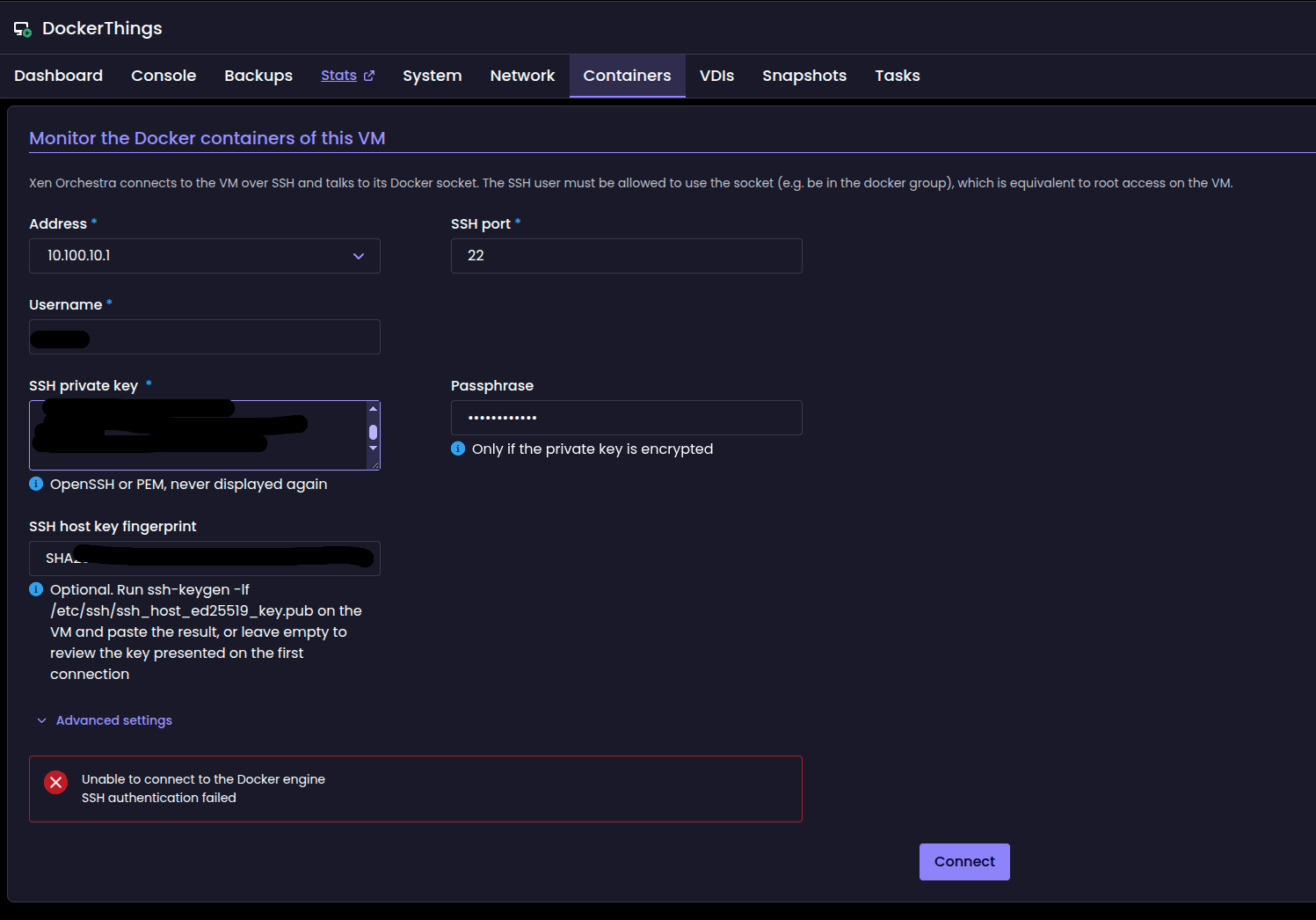
After some digging around and with AI help i got the Fedora Docker vm connected...
There is a possibility i might not had sshkey installed on the vm. I should have looked before re-applying it.
SELinux: Fedora blocked sshd from reaching Docker's socket, which XO needs in order to talk to Docker. It denied two things, writing to /var/run/docker.sock and connecting to the Docker daemon. The two rules we added with audit2allow allow both. Ubuntu doesn't enforce SELinux, which is why the other two VMs worked with the same user and key.
@acebmxer Thanks for your very quick feedback, even more with screenshot
for the VM where the connection to the docker socket did not worked, are you sure the public ssh key corresponding to the private ssh key filled in the form is correctly deployed in the VM, to the corresponding ssh user? Do you have any logs from xo-server?
Yes i double checked the ssh key. As for the logs is there a particular log you would like to look at?
thanks for the build... I have tested and i was able to connect one vms docker to it. Other vms fail. The do prompt for the finger print but fails to connect...
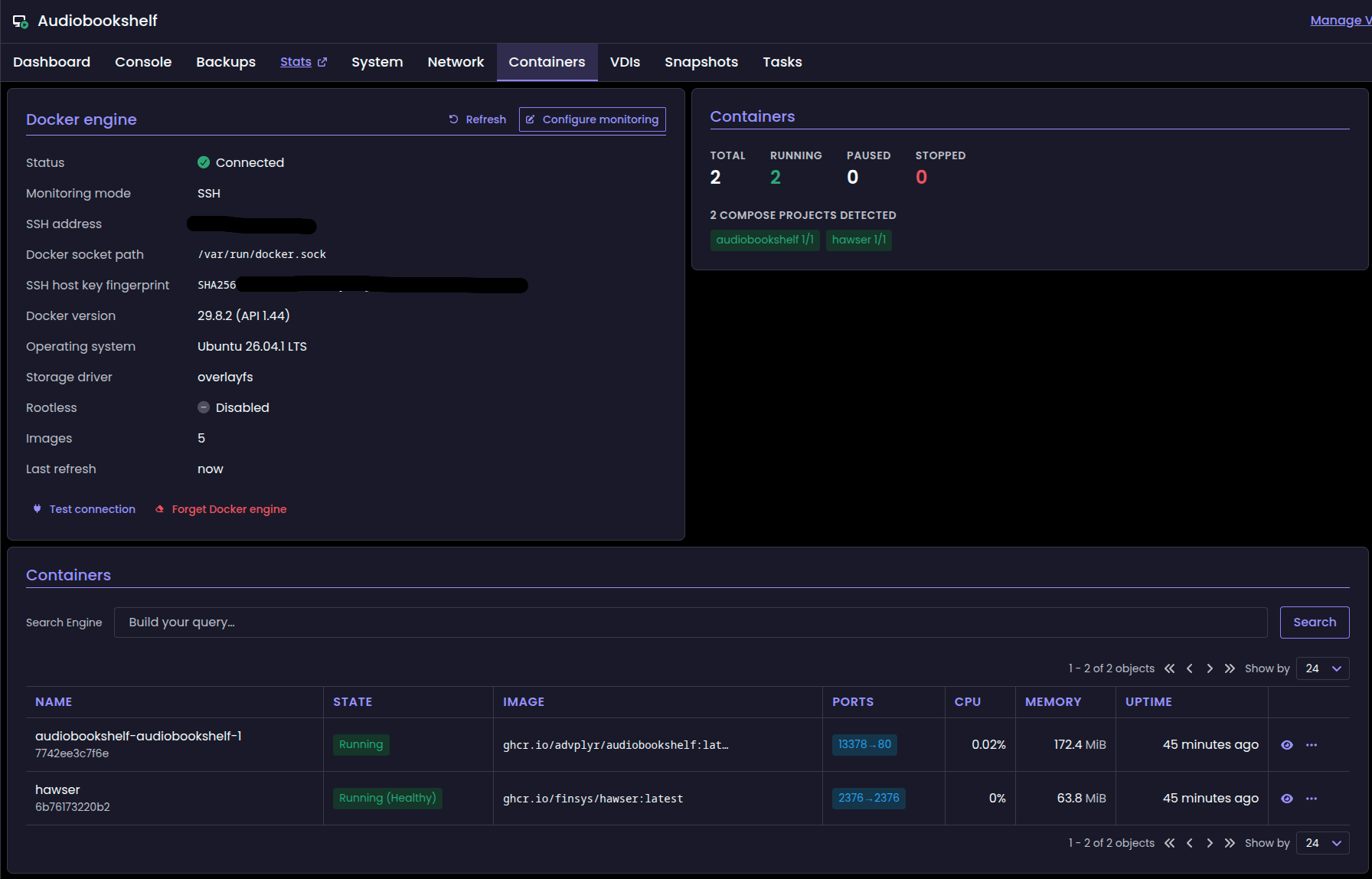
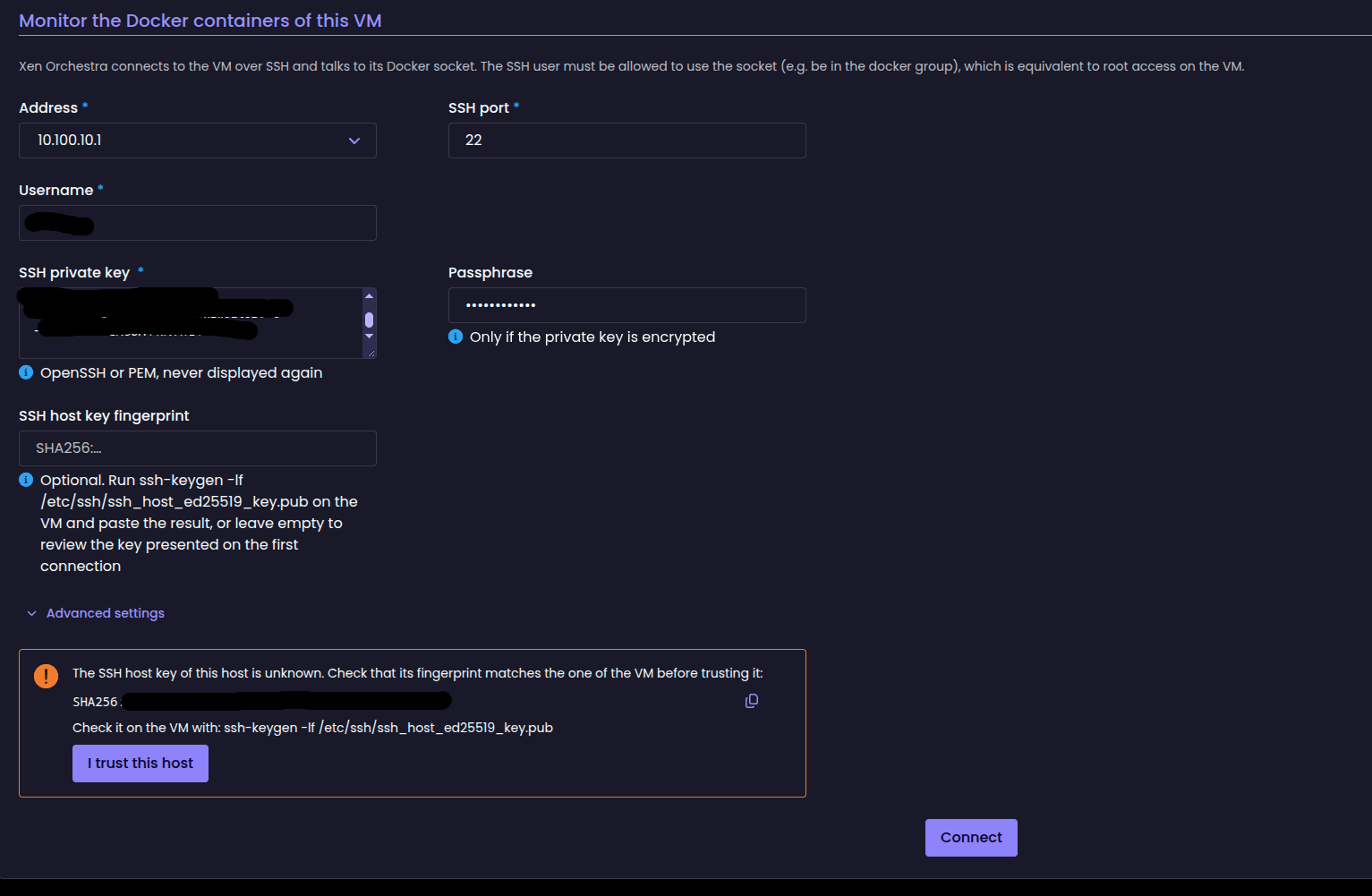
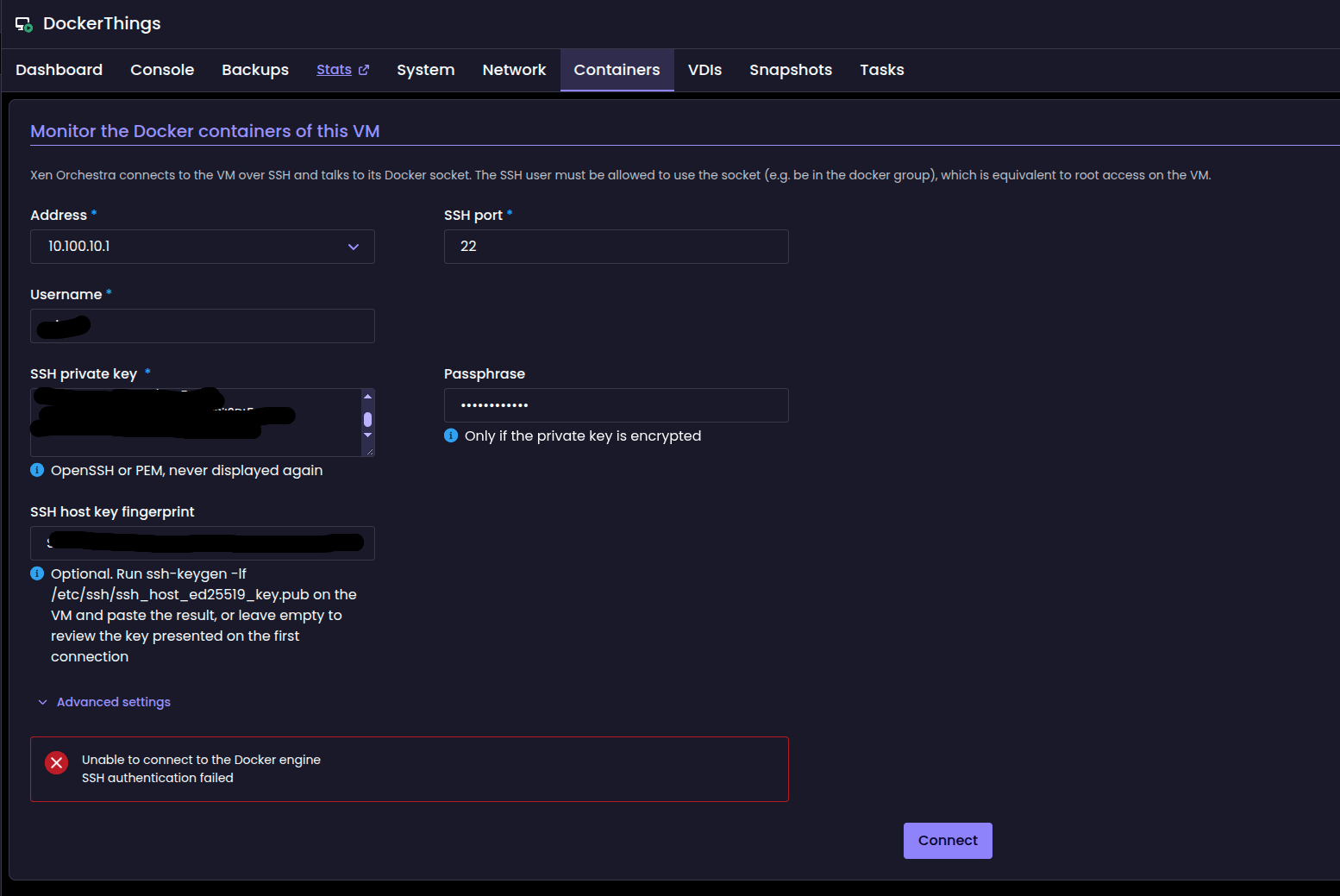
Update - changes are live in the dev branch now.
So figured out the update / switching branches for the proxy by connecting the proxy to my xoa free account. That triggered the available update to next version. From there I found the command that needs to be ran on the proxy to switch back and forth...

Latest branch

stable branch

Backup job ran sucessful.
2026-10-09T17_48_25.447Z - backup NG.txt
After the proxy has been deployed...
The proxy has been registered with your Xen Orchestra instance.
You can manage it from the Xen Orchestra web interface.
Next: register the proxy's updater and move it to the 'latest' channel.
xe vm-param-set uuid=UUID xenstore-data:vm-data/system-account-xoa-password='<your password>'xe vm-reboot uuid=UUIDsudo xoa-updater register - This registers it with your vates account.sudo xoa-updater configure-channel xo-proxy-appliance-latest - set to latest or stable sudo xoa-updater upgrade - This can be ran via the UI or this command. Both need to be done twice to do the upgrade and/or downgrade.And host connected via proxy.

Update - changes are live in the dev branch now.
So figured out the update / switching branches for the proxy by connecting the proxy to my xoa free account. That triggered the available update to next version. From there I found the command that needs to be ran on the proxy to switch back and forth...
Latest branch
stable branch
Backup job ran sucessful.
2026-10-09T17_48_25.447Z - backup NG.txt
After the proxy has been deployed...
The proxy has been registered with your Xen Orchestra instance.
You can manage it from the Xen Orchestra web interface.
Next: register the proxy's updater and move it to the 'latest' channel.
xe vm-param-set uuid=UUID xenstore-data:vm-data/system-account-xoa-password='<your password>'xe vm-reboot uuid=UUIDsudo xoa-updater register - This registers it with your vates account.sudo xoa-updater configure-channel xo-proxy-appliance-latest - set to latest or stable sudo xoa-updater upgrade - This can be ran via the UI or this command. Both need to be done twice to do the upgrade and/or downgrade.And host connected via proxy.
Got so possible good news... I got the proxy to update to the latest version and was able to do a backup job with it. Still need to test connecting a host via proxy.
Correction to my side note: the license check can still block backups through a proxy. A proxy deployed by --proxy on a free xen-orchestra.com account updates to 0.31.10 and fails backups with no valid proxy license. The fix that stops gating backups on the license first ships in proxy 0.32.0+. The README now covers registering the proxy and this limit (dev branch).
I took this screenshot before the error whent away.
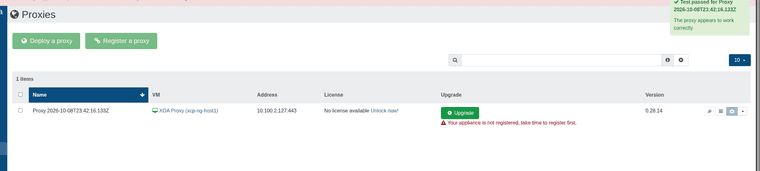
After update.

Backup Remote connected via proxy.

I did not test with host connected via proxy yet. Just not sure why the proxy will not update to 0.33.1.
Also added support for auth token when xo account is using MFA.
Thanks for trying it! This one comes from upstream Xen Orchestra, not the installer. A change in XO's connection library (around 2026-09-09) left servers set to connect through an HTTPS proxy that supports HTTP/2, such as XO Proxy, stuck in Connecting. Vates fixed it in #10507 and released it in XO 6.9.1 (2026-10-05). That's also why the other project broke the same way.
Running --update should pull the fix, since the installer builds from master by default. If servers behind the proxy still won't connect after updating, please open an issue with what the Servers page shows and I'll dig in.
Side - note the disable license check is no longer needed as that appears not to be gated by the license check.
I have pushed these changes to the Dev branch. You should be able to switch to the dev branch and run the update ...
git fetch origin
git switch dev
./install-xen-orchestra.sh
VM were Ubuntu and Fedora distros. Ubuntu is 7.0.0-38-generic. The Fedora vms 7.2.7-200.fc44.x86_64 and 7.2.9-300.fc45.x86_64.
Had no issues with the beta test but those were done not via Rolling pool update.
after multiple failed attempts and rebooted all three host. Host 1 did update and finally got host 2 and host 3 updated both via rolling pool update.
During the evacuation multiple vms failed to migrate / reboot. All showing similar errors in each console for the vms.