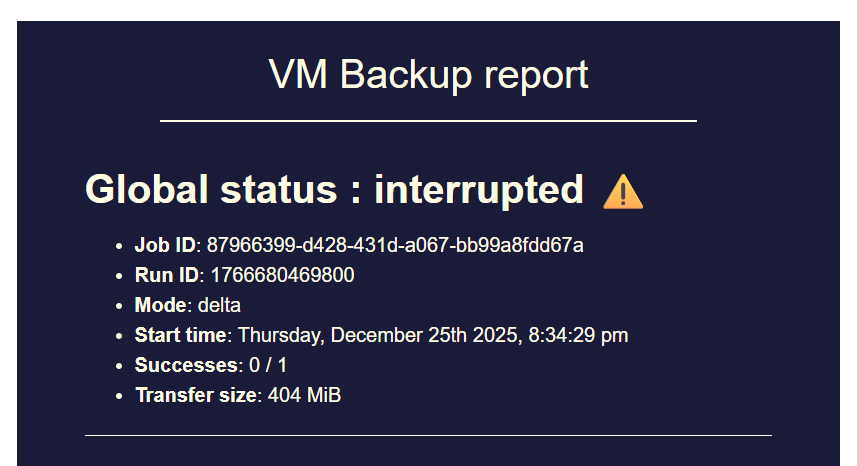
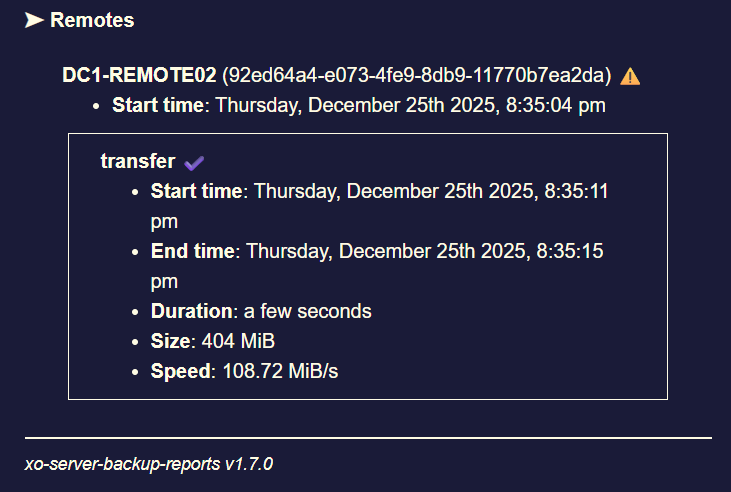
backup mail report says INTERRUPTED but it's not ?

-
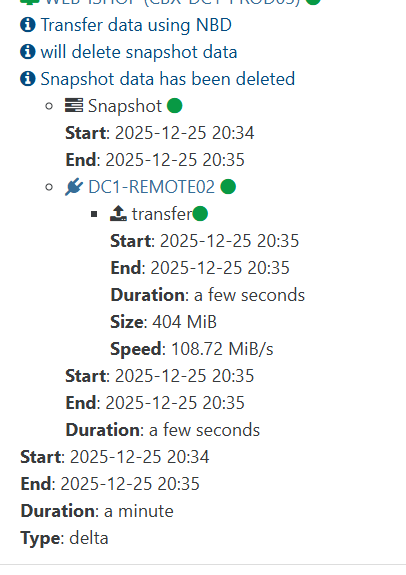
While working last night i noticed one of my backups/pools did this. Got the email that it was interupted but when i looked the tasks were still running and moving data it untill it porcess all vms in that backup job.
Edit - note my backup job was run via proxy on the specific pool/job.
2026-02-19T03_00_00.028Z - backup NG.txt
Edit 2 - homelab same last backup was interupted.
-
I wonder if this PR https://github.com/vatesfr/xen-orchestra/pull/9506 aims to solve the issue that was discussed in this thread.
To me it looks like it's the case as the issue seems to be related to RAM used by backup jobs not being freed correctly and the PR seems to add some garbage collection to backup jobs.
I hope that it will fix the issue and if needed I can test a branch. -
Hi @MajorP93,
This PR is only about changing the way we delete old logs (linked to a bigger work of making backups use XO tasks instead of their own task system), it won't fix the issue discussed in this topic.
-
Hi @Bastien-Nollet,
oh okay, thanks for clarifying!
-
P Pilow referenced this topic on
-
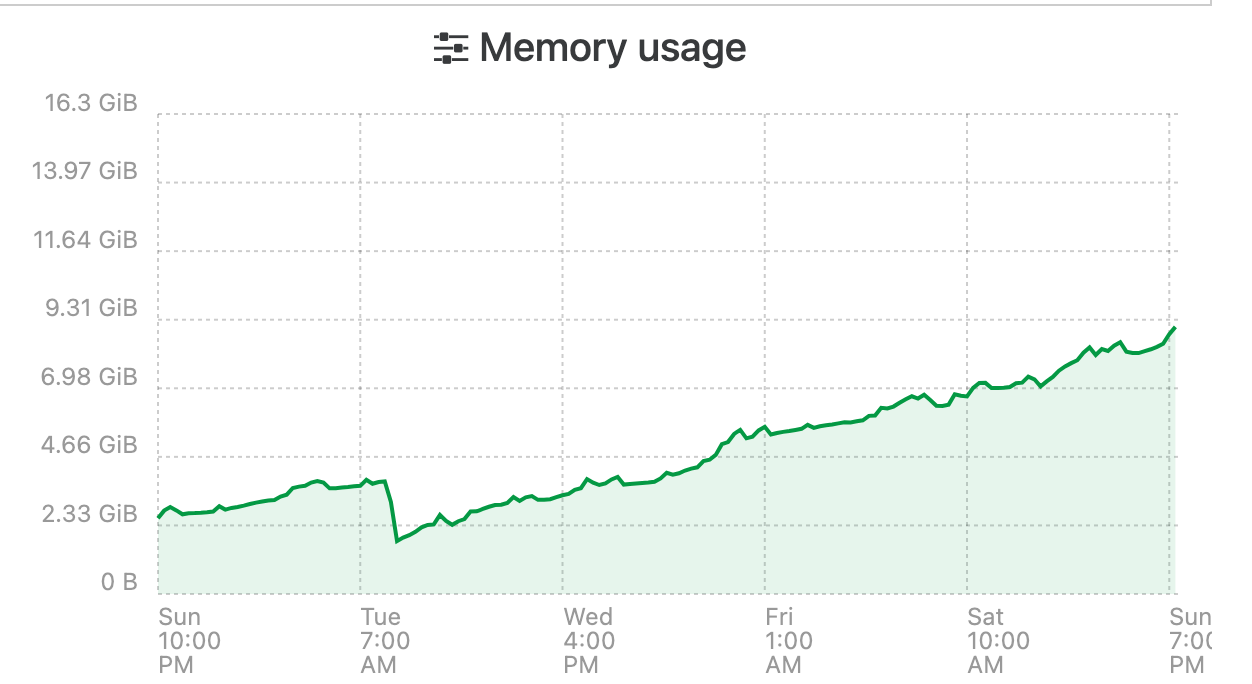
I have been having the same issue and have been watching it for the last couple weeks. Initially my XOA only had 8GB of ram assigned, i have bumped it up to 16 to try an alleviate the issue. Seems to be some sort of memory leak. This is the official XO Appliance too not XO CE.
I changed the systemd file to make use of the extra memory as per the docs,
ExecStart=/usr/local/bin/node --max-old-space-size=12288 /usr/local/bin/xo-serverIt seems that over time it will just consume all of its memory until it crashes and restarts no matter how much i assign.
-
During the past month my backups failed (status interrupted) 1-2 times per week due to this memory leak.
When increasing heap size (node old space size) it takes longer but the backup fails when RAM usage eventually hits 100%.
I guess I’ll go with @Pilow ‘s workaround for now and create a cronjob for rebooting XO VM right before backups start. -
All of you are using a Node 24 LTS version? Do you still have the issue with Node 20 or Node 22?
-
@olivierlambert No.
I reverted to Node 20 as previously mentioned.
I was using Node 24 before but reverted to Node 20 as I hoped it would "fix" the issue.
Using Node 20 it takes longer for these issues to arise but in the end they arise.3 of the users in this thread that encounter the issue said that they are using XOA.
As XOA also uses Node 20, I think most people that reported this issue actually use Node 20. -
Thanks for the recap!
-
@olivierlambert Using the prebuilt XOA appliance which reports:
[08:39 23] xoa@xoa:~$ node --version v20.18.3 -
@flakpyro said in backup mail report says INTERRUPTED but it's not ?:
@olivierlambert Using the prebuilt XOA appliance which reports:
[08:39 23] xoa@xoa:~$ node --version v20.18.3@majorp93 @pilow Can you please capture some heap snapshots from during backup runs of XOA via NodeJS?
Then compare them to each other, they need to be in the following order:-
- Snapshot before backup
- Snapshot following first backup
- Snapshot following second backup
- Snapshot following third backup
- Snapshot following subsequent backups to get to Node.js OOM (or as close as you’re willing to risk)
These will require that XOA (or XOCE) is started with Node.js heap snapshots enabled. Then open in a Chromium based browser the following url:-
chrome://inspectThe above URL will require using the browser’s DevTools features!
Another option is to integrate and enable use of Clinic.js (clinic heapprofiler), or configure node to use node-heapdump when it reaches a threshold amount.
Once your got those heap dumps your looking for the following:-
- Object types that grow massively between the snapshots.
- Large arrays or maps of backup-related objects (VMs, snapshots, jobs, tasks, etc.).
- Retained objects whose “retainers” point to long-lived structures (global, caches, singletons).
These will likely help to pin down what and where in the backup code, the memory leak is located.
Once have these a heap snapshot diff showing which object type (or types) growing by a stated size per backup will finally help the Vates developers fix this issue.
@florent I left the above for the original reporters of the memory leak issue, and/or yourselves.
-
@john.c If a Xen Orchestra developer asks for logs / heap snapshots I will be happy to provide them.
Ideally they should tell us what is needed from us to debug this.That being said I am not entirely sure they are currently working on this as XO team has not been very vocal here.
Looking at Github repository commits indicates that other things are currently being prioritized over this crucial backup stability issue.
-
we are trying to reproduce it here, without success for now
It would be good for us too if we can identify what cause this before the upcoming release ( thursday )for example here my xoa at home , seems quite ok running by itself :
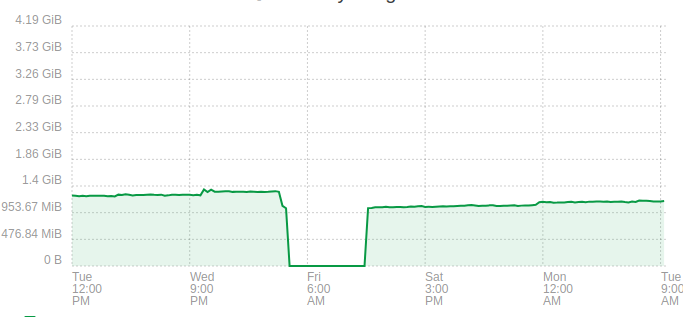
to be fair the debug is not helped by the fact that we have one big process, with so much object that changes that exploring and pinpointing exactly what is growing is tricky ( or we may not look at the right place)
-
@florent do you have (heavy?) use of backup jobs on your XOA ?
we all noticed this because of correlation between backup jobs & memory growthI do have all my backup jobs through XO PROXIES though, and XOA still explodes in RAM Usage...
-
Could you try disabling XO6?
In a configuration file, enable XO5 as the default version and ensure that XO6 is inaccessible (for example, by using an invalid path or removing the corresponding entry in the configuration). This will help determine if the issue is related to XO6/REST API.https://docs.xen-orchestra.com/configuration#using-xo-5-as-the-default-interface
-
@Pilow said in backup mail report says INTERRUPTED but it's not ?:
@florent do you have (heavy?) use of backup jobs on your XOA ?
we all noticed this because of correlation between backup jobs & memory growthI do have all my backup jobs through XO PROXIES though, and XOA still explodes in RAM Usage...
I back up a only few VM on this one , it was to illustrate that we try to reproduce it with a scope small enough to improve the situation
is the memory stable on the proxy ?
-
@florent In my case I have 4 backup jobs. 1 full, 2 delta (1 onsite, 1 offsite), 1 mirror.
106 VMs are being backed up by these jobs.
In my case that setup clearly shows the RAM issue. I do not know if it can be replicated in a very small setup.
Sometimes multiple backup jobs run at the same time. It appears that backup jobs running in parallel make the issue occur faster.@mathieura Thanks for the hint! I can imagine that this could possibly change something in this regard as I did not have any issues with this exact backup job configuration some time ago. The issues started to appear somewhere in december so it could be related to the XO6 release. I will try what you suggested and report back.
-
I also have this problem in my XO-CE (ronivay-script) at home
I get the mail report after 4 days
A reboot resets the memorythe XO-CE have 3.1 GB and the Control domain memory have 2 GB
Node v24.13.1
Running Continuous Replication and Delta Backups -
@florent said in backup mail report says INTERRUPTED but it's not ?:
is the memory stable on the proxy ?
can't really say, as i reboot them everyday with my XOA
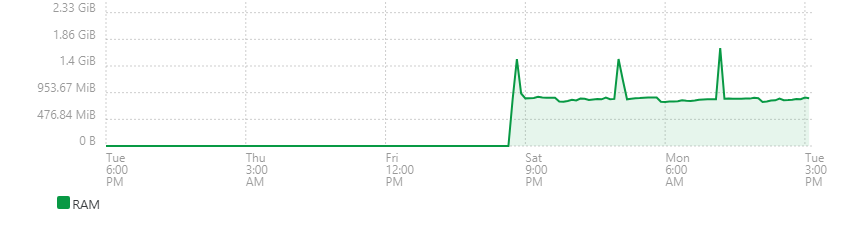
but when I do not reboot them, they dont seem to be so impacted as I need to reboot them.
I will detach them from the reboot job and will report RAM consumption on proxies -
@Pilow at least this can rule out the disk data and backup archive handling (that changed a lot in 2025 for qcow2 )
so if it's backup related, it can be the task log and the scheduler.
are you using the open metrics plugin ?





Hello! It looks like you're interested in this conversation, but you don't have an account yet.
Getting fed up of having to scroll through the same posts each visit? When you register for an account, you'll always come back to exactly where you were before, and choose to be notified of new replies (either via email, or push notification). You'll also be able to save bookmarks and upvote posts to show your appreciation to other community members.
With your input, this post could be even better 💗
Register Login