XCP-ng
    • Categories
    • Recent
    • Tags
    • Popular
    • Users
    • Groups
    • Register
    • Login

    🛰️ XO 6: dedicated thread for all your feedback!

    Scheduled Pinned Locked Moved Xen Orchestra
    165 Posts 41 Posters 16.7k Views 33 Watching
    Loading More Posts
    • Oldest to Newest
    • Newest to Oldest
    • Most Votes
    Reply
    • Reply as topic
    Log in to reply
    This topic has been deleted. Only users with topic management privileges can see it.
    • pdoniasP Offline
      pdonias Vates 🪐 XO Team @acebmxer
      last edited by

      @acebmxer Thanks for the report, we'll check that! Regarding themes, it will remain non-persistent until we implement the full theme system.

      @jacob.becker Thanks for the detailed feedback, we'll see how we can improve that 🙂

      1 Reply Last reply Reply Quote 0
      • M Online
        MajorP93 @marcoi
        last edited by

        @marcoi Sounds like your issue is related to: https://github.com/vatesfr/xen-orchestra/issues/9500

        ronivay created this issue in vatesfr/xen-orchestra

        closed v5 interface doesn't work if hostname set #9500

        marcoiM 1 Reply Last reply Reply Quote 0
        • marcoiM Online
          marcoi @MajorP93
          last edited by

          yeah that was it, i removed the ip address from cfg file and it working now.

          1 Reply Last reply Reply Quote 0
          • D Offline
            DustinB
            last edited by DustinB

            XO 6 (Enterprise) VM Interfaces shows incorrect IP address assignment on a given VM for a multi NIC VM.

            XOA Version 6.0.3
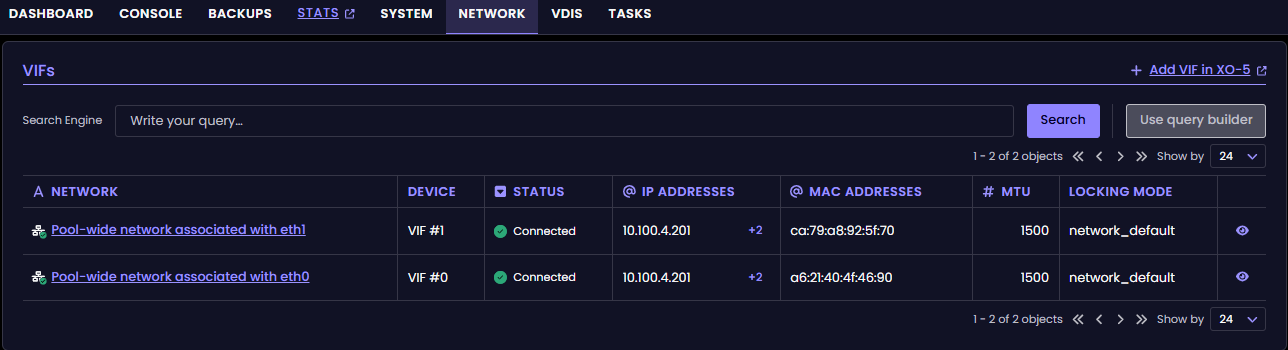
            2dc0dc0f-903e-4bbd-bac0-ade7dbf119ab-image.png

            This shows correctly in XO5 Enterprise (and XOCE) without issue.
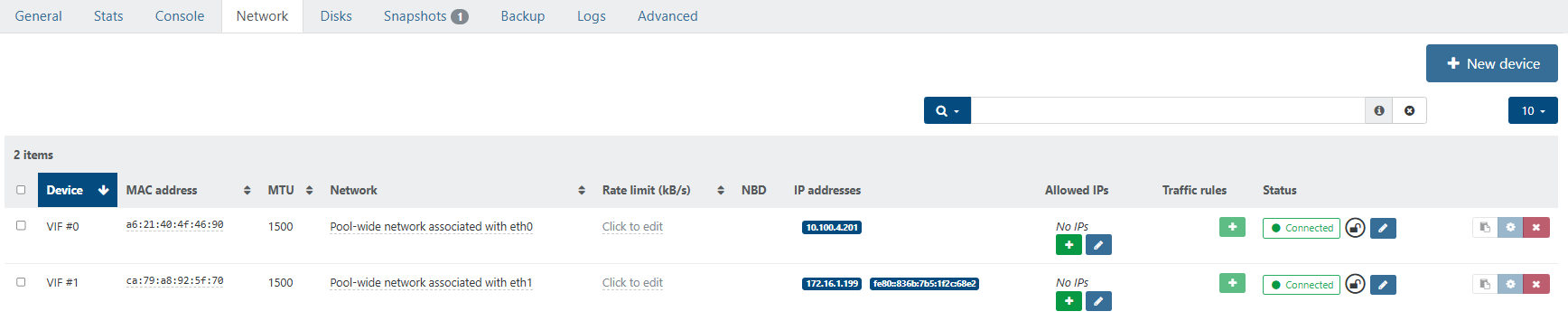
            e9efc216-7326-4fd4-9e29-ff2160b7e577-image.png

            The expanded view shows both IP addresses that are assigned to different interfaces, but it doesn't delineate nor show properly which IP address is actually assigned to the VIF. See below.
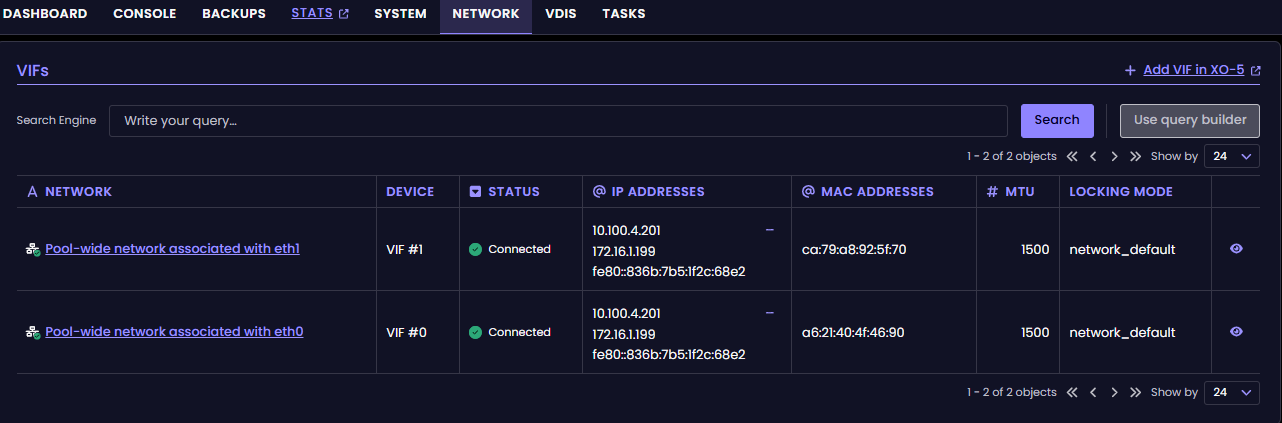
            f41667d9-9de5-461e-af69-4598910b9e87-image.png

            On VIF1, this nic is assigned to the 172.16.1.199 address.

            1 Reply Last reply Reply Quote 2
            • olivierlambertO Online
              olivierlambert Vates 🪐 Co-Founder CEO
              last edited by

              Nice catch! Thanks for reporting 👍

              1 Reply Last reply Reply Quote 0
              • H Offline
                Hex
                last edited by

                Snapshots.
                There is no information about them in any dashboard.
                There is no way to manage them.

                olivierlambertO 1 Reply Last reply Reply Quote 0
                • olivierlambertO Online
                  olivierlambert Vates 🪐 Co-Founder CEO @Hex
                  last edited by olivierlambert

                  @Hex Have you looked at https://feedback.vates.tech ?

                  If there's nothing on what you need there, feel free to add an entry!

                  1 Reply Last reply Reply Quote 2
                  • S Offline
                    skipthompson81
                    last edited by

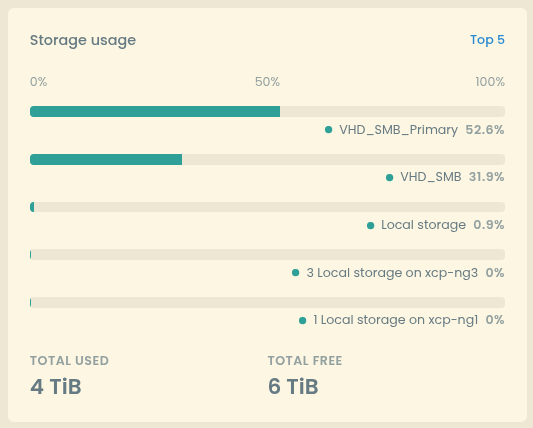
                    KUDOS ON THIS BLOCK

                    (with my primary on top, instead of my local storage usb drives at 100% )

                    WELL DONE!
                    19ca252c-a7c2-480c-923b-dde1b8d20020-image.png

                    1 Reply Last reply Reply Quote 1
                    • J Offline
                      john.c
                      last edited by john.c

                      This post is deleted!
                      1 Reply Last reply Reply Quote 0
                      • A Online
                        acebmxer
                        last edited by acebmxer

                        When creating vm in v6 and renaming the disk name. You can only enter 1 letter at a time. You have to keep clicking then typing the next letter. No other field has this issue.

                        Screenshot_20260303_211423.png

                        A P pdoniasP 3 Replies Last reply Reply Quote 1
                        • J Offline
                          jr-m4 @probain
                          last edited by

                          @probain said:

                          said in 🛰️ XO 6: dedicated thread for all your feedback!:

                          Windows guests Console - Reloads every 5-10s.

                          When trying to use the console for both my Windows 11 and Server 2025. The console reloads every 5-10s. This makes it borderline unusable. Since it resets the viewport/window scroll placement as well. Also the console seems to loose focus when this happens as well. Leading to have to click the console-section to get it in focus, to receive I am not seeing this behaviour in XO5 at all.

                          .
                          .
                          .
                          .
                          Unfortunately this is still present in commit 0a0ae5dc7ea6608612d105f6338ffe72d8bd9ed1 as well..

                          Update: I recorded the behaviour, for better clarification:
                          https://www.youtube.com/watch?v=PXpBFgSl31U

                          I'm noticing the same, or at least very similar, behaviour on some linux VMs now also.

                          1 Reply Last reply Reply Quote 0
                          • S Offline
                            ShaneNP
                            last edited by

                            I just setup a fresh demo install (fresh empty XCP-NG) on a laptop w/ a NAS for ISO/VM/Backup, and thought I would give XO 6 a go...and the first thing I needed was a Storage Repository...where does one add that in XO 6? in XO 5 +New > Storage.

                            I am not seeing anything to add one, figured I would post here, because its a new interface, I might be 100% blind to it.

                            D 1 Reply Last reply Reply Quote 0
                            • D Offline
                              DustinB @ShaneNP
                              last edited by

                              @ShaneNP said:

                              I just setup a fresh demo install (fresh empty XCP-NG) on a laptop w/ a NAS for ISO/VM/Backup, and thought I would give XO 6 a go...and the first thing I needed was a Storage Repository...where does one add that in XO 6? in XO 5 +New > Storage.

                              I am not seeing anything to add one, figured I would post here, because its a new interface, I might be 100% blind to it.

                              It's likely not functional in XO6 atm, I'd just default to using XO5 for the infrastructure setup and then you can test the XO6 interface out as your daily driver

                              S 1 Reply Last reply Reply Quote 0
                              • S Offline
                                ShaneNP @DustinB
                                last edited by

                                @DustinB Thanks, figured so, but I had to post, because I have missed obvious things before. I also wanted to mention it for any other person searching 🙂

                                G 1 Reply Last reply Reply Quote 0
                                • G Offline
                                  Greg_E @ShaneNP
                                  last edited by

                                  @ShaneNP

                                  I just set my lab back up from scratch, I can't remember for certain, but I think it pushed me over to v5 to set up the SR.

                                  1 Reply Last reply Reply Quote 0
                                  • A Online
                                    acebmxer @acebmxer
                                    last edited by

                                    said:

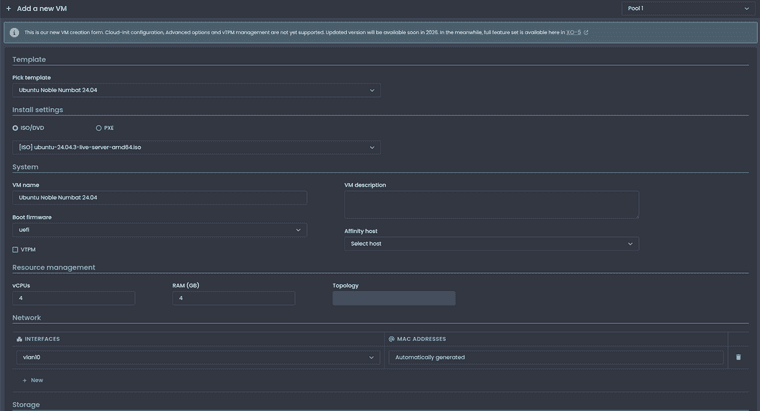
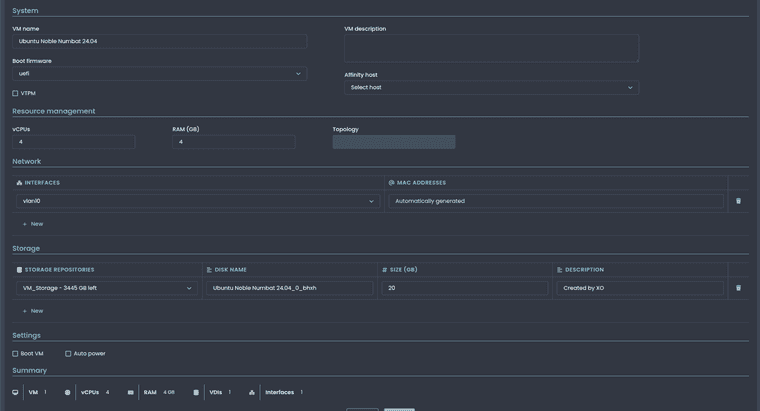
                                    When creating new vm in XOv6 it does not set the correct number of cpu's....

                                    I set 4 cpu's and after creation there is only 1. Also the ISO image is not mounted after creation.
                                    Screenshot_20260131_185433.png

                                    Screenshot_20260131_185453.png

                                    Screenshot_20260131_185557.png

                                    Screenshot_20260131_185911.png

                                    This issue was fixed in commit - 2444861

                                    1 Reply Last reply Reply Quote 0
                                    • A Online
                                      acebmxer @acebmxer
                                      last edited by

                                      said:

                                      When creating vm in v6 and renaming the disk name. You can only enter 1 letter at a time. You have to keep clicking then typing the next letter. No other field has this issue.

                                      Screenshot_20260303_211423.png

                                      This is still an issue in the latest commit - 2cd5ba0

                                      1 Reply Last reply Reply Quote 0
                                      • P Offline
                                        Pilow @acebmxer
                                        last edited by

                                        @acebmxer said:

                                        When creating vm in v6 and renaming the disk name. You can only enter 1 letter at a time. You have to keep clicking then typing the next letter. No other field has this issue.

                                        JS focus problem, should be easy to fix by the devs

                                        B 1 Reply Last reply Reply Quote 0
                                        • B Offline
                                          benapetr @Pilow
                                          last edited by

                                          Hello,

                                          What are minimum requirements for XO6? I have XCP-ng 8.2 (will eventually upgrade, but planning the upgrade and testing it is extremely complex and time consuming) and in 8.2 XO6 doesn't work at all, it just shows everything empty
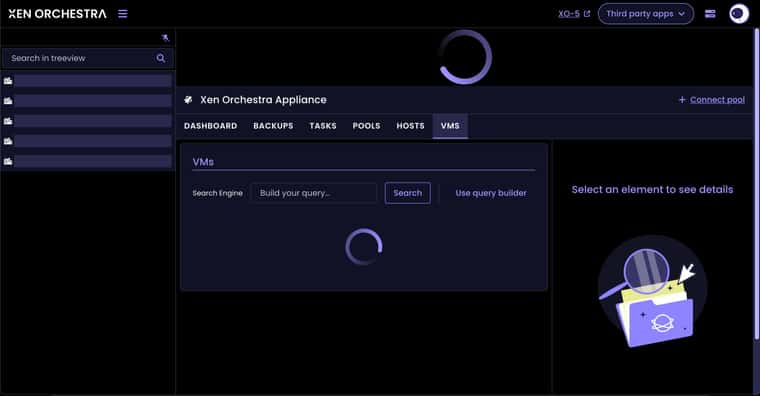
                                          640685c3-6236-41d2-84bc-af412358d212-image.jpeg

                                          Just spinning wheels forever and showing nothing. XO5 view is working fine as expected. Is this a known limitation?

                                          M 1 Reply Last reply Reply Quote 0
                                          • M Online
                                            MajorP93 @benapetr
                                            last edited by

                                            @benapetr Is your XO fully up to date? I remember that there was a bug that caused this spinning wheel / infinite loading on XO6 that got fixed already. Maybe the issue you faced is related to that. I do not know about compatibility with 8.2 but can imagine that it is not supported as it is EOL so probably no compatibility guaranteed by Vates.


                                            B 1 Reply Last reply Reply Quote 0

                                            Hello! It looks like you're interested in this conversation, but you don't have an account yet.

                                            Getting fed up of having to scroll through the same posts each visit? When you register for an account, you'll always come back to exactly where you were before, and choose to be notified of new replies (either via email, or push notification). You'll also be able to save bookmarks and upvote posts to show your appreciation to other community members.

                                            With your input, this post could be even better 💗

                                            Register Login
                                            • First post
                                              Last post