Subcategories

  • VMs, hosts, pools, networks and all other usual management tasks.

    476 Topics
    4k Posts
    A
    @pkgw Planning an RPU as a whole is a nice idea in theory, but it's inherently designed to co-exist with normal pool management operations (you should still be able to migrate VMs between hosts B and C during it, or start new ones), we are not "pre-booking" memory and other resources for groups of VMs, otherwise it can quickly make the rest of the pool hard to manage while some VM migrations could still be far away. Regarding the narrower case - I'll note this down and see if we can improve things, thank you!
  • ACLs, Self-service, Cloud-init, Load balancing...

    105 Topics
    864 Posts
    M
    Is a centralized XOA server "managing" two remote Proxy-fronted XCP clusters supported with the SDN Controller Plugin? We are looking to deploy an architecture similar to this blog post from 2022: https://xen-orchestra.com/blog/xo-proxy-a-concrete-guide/
  • All XO backup features: full and incremental, replication, mirrors...

    515 Topics
    5k Posts
    poddingueP
    Thanks for checking. That's useful, even if it points away from where I was looking. Clocks within a second of each other means drift probably isn't your problem, and I'd guess the MST/UTC difference is just how dom0 displays it, though I'm not sure. What I keep coming back to is that your full backups fail while the delta jobs on the same hosts never do. That's the same split in https://github.com/vatesfr/xen-orchestra/issues/9181, where full backups hit BodyTimeoutError on VMs with big disks or a lot of free space and the deltas are fine. If your failing VMs look like that, your dates and the MST/UTC detail would do more good on that issue than buried in here. MajorP93 created this issue in vatesfr/xen-orchestra open Full backup fails on large VMs / VMs with lots of free disk space #9181
  • Everything related to Xen Orchestra's REST API

    86 Topics
    645 Posts
    J
    Hello I'm pulling stats for all VMs to understand CPU usage. We're a bit behind the curve in terms of XO versions, but these questions hopefully are still relevant. If using a granularity of days, the interval is set to 86400 (understandably) but the endTimestamp varies. Running this on June 9th @ ~1740 we get timestamps for both Mon Jun 8 01:00:00 AM BST 2026 and Tues Jun 9 01:00:00 AM BST 2026. Does this average across the day? Why is the timestamp 0100? Why would there be different timestamps between VMs (all are running) and does that mean that the figures are misaligned in the results? These are retrieved via curl and a bash script, a bit hacky, but for clarity the request is: ++ curl -X GET -s -H accept:application/json -b authenticationToken=[[REDACTED]] -o [[REDACTED]] 'https://[[REDACTED]]/rest/v0/vms/[[REDACTED]]/stats?granularity=days' Really keen to know if we can control the start and endtime, as well as provide a manual interval, as well as the aggregation strategy (min, max, average). Are any of these possible? Lastly, is cpuUsage the percentage as per the dashboard, but averaged over all CPUs? Thanks so much in advance. James
  • Terraform, Packer or any tool to do IaC

    51 Topics
    471 Posts
    poddingueP
    The Kubernetes CSI driver for Xen Orchestra just hit v0.4.0, and we want it on more real clusters before it reaches a stable release candidate. If you run Kubernetes on XCP-ng VMs, this is a good time to give it a proper workout. What's new in v0.4.0: Local-storage support Automatic pool-discovery fallback Kubernetes metadata now lives in Xen Orchestra VDI tags instead of the deprecated other_config. That change also drops the old requirement for Xen Orchestra 6.4 or newer, so the driver runs on more deployments now. ️ Read this before you upgrade. v0.4.0 is a breaking change. The Kubernetes metadata moved from other_config to VDI tags, so you must migrate before upgrading from v0.3.0. Do not upgrade in place: follow the v0.3.0 to v0.4.0 migration guide in the release notes, then move to v0.4.0. What helps us most is hearing how it behaves on your own setup: what works, what breaks, which storage backend you use, and which flavour of Kubernetes you run (k3s, full k8s, or something else). Edge cases on real clusters are the ones we don't see in our own testing. Where to report: start right here in this thread. It keeps everything visible to the community and lets others on the same setup jump in. If something turns out to be a reproducible bug, we'll move it to a GitHub issue on the repo so the team can track it to a fix. Release notes and migration guide: https://github.com/vatesfr/xenorchestra-csi-driver/releases/tag/v0.4.0
  • 10 gig secondary network

    6
    0 Votes
    6 Posts
    1k Views
    fohdeeshaF
    @abelaguilar indeed you do not have to fill out the dns and gateway fields - in fact as you surmised you shouldn't. Where you getting an error or something when leaving them blank? The only mandatory fields are IP and netmask.
  • This topic is deleted!

    Unsolved
    1
    0 Votes
    1 Posts
    3 Views
    No one has replied
  • 0 Votes
    5 Posts
    751 Views
    Daikon-RadishD
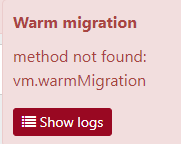
    So it looks like the warm migration of the first VM I tried migrating works, but after trying to migrate another VM, I'm getting a new error message: "Warm migration: task has already ended" Is there any particular process that I'm missing to mark the first VM as successfully migrated? **edit: Maybe I'm just impatient because after waiting another couple of minutes it looks like it's migrating OK.. LOL
  • Hot add hardware

    hot-add
    6
    0 Votes
    6 Posts
    2k Views
    D
    @lawrencesystems I am looking at it right now. Thank you!!
  • Cannot upload / import OVAs using xo-upload-ova / XO UI

    1
    0 Votes
    1 Posts
    442 Views
    No one has replied
  • XO Self service wrong quota calculations...

    3
    0 Votes
    3 Posts
    555 Views
    S
    @olivierlambert Thanks, I just opened 1.
  • Migrated XO VM with broken network

    2
    0 Votes
    2 Posts
    863 Views
    splastunovS
    You can try to "attach" broken VIF to some network and then delete it. Try to use this command xe vif-move If that doesn't work, you can shut down the XO VM, detach the disk, deploy a new VM without a disk, attach the XO disk to the new VM.
  • Convert CentOS 8.0 Template to Red Hat 9

    5
    0 Votes
    5 Posts
    703 Views
    F
    @olivierlambert can you help me with this please?
  • Patching to a specific version

    9
    0 Votes
    9 Posts
    3k Views
    mauzillaM
    works like a charm, thank you gents!
  • 0 Votes
    8 Posts
    3k Views
    R
    @olivierlambert @gduperrey Thanks for clearing that up. Appreciate the responses.
  • File restore not finding any option

    backup file level restore
    18
    2
    0 Votes
    18 Posts
    5k Views
    D
    @splastunov said in File restore not finding any option: If nothing will help and you can't import xva with import VM, I have solution. Deploy new VM with disk x4 times greater than backup file. OS Ubuntu 16.04 or later. Copy backup. Take attention. You need always copy backup. Do not move it. Install xva-img https://github.com/eriklax/xva-img add-apt-repository ppa:ubuntu-toolchain-r/test && apt-get update && apt-get install -y gcc-7 cd to xva-img dir and run next command cmake ./ make install Extract xva file tar -xf my-virtual-machine.xva -C my-virtual-machine chmod -R 755 my-virtual-machine In folder my-virtual-machine you will find some directory like Ref :1, but maybe with another number. Remember this number. Create raw disk from extracted. Replace 1 with number from previous step. xva-img -p disk-export my-virtual-machine/Ref\:1/ disk.raw Install qemu-utils apt install qemu-utils Convert raw to vhd qemu-img convert -f raw -O vpc disk.raw [vhd-name-you-like].vhd Copy vhd to some SR. I'm using local SRs, so in my case path is /var/run/sr-mount/[sr-uuid] Go to the host, cd to SR folder, get VHD uuid, rename VHD cd /var/run/sr-mount/[sr-uuid] vhd-util read -p -n [vhd-name-you-like_from-step-8].vhd mv [vhd-name-you-like_from-step-8].vhd [uuid].vhd Rescan SR Attach VHD to existing VM or deploy new one Get you files wow. I am getting on with this in parallel. Thank you again! Results for both suggestions and requests are coming!
  • 0 Votes
    15 Posts
    3k Views
    F
    @florent I would love to....but I transitioned from Hyper-V a few months ago. No VMWare to be found around here. Without fail, these OVAs will be downloads from a variety of applications. Thanks again!
  • Linguiring VDI Export task after backup fails

    7
    2
    0 Votes
    7 Posts
    1k Views
    olivierlambertO
    A badly formated VHD can indeed trigger this, nice catch!
  • [XO] Export pool metadata not finish...

    10
    0 Votes
    10 Posts
    2k Views
    S
    @Darkbeldin Yes, btw right now works normal after 3-5 days with problem...
  • Long Backup Task Goes Away from List

    4
    0 Votes
    4 Posts
    662 Views
    olivierlambertO
    This is documented in our official doc IIRC
  • Continuous replication failing

    10
    0 Votes
    10 Posts
    2k Views
    M
    Update: I disabled the CR job and created a new one, which did successfully start - so I'm hoping this fixed it
  • delayed_ack needed?

    4
    0 Votes
    4 Posts
    836 Views
    olivierlambertO
    I am no iSCSI expert, I don't know if this settings exists, but before tinkering I would do some benchmarks.
  • Continous Replication Network

    8
    0 Votes
    8 Posts
    2k Views
    planedropP
    @vincentp I'd personally go with a 10GbE switch just to be sure there are no bottlenecks from that, I don't really think you'll hit full 10GbE for a replication job but it's better to alleviate that IMO.
  • Backups show as started but no tasks running

    Solved
    4
    0 Votes
    4 Posts
    951 Views
    V
    @Darkbeldin worked perfectly thanks.
  • 10 gig on different subnet

    6
    0 Votes
    6 Posts
    1k Views
    planedropP
    @abelaguilar Sounds good, yeah I think that is the easiest method to go about it, rather than direct attached networking.