Subcategories

  • VMs, hosts, pools, networks and all other usual management tasks.

    499 Topics
    4k Posts
    I
    @tjkreidl everything looks normal. I also shared SOS report with @goulven I hope I'll get a feedback on slowness.
  • ACLs, Self-service, Cloud-init, Load balancing...

    107 Topics
    877 Posts
    Bastien NolletB
    Hello @ludalm13, Thanks for your contribution and sorry for not giving an answer earlier. We initially planned to review your PR while doing some additional work on the audit plugin, but our planning evolved and that work was postponed. We'll review your PR in the following days.
  • All XO backup features: full and incremental, replication, mirrors...

    550 Topics
    6k Posts
    Z
    Hi, I think I'm hitting the same issue, on the same versions (sm-3.2.12-25.2, blktap-3.55.5-12.3, XCP-ng 8.3, XOA stable fully updated). In my case it's incremental replication between two local EXT qcow2 SRs (source Xcpng-02, target Xcpng-03). It's consistent rather than intermittent, and only one VM's 425 GiB disk (~341 GiB used) is affected; 15 other VMs replicate incrementally fine. A fresh reseed doesn't help: the full succeeds, then the next incremental fails again. CBT on or off made no difference. My disks were never VHD. They were imported from VMware directly as qcow2. I traced the timing on the target host, in case it helps narrow it down: 18:58:00 qcow2-to-stdout.py <replica disk> --diff <replica snapshot> (tapdisk 2181814) 19:04:57 tap-ctl close -p 2181814 -m 4 -t 120 failed ... Connection timed out, status=110 -> SR_BACKEND_FAILURE_1200 on VBD.unplug_force (xo-server: BodyTimeoutError, "Couldn't disconnect ... from dom0", "can't compute delta ..., fall back to a full") 19:06:59 same tap-ctl close timeout on retry 19:08:14 qcow-tool failed, returning VDI_IO_ERROR ... BrokenPipeError: [Errno 32] Broken pipe The smaller disk of the same VM (~93 GiB used) completes the same diff in about 3 minutes. qemu-img map on these files takes under 2 seconds, so the time seems to be inside the diff itself. From a quick read of qcow2-to-stdout.py, --diff appears to read and compare all allocated clusters, so for a large disk it can run more than 5 minutes without sending anything. Here's what I think is happening, though I may be wrong: The diff runs for a long time without sending any data back to XO. After about 5 minutes of silence, xo-server gives up (BodyTimeoutError) and tries to unplug the disk. The unplug fails because the diff is still reading the disk through tapdisk, so tap-ctl close times out (SR_BACKEND_FAILURE_1200). If that's right, the 1200 error and the stuck VBD are side effects. The real problem would be how long the diff takes on a large disk.

  • Everything related to Xen Orchestra's REST API

    89 Topics
    656 Posts
    P
    Hi, This was fixed in Latest. But if you need to stay on Stable, you can open a ticket to have a patch.
  • Terraform, Packer or any tool to do IaC

    54 Topics
    509 Posts
    enkaskalE
    @poddingue no worries and thanks for reporting your findings
  • Multiple NIC in XOA / XO CE

    Solved
    3
    0 Votes
    3 Posts
    1k Views
    H
    @olivierlambert Thank you again for the answer! I was not using the right search criteria to find this part myself Changed the 'config.toml' file after searching my system (not an XOA but XO CE, so it was in another location then mentioned in the documentation) Restarted and just as expected the GUI was only available on the specified IP
  • Ansible dynamic inventory

    2
    0 Votes
    2 Posts
    971 Views
    olivierlambertO
    We sponsored someone to work on Terraform and Packer. But every contribution is welcome, on Ansible too
  • Help with Xen Orchestra

    6
    0 Votes
    6 Posts
    2k Views
    olivierlambertO
    Sure, you can create a GH issue on XO repository
  • Xen Orchestra proxies - Test Feedback

    31
    0 Votes
    31 Posts
    22k Views
    olivierlambertO
    We are focusing first on getting something correctly integrated from XOA, it doesn't mean it will be exclusive to XOA. It's just we are first focusing on a completely "known" environment (XOA), but I think at some point we'll be able to provide manual setup for people who want to do it from the sources
  • Delta backup - can't restore

    4
    0 Votes
    4 Posts
    1k Views
    tonyp90T
    @julien-f Backup files check found no problems, so I tried to restore again and it works. No changes or updates in XO, no changes on vhd or json files (same dates and sizes). Only think I did was detach and attach backup repository (settings - remotes) which I tried before with no luck.
  • Python3 support?

    12
    0 Votes
    12 Posts
    4k Views
    DanpD
    @julien-f
  • Min static memory fixed?

    4
    0 Votes
    4 Posts
    2k Views
    olivierlambertO
    In theory, static min is bundled in the template and you shouldn't use less than that. If you still want to do it, consider it as "advanced", and do it with xe
  • Disable network_usage alarm

    3
    1
    0 Votes
    3 Posts
    1k Views
    olivierlambertO
    pinging @nhanlon
  • VM space used in local storage and base copies

    8
    6
    0 Votes
    8 Posts
    3k Views
    N
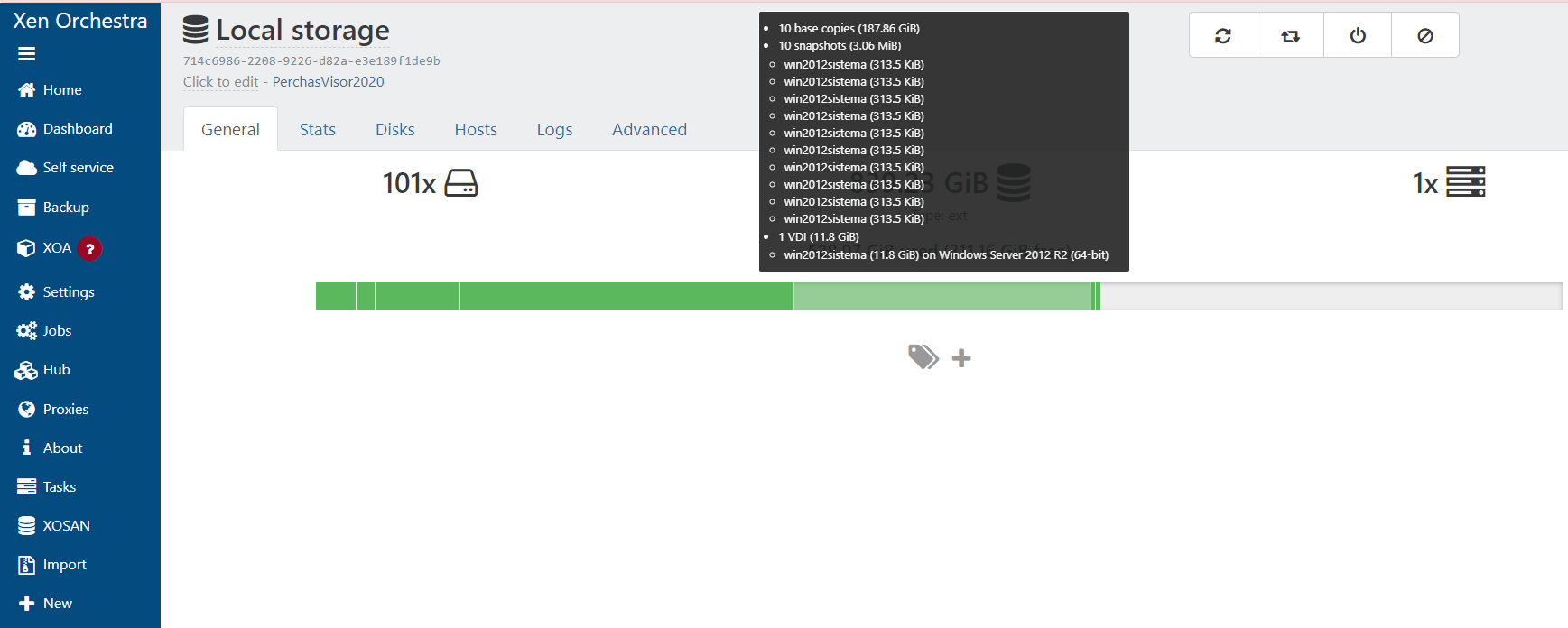
    @olivierlambert Dont know why the screenshots were not loading, posting that again With no snapshots and coalesce completed, very very little space used. [image: Captura de pantalla (233).png]
  • Feature Request: Allow changing proxy from WebUI in XOA

    6
    0 Votes
    6 Posts
    5k Views
    ForzaF
    @julien-f That explains it. Thanks!
  • XO HUB Templates and Recipes Free vs Premium

    Solved
    4
    0 Votes
    4 Posts
    2k Views
    olivierlambertO
    @maxcerny You shouldn't have any diff, no.
  • Terraform

    4
    0 Votes
    4 Posts
    2k Views
    D
    @ruskofd is right. You should be able to use the cloud_network_config attribute to achieve this. The following code is untested but should launch a vm with a static IP. Please see the xenorchestra_vm resource docs and the cloud-init networking v1 docs for more details. resource "xenorchestra_vm" "static_ip_vm" { .... cloud_network_config = <<EOF network: version: 1 config: - type: physical name: eth0 subnets: - type: static address: STATIC_IP/24 gateway: GATEWAY_IP dns_nameservers: - 8.8.8.8 EOF } Let me know if you have any questions or issues using cloud_network_config, As for the blog post, the VM would have been assigned an ip address via dhcp (assuming the guest OS had cloud-init installed which was true for the VM template in the blog post).
  • Feature request: Highlight full backups

    feature in backlog
    6
    1
    0 Votes
    6 Posts
    1k Views
    julien-fJ
    I agree it makes sense. Ping @pdonias
  • Clarification on an Advanced setting

    5
    0 Votes
    5 Posts
    2k Views
    stormiS
    @jedimarcus said in Clarification on an Advanced setting: @eangulus With MaxCPU you can do the increase WITHOUT shutting down... I'll complete this with an example: create a VM with 4 vCPUs and Max vCPU = 8. you can now change the number of vCPUs from anything between 1 and 8 without shutting the VM down
  • S3 / Wasabi Backup

    47
    0 Votes
    47 Posts
    35k Views
    olivierlambertO
    It's also explained very clearly here: https://xen-orchestra.com/docs/community.html (in the first point) Always update to latest code available before reporting a problem
  • Full Backup Problem

    6
    1
    0 Votes
    6 Posts
    1k Views
    N
    @danp i couldnt get the log from command line, sorry But i was able to complete the backup to another remote, so i think the main problem is the remote im using
  • XOA from Source Limitation

    11
    0 Votes
    11 Posts
    4k Views
    J
    @harajukakei I dont use it but it does work for me (XO build from Source), although not from my android phone (the hosts don't move across to the Available list), so could it be browser related?
  • Cannot add ip or edit to existing network

    Solved
    4
    1
    0 Votes
    4 Posts
    1k Views
    M
    @andy you're welcome!
  • XO tree view

    8
    1 Votes
    8 Posts
    3k Views
    ForzaF
    @julien-f Thank you for explaining your plans. I am very eager to see the new XO 6! Perhaps a Christmas present for all of us? I just realised I have one more "peeve" with XOA. That is the console view which does not work well with Swedish keyboard layout. For example pressing Alt-Gr+2 to get at-sign '@' doesn't work. It also crashes the keyboard input so it doesn't release the alt-key. This always works correctly in XCP-ng center. The problem is in both Linux and Windows guests.
  • Switch to XOA free

    5
    0 Votes
    5 Posts
    7k Views
    olivierlambertO
    Have you checked our guide to install Windows drivers? Check https://xcp-ng.org/docs/guests.html#windows If you still have issues, with your current XOA account in trial, you can open support tickets already so we can take a look remotely (https://support.vates.fr)