🛰️ XO 6: dedicated thread for all your feedback!
-
Are you in UTC+1? This one might simply be because the VM's name shows the UTC time while, in the tables, we convert dates to your actual timezone.
Yes, I'm in CET, UTC+1 and 24h
Yes theCont.Rep.VMs show UTC. During summertime, it was 2h off.
Its just cosmetics, not "urgent", but still inAM/PMThese are also still in
AM/PM- Snapshots
- backup jobs that run the Sequences schedule
- The next run in job-schedule
-
Commit
035eeindashboard
I'm not sure if it's a good idea to show aBackup issueevery time a Cont.rep. job is run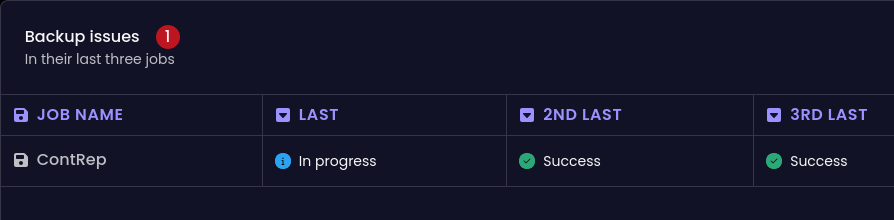
It would be more or less a static feature for somebody who run Cont rep frequently. and as a consequence won't react when a proper alert should be displayed
-
@olivierlambert I may be a rarity in IT these days, but for most apps, I use Light Mode. v5 was good. I think the blue sidebar and gray top bar made it workable. v6 is painfully white. I'm not fond of the purple on black Dark Mode either. If we could just make the screen less bright than the sun, Light Mode would be great.
In a few places the grid column headers aren't really differentiated from the rest of the grid. For example, at the XOA level in the Pools tab. It looks like the first pool is called "Pool" when that is the column header. Maybe use the light purple that you have for the selected tab above?
Overall, I'm really liking the new interface.
Thanks!
-
This post is deleted! -
I run these kinds of backup jobs
- Full Backup x2
- Delta backup
- Continuous Replication
- XO Config and Metadata
In ContRep, Conf/meta and in one of the Full Backup jobs I get
Report whenNever
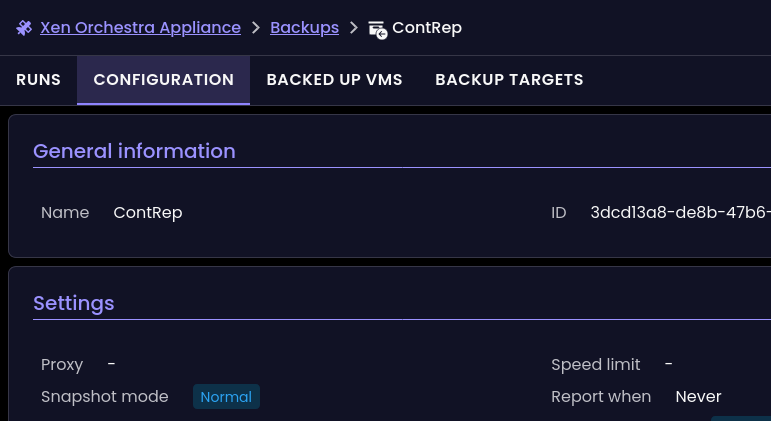
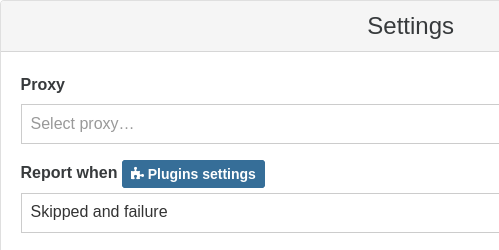
But they are enabled in XO5 with mail address and
Report whenSkipped and failure
-
I use the "VM notes" feature in XO 5 for lots of things, and I appreciate having the markdown capability. It seems now these VM Notes are stuffed into a small "Description" field inside the "Quick Info" panel for a VM.
Currently in XO 6, it looks like my notes are getting truncated in this new description field, are there plans to preserve the "VM Notes" functionality? Or should I be backing them up now before I lose them?
-
@cmoriarty said in
 ️ XO 6: dedicated thread for all your feedback!:
I use the "VM notes" feature in XO 5 for lots of things, and I appreciate having the markdown capability. It seems now these VM Notes are stuffed into a small "Description" field inside the "Quick Info" panel for a VM.
Currently in XO 6, it looks like my notes are getting truncated in this new description field, are there plans to preserve the "VM Notes" functionality? Or should I be backing them up now before I lose them?
Me too. They serve as important info, documentation, and other bits of info that needs to be quickly on-hand.
What I would like to add is a way to upload images and include them in the Markdown.
-
@ph7 said in
️ XO 6: dedicated thread for all your feedback!:I'm not sure if it's a good idea to show a Backup issue every time a Cont.rep. job is run
Thanks for the feedback, we'll fix that!
@XCP-ng-JustGreat said in
️ XO 6: dedicated thread for all your feedback!:However, the periodic console refresh interrupts the performing of actual work
We'll investigate that issue, thanks for the report.
@ph7 said in
️ XO 6: dedicated thread for all your feedback!:In ContRep, Conf/meta and in one of the Full Backup jobs I get Report when Never. But they are enabled in XO5 with mail address and Report when Skipped and failure
This definitely looks like a bug, we'll check that, thanks again!
@cmoriarty said in
️ XO 6: dedicated thread for all your feedback!:It seems now these VM Notes are stuffed into a small "Description" field inside the "Quick Info" panel for a VM.
Notes and descriptions are 2 separate things. We haven't added notes in XO 6 yet, but don't worry, we will! And XO 5 and XO 6 will be available side by side until XO 6 is fully usable, so you're not going to lose your notes, no need to back them up

-
FYI, we are adding a more structured way to get your feedback on missing features that you consider the most important: https://feedback.vates.tech
You can sign in with your email or via your Github or Discord account.
-
@olivierlambert nice, better than megathreads !
 added my first TAG demand on it
 -
Hi,
Just pulled the last commit and see that v6 become the "default" endpoint.
Unfortunatly, I have to rollback, any user can connect, SSO (oidc) is broken, I think it's not fully implemented yet ?
callback URL give a "Internal Server Error"; adding "/v5" make a loop with login screen...
There is any trick to diable v6 by default ? Or make OIDC works ?
Thank you and have a good day
-
@Kptainflintt Please provide us the XO-server log that concerns the connection error, authentication is supposed to work as before.
-
Hi,
That's the wired thing, no error in logs...
But I found why : I have "profile" scope in my OIDC configuration for a while, it seems to broke SSO in last version. Without it, it works.
Thank you
-
Subject: XO 6 is unusable without Migration tools
I just updated and was presented with the XO 6 interface. I am shocked to find that the "Migrate" functionality is missing from the UI.
Moving a VM is the most fundamental feature of a hypervisor management tool. Making an interface the default—or even presenting it as a viable preview—without this feature is a major workflow breaker. I shouldn't have to revert to the CLI or hunt for a "legacy view" toggle just to perform basic maintenance.
Please prioritize porting the migration/lifecycle actions before pushing users toward this interface. It makes the product feel broken.
-
Have you read the release announcement? You can upvote your most important features at https://feedback.vates.tech
-
@olivierlambert i voted. thanks
-
Just did my RPU and checked on the new v6 interface.
The old one has task details that are missing on the new one (or I didn't find them: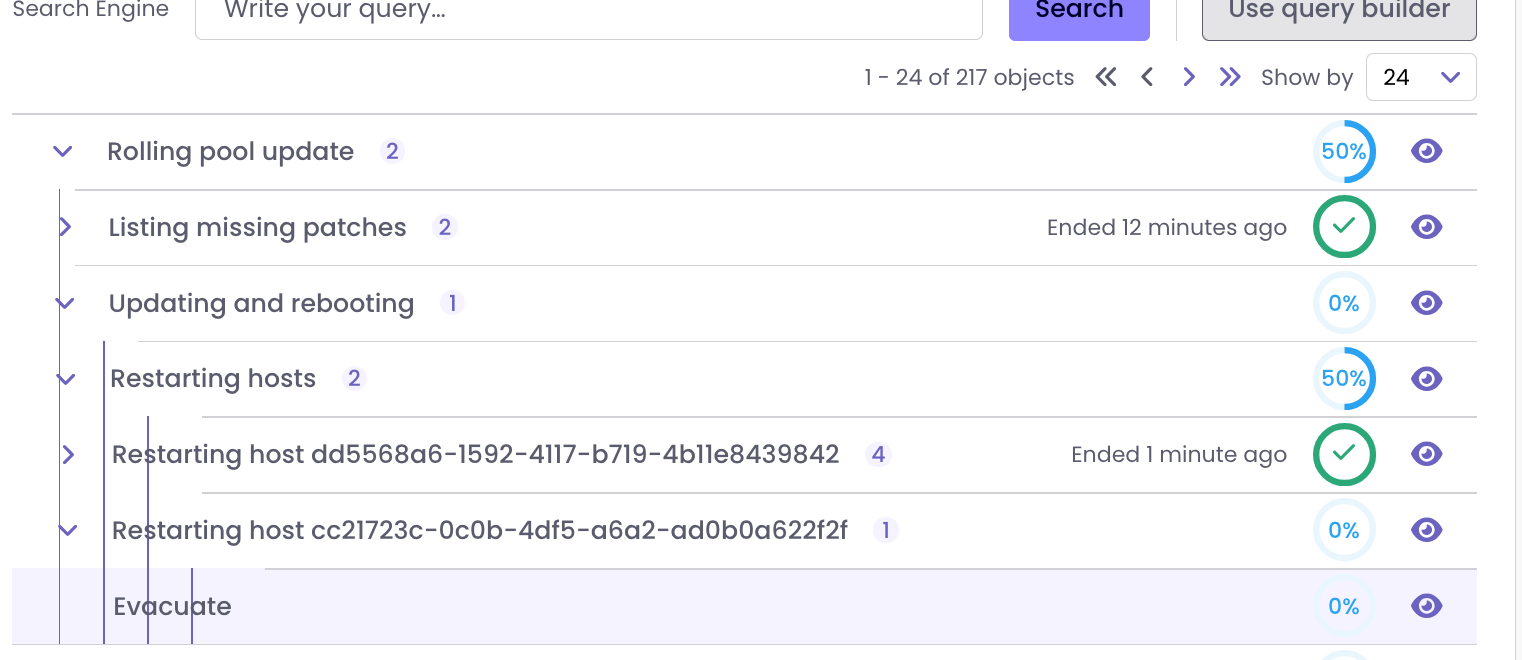
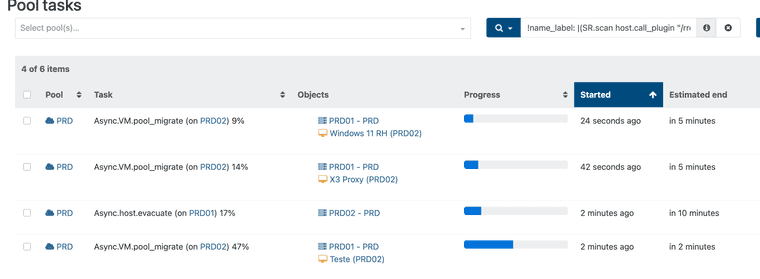
I like to see the evacuation tasks happening (in the past I could identify hangs etc)
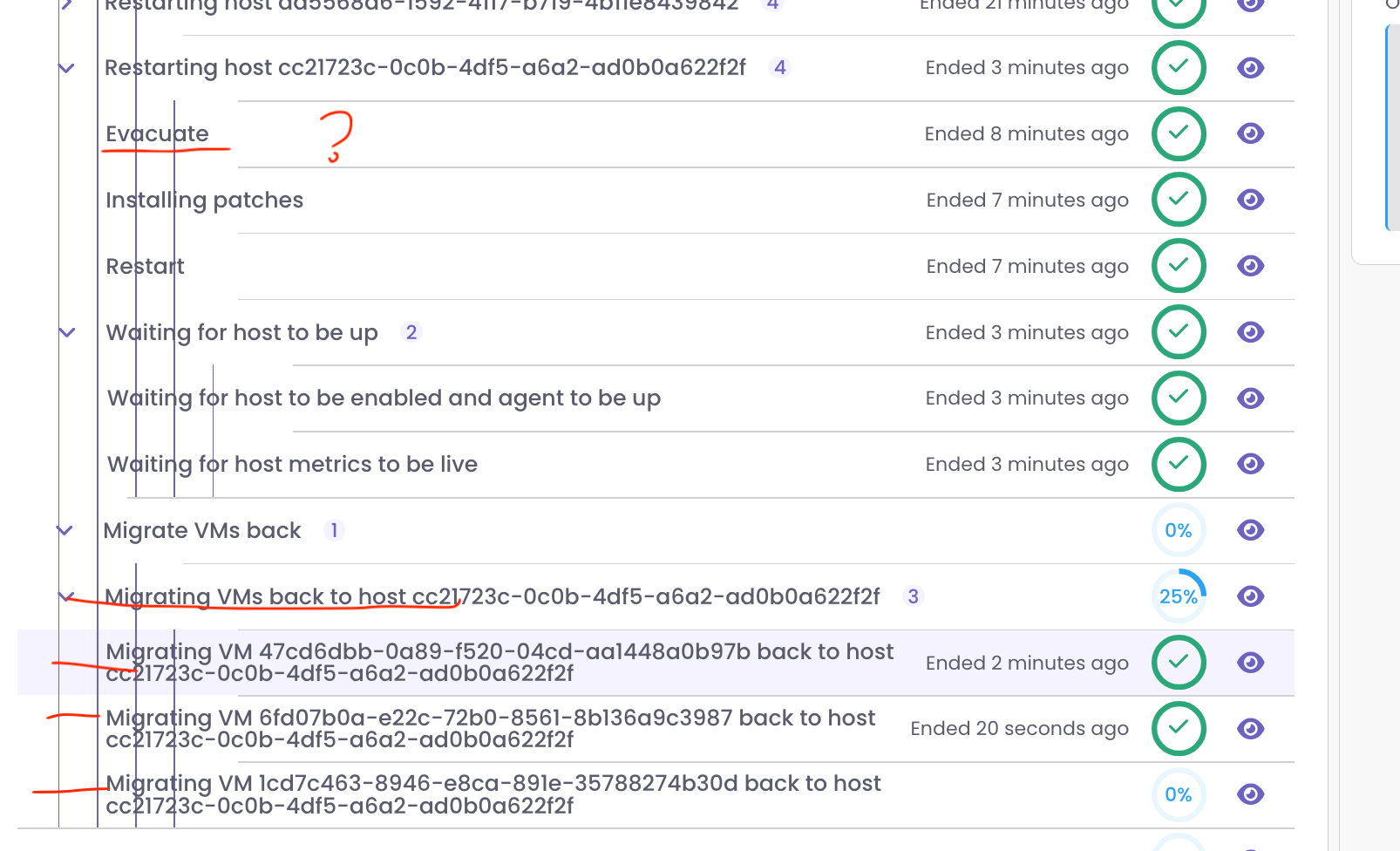
Here instead of the ID of the VM host the real names should be shown:

-
As shown above the evacuation tasks are not shown.
The last steps migrating thre VM's to the original place are shown:
-
Also here the task progression can't be followed (stays at 0% until completed):

instead of

-
I can't seem to find User settings to change admin name/password or configure filters. and they are not in the obvious place - account settings in top right corner.





Hello! It looks like you're interested in this conversation, but you don't have an account yet.
Getting fed up of having to scroll through the same posts each visit? When you register for an account, you'll always come back to exactly where you were before, and choose to be notified of new replies (either via email, or push notification). You'll also be able to save bookmarks and upvote posts to show your appreciation to other community members.
With your input, this post could be even better 💗
Register Login