VDI not showing in XO 5 from Source.
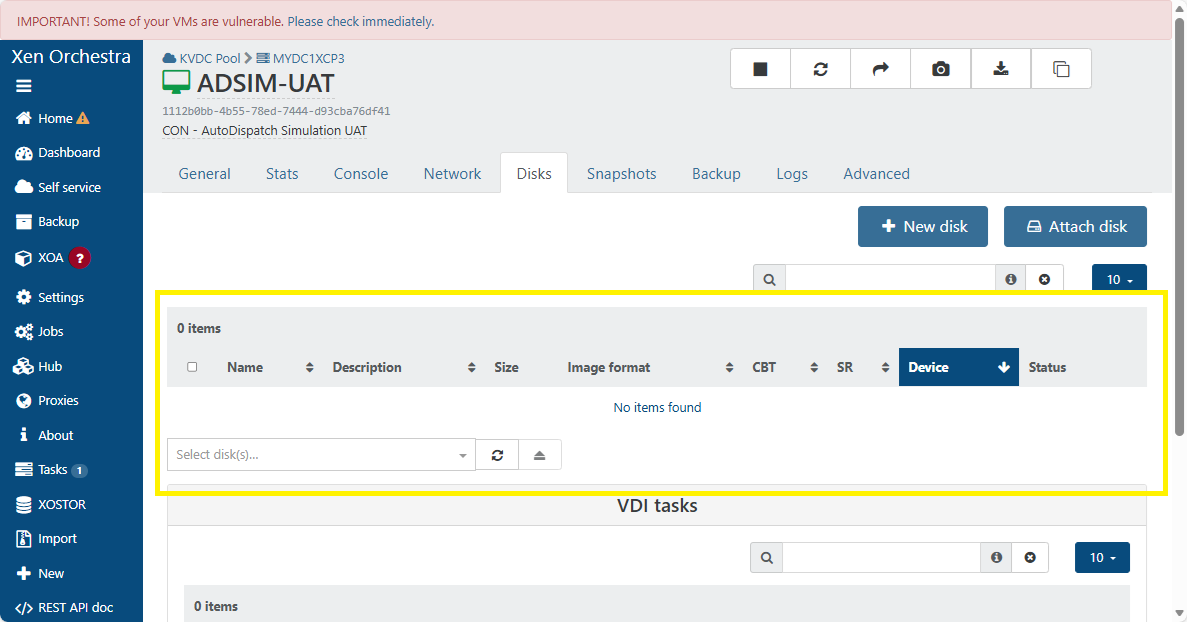
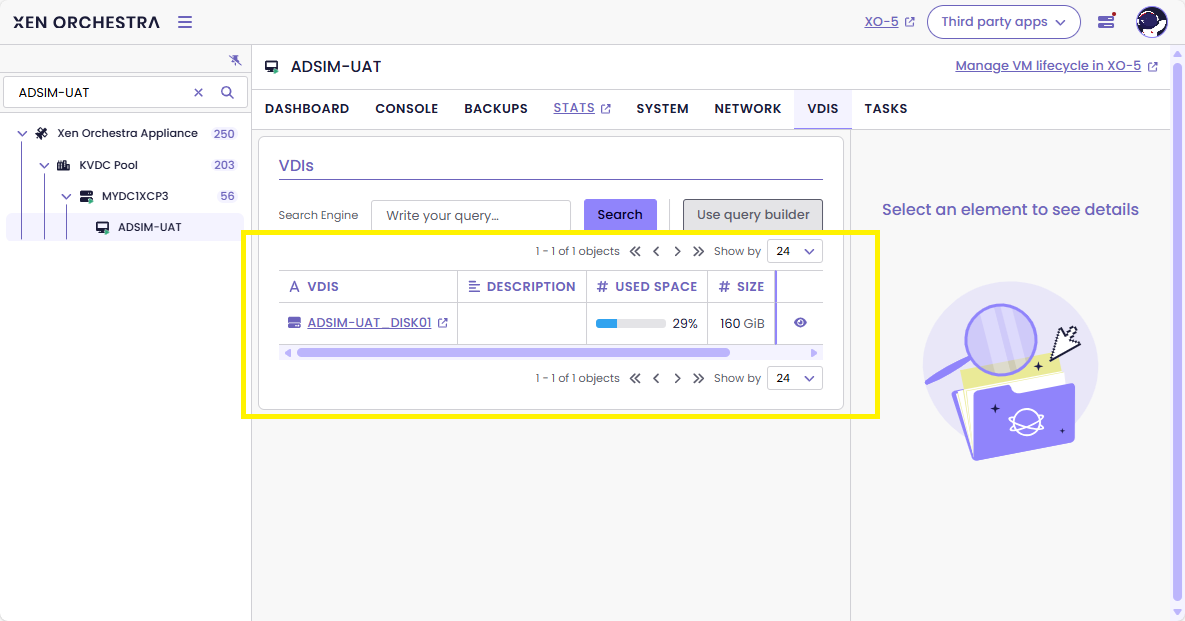
-
@Danp said in VDI not showing in XO 5 from Source.:
xe vdi-param-list uuid=
Hi Dan,
[18:52 mycsskvdcxcp03 ~]# xe vdi-param-list uuid=5f899e22-f3a7-4f0b-8de6-2b8058c0f575

uuid ( RO)                    : 5f899e22-f3a7-4f0b-8de6-2b8058c0f575
              name-label ( RW): ADSIM-UAT_DISK01
        name-description ( RW):
           is-a-snapshot ( RO): false
             snapshot-of ( RO): d31f2db0-be21-4794-b858-1bea357869c8
               snapshots ( RO):
           snapshot-time ( RO): 19700101T00:00:00Z
      allowed-operations (SRO): clone; snapshot
      current-operations (SRO):
                 sr-uuid ( RO): 5d22cba7-fbf6-a03b-bb73-9ffba3a3ee75
           sr-name-label ( RO): SR-HDD-DEV-2
               vbd-uuids (SRO): c6f4c7fa-4f6f-7999-d13c-3a29d887d828
         crashdump-uuids (SRO):
            virtual-size ( RO): 171798691840
    physical-utilisation ( RO): 50272698880
                location ( RO): 5f899e22-f3a7-4f0b-8de6-2b8058c0f575
                    type ( RO): User
                sharable ( RO): false
               read-only ( RO): false
            storage-lock ( RO): false
                 managed ( RO): true
     parent ( RO) [DEPRECATED]: <not in database>
                 missing ( RO): false
            is-tools-iso ( RO): false
            other-config (MRW):
           xenstore-data (MRO):
               sm-config (MRO): host_OpaqueRef:c3426081-ce96-507b-a219-8d2cb124c3ad: RW; read-caching-enabled-on-e1594701-28e9-4127-858e-74d4663669f8: true
                 on-boot ( RW): persist
           allow-caching ( RW): false
         metadata-latest ( RO): false
        metadata-of-pool ( RO): <not in database>
                    tags (SRW):
             cbt-enabled ( RO): false


[18:54 mycsskvdcxcp03 ~]#
Best regards,
Azren -
I just noticed I am seeing the same thing on some of my virtual machines. When I view the Disks tab for a vm in the Xen Orchestra 5 ui it shows no items found but XO6 will lists the disks associated with this vm. It only appears to be affecting 2 out of the 4 hosts that I have connected to the xoa instance but is not affecting all the virtual machines of those hosts. It seems to be impacting disks on both local and nfs storage pools.
There are no errors reported and the vm's are running fine and I can take snapshots and execute backup tasks, stop and start the vms without any problems. It just seems that the XOA v5 vm disks display is no longer able to find the disks for certain vms.
I am running version 6.0.2 XOA build: 20251101 from the latest channel.
-
@Danp I have also seen this problem with XO, but currently do not have an example to test. This was an issue on both local SR and shared SR on NFS.
-
Let me ping @team-xo-frontend
-
@wmazren Hi.
Weird,i am unable to reproduce the issue..Can you show us the output from the following command?
xe vbd-param-list uuid=c6f4c7fa-4f6f-7999-d13c-3a29d887d828 -
@wmazren said in VDI not showing in XO 5 from Source.:
       is-a-snapshot ( RO): false
         snapshot-of ( RO): d31f2db0-be21-4794-b858-1bea357869c8
this disk is now recognized as a snapshot by xo
is it a disk from a restored VM ? -
Hi,
I’m afraid I’ve encountered the same problem:-
Xen Orchestra, commit 0b52a
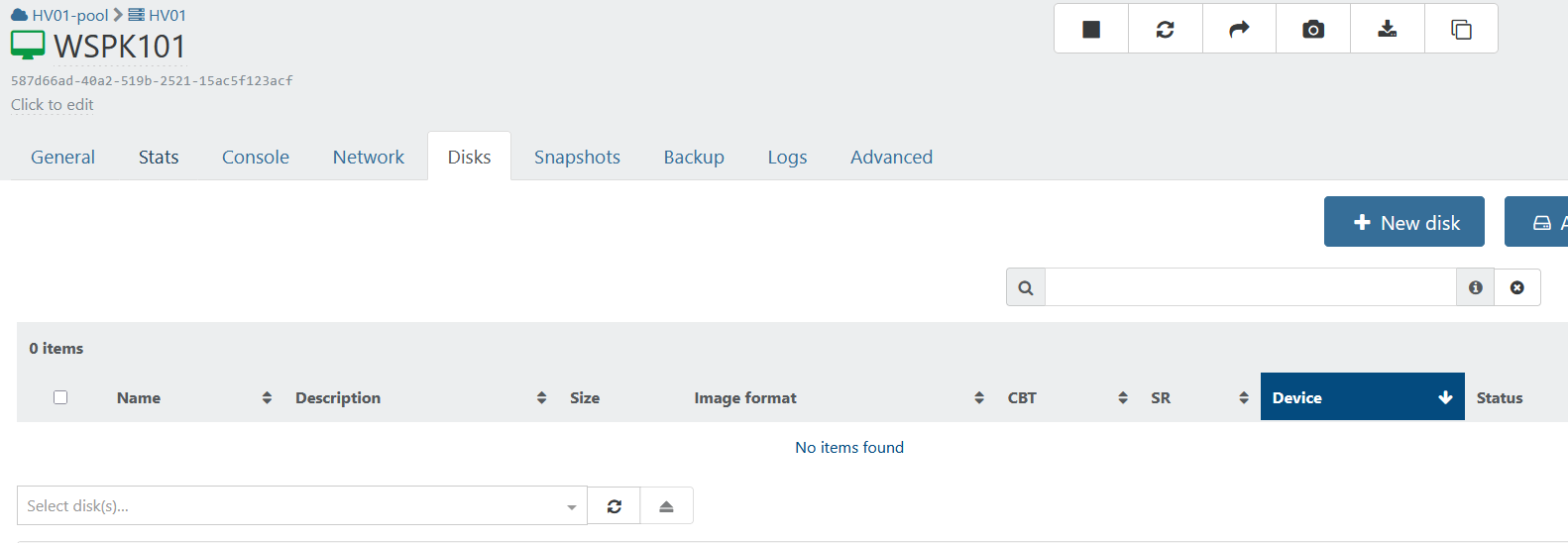
-
v6
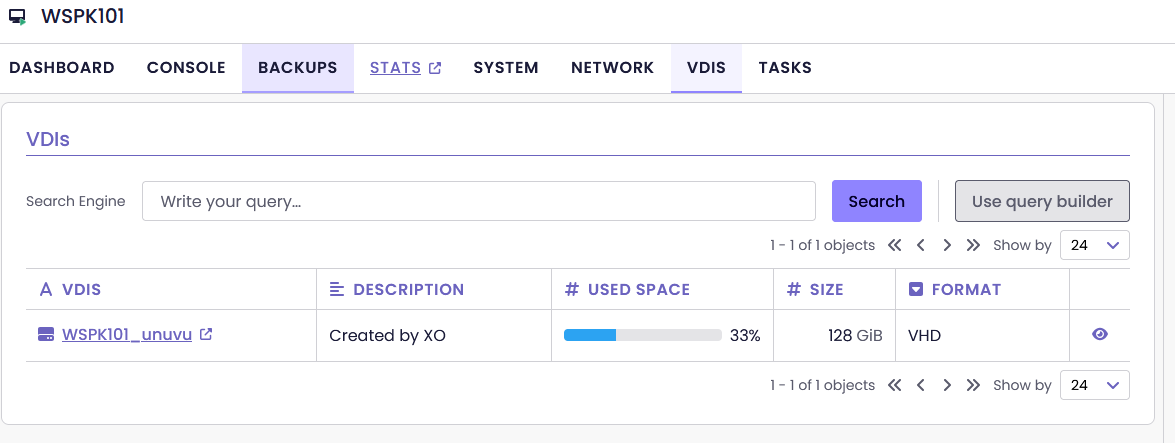
-
-

I am also impacted on some SRs, latest XOA 6.0.3
In the VM DISKS tab, no disk

VM is running OK. can snapshot, can backup.
on the impacted SR (local RAID5 for this one) I noted that there is no more green progress bar as if SR is empty, but showing 47 VDIs and occupied space OK :

DISKS tab of the SR is showing the VDIs on the running VMs :
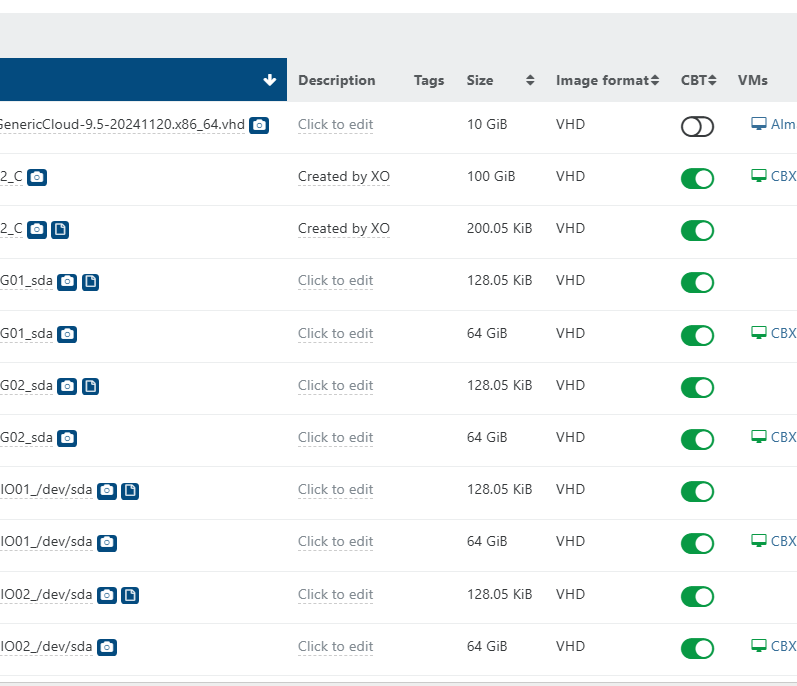
as @danp asked, check of params on one impacted VDI & VBD :
# xe vdi-param-list uuid=a81ecd87-3788-4528-819d-7d7c03aa6c61
uuid ( RO)                    : a81ecd87-3788-4528-819d-7d7c03aa6c61
              name-label ( RW): xxx-xxx-xxxxxx_sda
        name-description ( RW):
           is-a-snapshot ( RO): false
             snapshot-of ( RO): f9cbd30f-a261-4b95-97db-b6846147634a
               snapshots ( RO): cb65b96a-bed9-4e9a-82d3-e73b5aed546d
           snapshot-time ( RO): 20250912T17:38:57Z
      allowed-operations (SRO): snapshot; clone
      current-operations (SRO):
                 sr-uuid ( RO): b1b80611-7223-c829-8953-6aa2bf5865b3
           sr-name-label ( RO): xxx-xx-xxxxxxx RAID5 Local
               vbd-uuids (SRO): 51bb1797-c6c7-50f0-13a9-dfaad4c99d90
         crashdump-uuids (SRO):
            virtual-size ( RO): 68719476736
    physical-utilisation ( RO): 30686765056
                location ( RO): a81ecd87-3788-4528-819d-7d7c03aa6c61
                    type ( RO): User
                sharable ( RO): false
               read-only ( RO): false
            storage-lock ( RO): false
                 managed ( RO): true
     parent ( RO) [DEPRECATED]: <not in database>
                 missing ( RO): false
            is-tools-iso ( RO): false
            other-config (MRW):
           xenstore-data (MRO):
               sm-config (MRO): vhd-parent: daeee201-3891-443e-8bdb-b00ed1051279; host_OpaqueRef:3e7283ba-5a42-1881-958a-9f96b71fb98f: RW; read-caching-enabled-on-f2868da5-4509-43d7-9ef9-2bb3857e1ba5: true
                 on-boot ( RW): persist
           allow-caching ( RW): false
         metadata-latest ( RO): false
        metadata-of-pool ( RO): <not in database>
                    tags (SRW):
             cbt-enabled ( RO): true
# xe vbd-param-list uuid=51bb1797-c6c7-50f0-13a9-dfaad4c99d90 uuid ( RO) : 51bb1797-c6c7-50f0-13a9-dfaad4c99d90 vm-uuid ( RO): 108ad69b-1fa5-d80b-fb16-a62509ad642a vm-name-label ( RO): xxx-xxx-xxxxxx vdi-uuid ( RO): a81ecd87-3788-4528-819d-7d7c03aa6c61 vdi-name-label ( RO): xxx-xxx-xxxxxx_sda allowed-operations (SRO): attach; unpause; pause current-operations (SRO): empty ( RO): false device ( RO): xvda userdevice ( RW): 0 bootable ( RW): false mode ( RW): RW type ( RW): Disk unpluggable ( RW): false currently-attached ( RO): true attachable ( RO): true storage-lock ( RO): false status-code ( RO): 0 status-detail ( RO): qos_algorithm_type ( RW): qos_algorithm_params (MRW): qos_supported_algorithms (SRO): other-config (MRW): owner: io_read_kbs ( RO): 0.000 io_write_kbs ( RO): 93.752VDI seen as a snapshot...
in XO6, VDI appears ok.
we have an internal webapp that access by API and disk appears OK, like in XO6.seems to be rooted on the SR, not the VMs, as the entire SR is impacted... ? not all SRs in this XOA instance are impacted (have other RAID5 local SR and iSCSI SRs)
all VMs hosted on this SR have invisible disks in XO5have an XO CE attached to same servers, and same behavior, invisible disks

edit :
on GENERAL tab of an impacted VM :

we can see a 0Bytes VDI, but activity
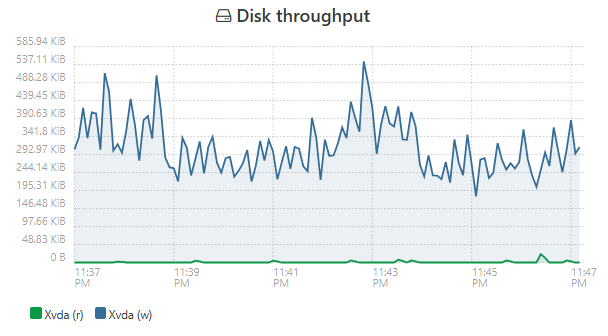
-
tried to deploy a NEW vm for testing purpose on an impacted SR :

and it appears ! it's the only VDI visible, there are OTHER vms on this same SR that have invisible disks
all as if nothing

I guess we could migrate the impacted VMs out of this SR and back, and it would correct the issue !
does that help ?!
-
@anthoineb or someone from the @team-storage, you might want to take a look (IDK if it's a known problem internally)
-
@olivierlambert Yes, we saw this before, we are investigating.
-
Thanks!
-
P Pilow referenced this topic on
-
Hello All,
Found some roundabout solutions you may want to try:
https://xcp-ng.org/forum/post/101370 -
@wilsonqanda tried your workaround on a halted VM, and it worked !
If i snapshot -> disk still invisible
delete snapshot - > disk still invisiblebut
if i snapshot --> disk still invisible
revert snapshot (with take snapshot option) --> disk APPEAR again
delete the two snapshots -> disks still thereedit : even without the take snapshot before revert, it is working, tried on another VM
-
@Pilow Lol glad I was able to help. Its only if you have a few VMs having hundreds will be a nightmare... giod luck to those that has that issue. In the meantime I will use the method I mention for now.

-
@wilsonqanda @anthoineb @olivierlambert
we are now impacted on a SR that didn't have the problem... now all disks are invisible and DASHBOARD/HEALTH show some strange dates on base copies...
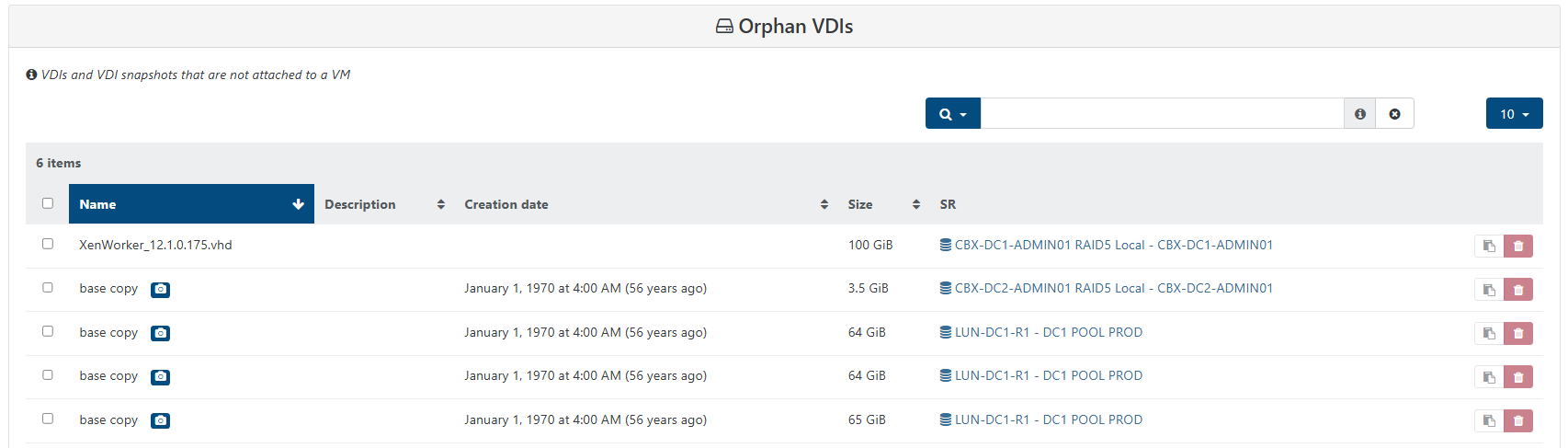
halt/snap/revert correct the issue but needs to be done on each VM
all VDIs seem to be regrouped strangely on unique base copy
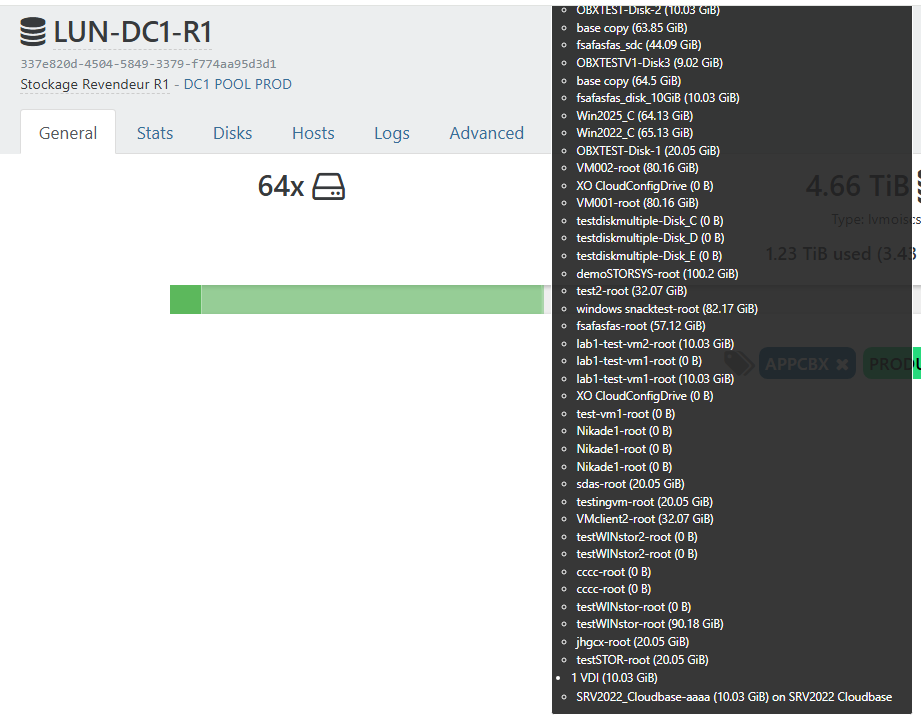
there is something seriously wrong happening

no impact on production of VMs though, just management issues in XOA web ui

even backups are OK.halp.
-
i could be wrong but in
/usr/local/lib/node_modules/xo-server/dist/xapi-object-to-xo.mjsI see a lot of
if (obj.is_a_snapshot || obj.$snapshot_of !== undefined)seems to be a way of managing both "old version" and "new version" (or "broader version") to define if a VDI is a snapshot
there has been an evolution in the code at some point ?and someone somewhere in recent updates (10 dec) forgot the || on some important action
my recent SR problem appeared when I was snapshoting/deleting VDI/reverting snapshot
all VMs suddenly didn't have visible VDIs anymore on the whole SR.I could be wrong, but the fact that ALL VDIs are now seen as snapshot seems smelly with this ||
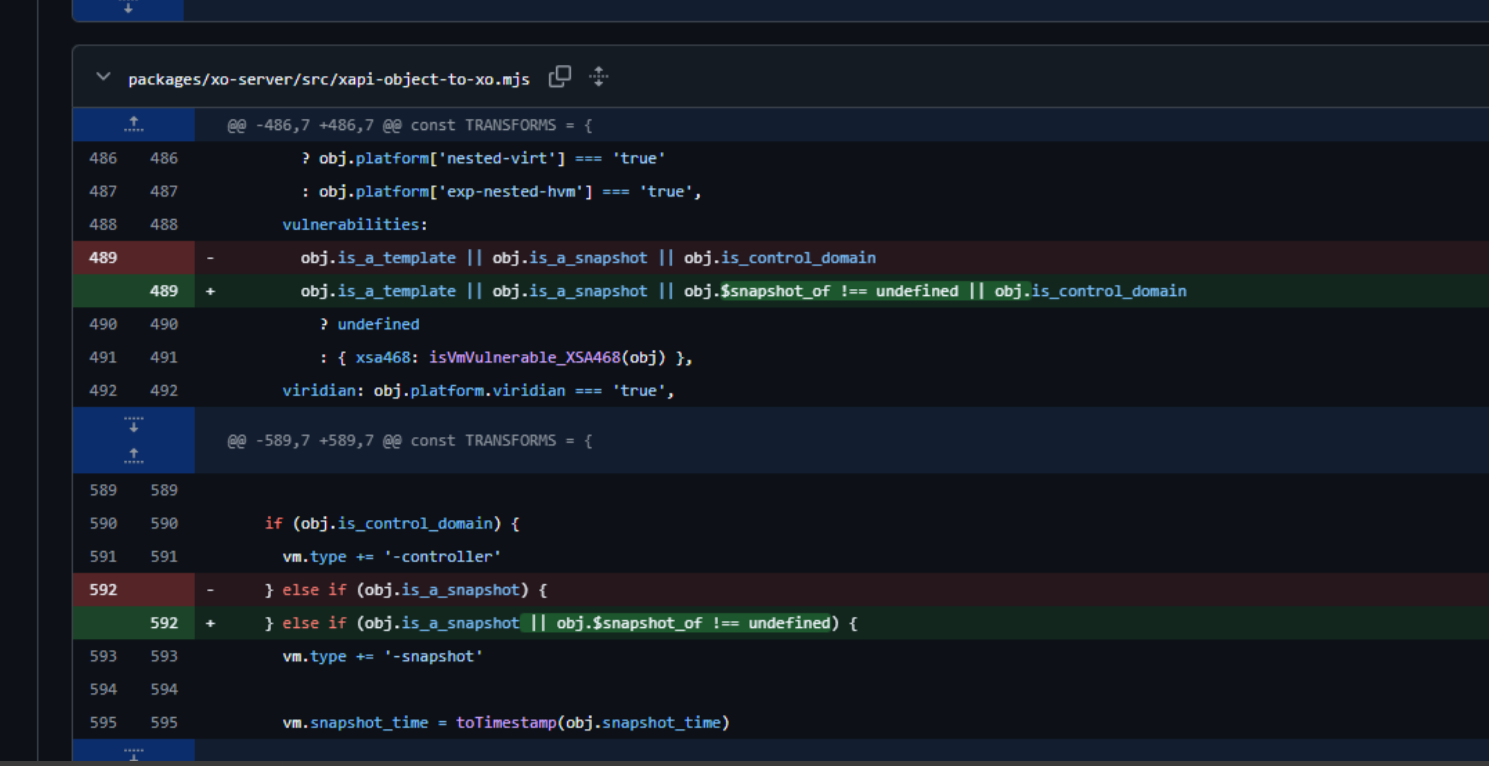
https://github.com/vatesfr/xen-orchestra/commit/85596da79217070bf4431135bbb5b0d2cf04e45b
-
@Pilow now that you mention that everything is seen as snapshot i remember all my ISO are seen as snapshots too... so most iso cannot be mounted until i drag them in a folder then put them back in same folder so XO could reprocess all the iso correctly. This might be a related issue to all the snapshots for the VMs.
-
@wilsonqanda strangely my ISOs were not impacted, except for the default XCP TOOLS iso that seems gone
the "base copy" regroup bug on homepage of the SR, and the orphan base copies in the DASHBOARD/HEALTH seems to be linked to same problem
we have much fast clones VMs depending on those base copies seen as orphan
we are narrowing on the problem, just need the dev to level it, have faith

-
@Pilow Check the iso does it have a snapshot icon in the drive?
Next it show up fine until u want to create a vm in the new vm pg it think they are snapshots and you cant select the ISOs. This is when the problem arise.
Yep the dev here are super reaponsive. Have been a long term user and here and love their support
. I mostly just been playing with things and learn so much by tinkering



Hello! It looks like you're interested in this conversation, but you don't have an account yet.
Getting fed up of having to scroll through the same posts each visit? When you register for an account, you'll always come back to exactly where you were before, and choose to be notified of new replies (either via email, or push notification). You'll also be able to save bookmarks and upvote posts to show your appreciation to other community members.
With your input, this post could be even better 💗
Register Login