Potential bug with Windows VM backup: "Body Timeout Error"
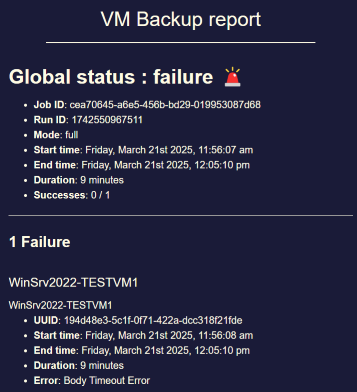
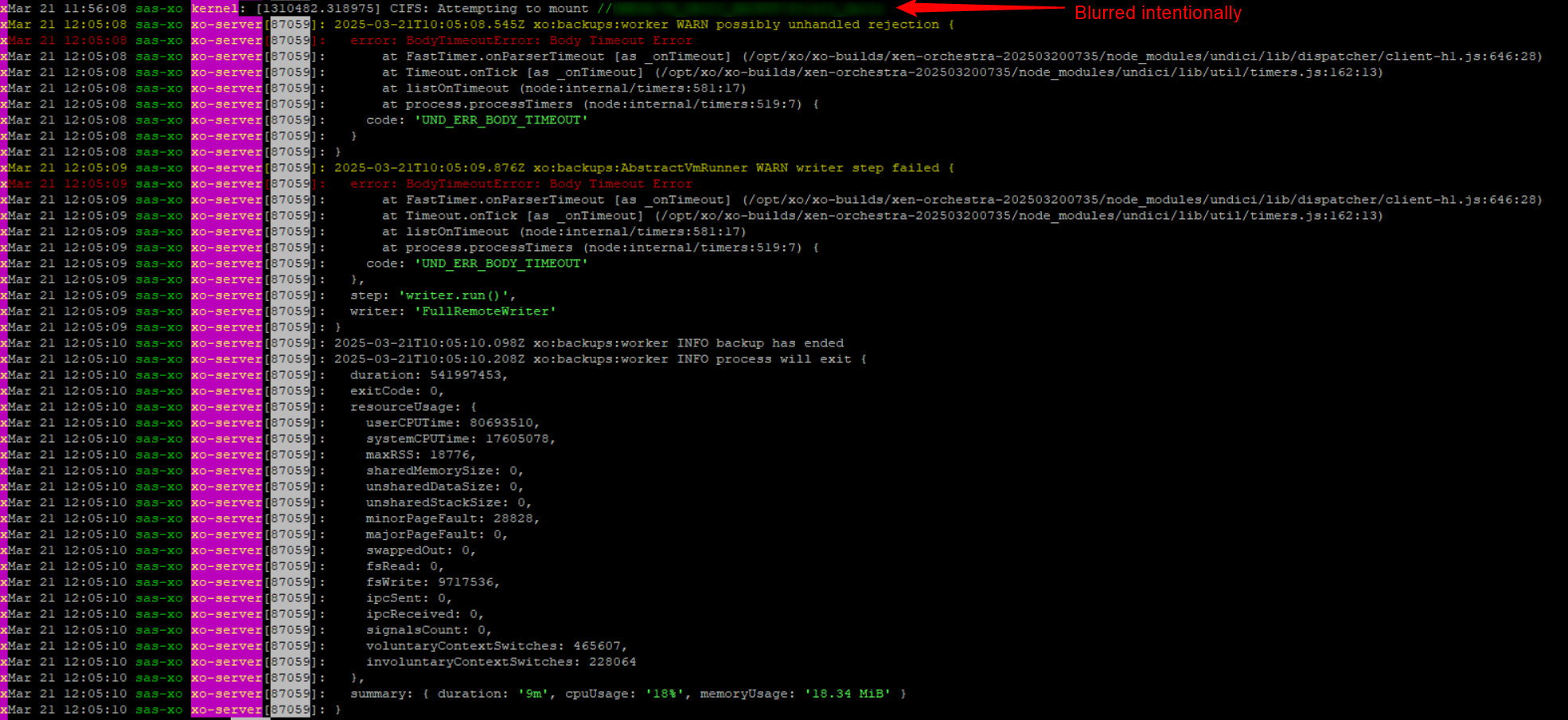
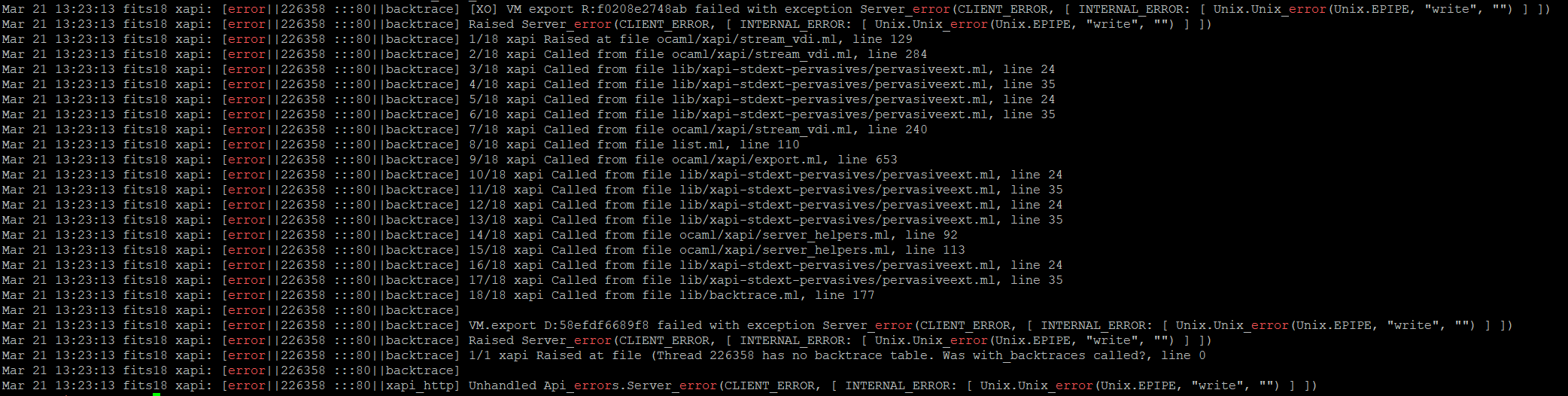
-
@MajorP93 It's being packaged at the moment. between this and the testing that needs to be done it might take a couple of weeks to be released, but I can't promise anything yet
-
I had same problem, about last 2 weeks, but is is about Xen update, after apply last update, Backup of Windows VMs works again.
-
The update mentioned by Pau should has just been released along with other updates. For more information, you can consult the corresponding blog post: https://xcp-ng.org/blog/2026/03/10/march-2026-maintenance-updates-for-xcp-ng-8-3-lts/
-
Amazing timing. I have been having this issue with a VM I just set up and I came here to find out if this is a known problem, only to discover that the 97 patches I have been planning to install tonight are going to fix it.
-
Did anyone try to patch xo and xcp-ng to the latest and did you have any luck with backups since then?
Im on XO (Xen Orchestra, commit 449e7 and Master, commit 2aff8) and the latest xcp-ng 8.3 with all patches installed and im still seeing the "Body timeout error" on 4/8 vm's: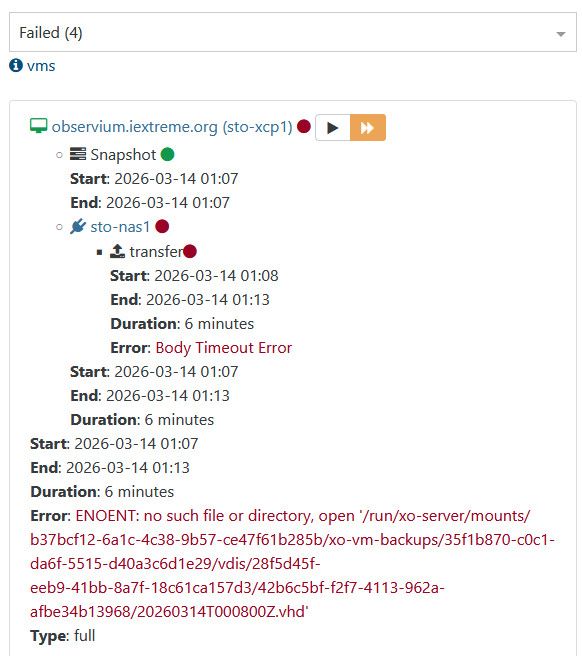
Some works tho:
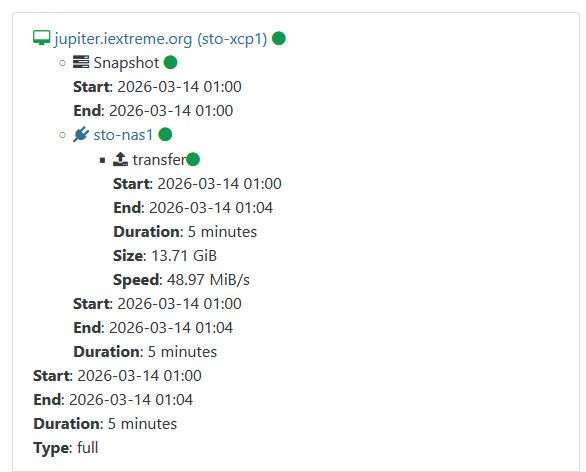
Observium has a 20Gb VDI with 15Gb used, jupiter has a 20Gb VDI with 12Gb used.
Let me know if you want any logs from my XO or XCP and I'll happily provide them. -
@nikade I did install the 97 XCP patches and that night the VM that was failing to backup was able to successfully backup. It had a 500GB secondary drive that was formatted but totally empty.
I had not yet patched my XO from source to the latest, it was maybe 24 commits behind. On Friday I updated it so I will find out on Monday if those backups continued to work but I assume they did.
-
@CodeMercenary alright, thanks for replying. I tried some more, but still getting the same error, on linux as well as windows vm's so im at lost here.
-
@nikade Hey Nikade,
Did you try to create a new job that will do a new chain ? Just for test.
-
@Pilow We tried that as well, same problem

Also tried with a VM on the same newtork, just another VLAN, and we're seeing the same thing. At first we figured it was because one of the xcp-ng's was on a remote site which is connected through an IPSEC VPN, but that wasn't the case.
-
Reviving this one because it never really got a clean ending. The fix for the Body Timeout Error on full backups went into xapi-project/xen-api#6786 and shipped with the March 2026 8.3 maintenance updates.
@nikade, back in March, you mentioned still hitting it on both Linux and Windows VMs even after updating. Is that still the case for you on current versions? And anyone else who landed here: are you still seeing it, or did the update sort it out?
Mostly trying to work out whether there's still something to chase or whether we can call this resolved. I'm not deep enough in the backup internals to say for sure, so your real-world results would tell us far more than anything I could guess. Thanks!
-
I need to update a few things and then I plan on trying to see if this was fixed for me. I think I only had 2 Windows machines that were a problem, and only on machines that had a larger disk and were basically empty. The counting zeros seemed to lead to a time out. Just haven't had the time to look at much of anything lately.
-
@poddingue My colleage managed to workaround the issue by re-installing the lab on other hardware, I think it is now Cisco UCS-servers. It was HP ProLiant-servers before.
Maybe it was an issue with some of the NIC or firmware, im not really sure, but it works now.
-
I get this error with each metadata backup run, but every time it fail on different pool. Only 1 failed pool at once.
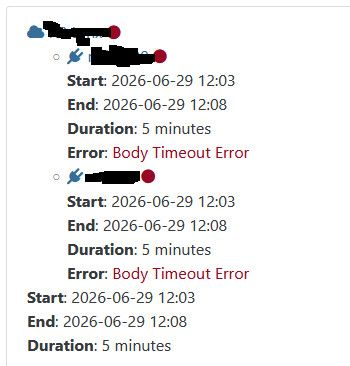
-
@Tristis-Oris Hi,
Can you upload your complete logs from one of these jobs, please? You can DM me if you prefer
-
@poddingue I have asked our engineers for feedback. We have left one big VM with 1TB empty disk - and full backups are going without errors for one week.
So it seems issue is resolved.
I have to mention that during this time we have migrated to XCP-NG 8.3. and are using one of the latest XO builds. -
That's excellent news, thanks a lot for the feedback!

-
commit 63f8d, (Ronivay script)
Got this error on my test ofTWINSTOR: next gen 2 nodes HCI
First I ran the job manually (metadata and config), OK
Then the scheduled job ran with this error on the metadata.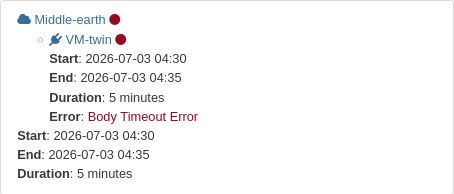
	{ reportWhen: "failure" }
id	"1783045813184"
jobId	"e664efb6-9514-4e6b-8303-f236ad4dbfb9"
jobName	"twin-conf"
message	"backup"
scheduleId	"d343fdd7-9dde-4695-adec-ba2eb43f23d2"
start	1783045813184
status	"failure"
tasks	[ {…}, {…} ]
end	1783046114017
result	{ message: "backup task failed with undefined error", name: "Error", stack: "Error: backup task failed with undefined error\n    at forwardResult (file:///opt/xo/xo-builds/xen-orchestra-202607020951/pa….runJobSequence (file:///opt/xo/xo-builds/xen-orchestra-202607020951/packages/xo-server/src/xo-mixins/jobs/index.mjs:339:7)" }
Config seems to be OK
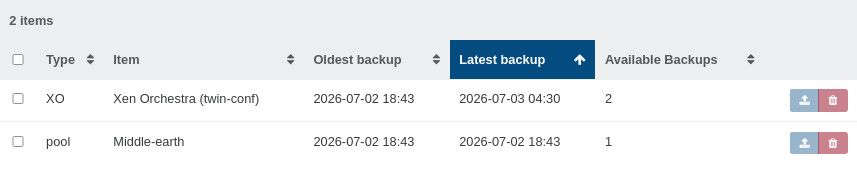
-
Hi,
Would be nice to have the entire log
Could it be possible that the master or the pool was not reachable at the time of the metadata backup?
-
@olivierlambert
Removed the uefi_certificates{ "data": { "reportWhen": "failure" }, "id": "1783045813184", "jobId": "e664efb6-9514-4e6b-8303-f236ad4dbfb9", "jobName": "twin-conf", "message": "backup", "scheduleId": "d343fdd7-9dde-4695-adec-ba2eb43f23d2", "start": 1783045813184, "status": "failure", "tasks": [ { "id": "0mr4bfumi-dzqwb7948p", "start": 1783045813194, "status": "success", "tasks": [ { "id": "0mr4bfumi-9kdhhby2p5", "start": 1783045813194, "status": "success", "end": 1783045813258, "message": "Starting XO metadata backup for the remote (da08058c-c031-499d-b423-52b1e76380ed). (e664efb6-9514-4e6b-8303-f236ad4dbfb9)", "data": { "id": "da08058c-c031-499d-b423-52b1e76380ed", "type": "remote" } } ], "end": 1783045813259, "message": "Starting XO metadata backup. (e664efb6-9514-4e6b-8303-f236ad4dbfb9)", "data": { "type": "xo" } }, { "id": "0mr4bfuml-bqp15noo59i", "start": 1783045813197, "status": "failure", "tasks": [ { "id": "0mr4bfun2-d0l56rvwtg", "start": 1783045813214, "status": "failure", "end": 1783046113969, "result": { "name": "BodyTimeoutError", "code": "UND_ERR_BODY_TIMEOUT", "message": "Body Timeout Error", "stack": "BodyTimeoutError: Body Timeout Error\n at FastTimer.onParserTimeout [as _onTimeout] (/opt/xo/xo-builds/xen-orchestra-202607020951/node_modules/undici/lib/dispatcher/client-h1.js:688:28)\n at Timeout.onTick [as _onTimeout] (/opt/xo/xo-builds/xen-orchestra-202607020951/node_modules/undici/lib/util/timers.js:162:13)\n at listOnTimeout (node:internal/timers:605:17)\n at processTimers (node:internal/timers:541:7)" }, "message": "Starting metadata backup for the pool (7e461b17-b34e-5e10-277b-84677bb207bf) for the remote (da08058c-c031-499d-b423-52b1e76380ed). (e664efb6-9514-4e6b-8303-f236ad4dbfb9)", "data": { "id": "da08058c-c031-499d-b423-52b1e76380ed", "type": "remote", "progress": 0 } } ], "end": 1783046113971, "message": "Starting metadata backup for the pool (7e461b17-b34e-5e10-277b-84677bb207bf). (e664efb6-9514-4e6b-8303-f236ad4dbfb9)", "data": { "id": "7e461b17-b34e-5e10-277b-84677bb207bf", "pool": { "uuid": "7e461b17-b34e-5e10-277b-84677bb207bf", "name_label": "Middle-earth", "name_description": "", "master": "OpaqueRef:5ceac8f1-744c-13b0-0652-75fdff79f6c9", "default_SR": "OpaqueRef:NULL", "suspend_image_SR": "OpaqueRef:NULL", "crash_dump_SR": "OpaqueRef:NULL", "other_config": { "xo:clientInfo:zffyon3svem": "{\"lastConnected\":1783034682565,\"networkInterfaces\":{\"enX0\":[{\"address\":\"192.168.11.104\",\"netmask\":\"255.255.255.0\",\"family\":\"IPv4\",\"mac\":\"a6:7c:87:67:5e:41\",\"internal\":false,\"cidr\":\"192.168.11.104/24\"},{\"address\":\"fe80::a47c:87ff:fe67:5e41\",\"netmask\":\"ffff:ffff:ffff:ffff::\",\"family\":\"IPv6\",\"mac\":\"a6:7c:87:67:5e:41\",\"internal\":false,\"cidr\":\"fe80::a47c:87ff:fe67:5e41/64\",\"scopeid\":2}]}}", "xo:clientInfo:c725c94e-296d-61d8-23a0-f07c63520f65": "{\"lastConnected\":1783013072625,\"networkInterfaces\":{\"enX0\":[{\"address\":\"192.168.11.101\",\"netmask\":\"255.255.255.0\",\"family\":\"IPv4\",\"mac\":\"e2:7f:90:57:75:a6\",\"internal\":false,\"cidr\":\"192.168.11.101/24\"},{\"address\":\"fe80::e07f:90ff:fe57:75a6\",\"netmask\":\"ffff:ffff:ffff:ffff::\",\"family\":\"IPv6\",\"mac\":\"e2:7f:90:57:75:a6\",\"internal\":false,\"cidr\":\"fe80::e07f:90ff:fe57:75a6/64\",\"scopeid\":2}]}}", "xo:clientInfo:9kul7pgojmd": "{\"lastConnected\":1783002005305,\"networkInterfaces\":{\"enX0\":[{\"address\":\"192.168.11.104\",\"netmask\":\"255.255.255.0\",\"family\":\"IPv4\",\"mac\":\"a6:7c:87:67:5e:41\",\"internal\":false,\"cidr\":\"192.168.11.104/24\"},{\"address\":\"fe80::a47c:87ff:fe67:5e41\",\"netmask\":\"ffff:ffff:ffff:ffff::\",\"family\":\"IPv6\",\"mac\":\"a6:7c:87:67:5e:41\",\"internal\":false,\"cidr\":\"fe80::a47c:87ff:fe67:5e41/64\",\"scopeid\":2}]}}", "xo:clientInfo:0rwhmux9ihqm": "{\"lastConnected\":1782989396232,\"networkInterfaces\":{\"enX0\":[{\"address\":\"192.168.11.104\",\"netmask\":\"255.255.255.0\",\"family\":\"IPv4\",\"mac\":\"a6:7c:87:67:5e:41\",\"internal\":false,\"cidr\":\"192.168.11.104/24\"},{\"address\":\"fe80::a47c:87ff:fe67:5e41\",\"netmask\":\"ffff:ffff:ffff:ffff::\",\"family\":\"IPv6\",\"mac\":\"a6:7c:87:67:5e:41\",\"internal\":false,\"cidr\":\"fe80::a47c:87ff:fe67:5e41/64\",\"scopeid\":2}]}}", "xo:clientInfo:4gtha9oducv": "{\"lastConnected\":1782983029680,\"networkInterfaces\":{\"enX0\":[{\"address\":\"192.168.11.104\",\"netmask\":\"255.255.255.0\",\"family\":\"IPv4\",\"mac\":\"a6:7c:87:67:5e:41\",\"internal\":false,\"cidr\":\"192.168.11.104/24\"},{\"address\":\"fe80::a47c:87ff:fe67:5e41\",\"netmask\":\"ffff:ffff:ffff:ffff::\",\"family\":\"IPv6\",\"mac\":\"a6:7c:87:67:5e:41\",\"internal\":false,\"cidr\":\"fe80::a47c:87ff:fe67:5e41/64\",\"scopeid\":2}]}}", "auto_poweron": "true", "xo:clientInfo:7f8ngv9i6st": "{\"lastConnected\":1782946813358,\"networkInterfaces\":{\"enX0\":[{\"address\":\"192.168.11.102\",\"netmask\":\"255.255.255.0\",\"family\":\"IPv4\",\"mac\":\"ae:f5:9b:89:01:07\",\"internal\":false,\"cidr\":\"192.168.11.102/24\"},{\"address\":\"fe80::acf5:9bff:fe89:107\",\"netmask\":\"ffff:ffff:ffff:ffff::\",\"family\":\"IPv6\",\"mac\":\"ae:f5:9b:89:01:07\",\"internal\":false,\"cidr\":\"fe80::acf5:9bff:fe89:107/64\",\"scopeid\":2}]}}", "xo:clientInfo:1hfj1o99bag": "{\"lastConnected\":1782945346185,\"networkInterfaces\":{\"enX0\":[{\"address\":\"192.168.11.102\",\"netmask\":\"255.255.255.0\",\"family\":\"IPv4\",\"mac\":\"ae:f5:9b:89:01:07\",\"internal\":false,\"cidr\":\"192.168.11.102/24\"},{\"address\":\"fe80::acf5:9bff:fe89:107\",\"netmask\":\"ffff:ffff:ffff:ffff::\",\"family\":\"IPv6\",\"mac\":\"ae:f5:9b:89:01:07\",\"internal\":false,\"cidr\":\"fe80::acf5:9bff:fe89:107/64\",\"scopeid\":2}]}}", "memory-ratio-hvm": "0.25", "memory-ratio-pv": "0.25" }, "ha_enabled": true, "ha_configuration": {}, "ha_statefiles": [ "OpaqueRef:1088109f-4634-2d30-6d7d-4b120dd09690" ], "ha_host_failures_to_tolerate": 1, "ha_plan_exists_for": 1, "ha_allow_overcommit": false, "ha_overcommitted": false, "blobs": {}, "tags": [], "gui_config": {}, "health_check_config": {}, "wlb_url": "", "wlb_username": "", "wlb_enabled": false, "wlb_verify_cert": true, "redo_log_enabled": false, "redo_log_vdi": "OpaqueRef:NULL", "vswitch_controller": "", "restrictions": { "restrict_vswitch_controller": "false", "restrict_lab": "false", "restrict_stage": "false", "restrict_storagelink": "false", "restrict_storagelink_site_recovery": "false", "restrict_web_selfservice": "false", "restrict_web_selfservice_manager": "false", "restrict_hotfix_apply": "false", "restrict_export_resource_data": "false", "restrict_read_caching": "false", "restrict_cifs": "false", "restrict_health_check": "false", "restrict_xcm": "false", "restrict_vm_memory_introspection": "false", "restrict_batch_hotfix_apply": "false", "restrict_management_on_vlan": "false", "restrict_ws_proxy": "false", "restrict_cloud_management": "false", "restrict_nrpe": "false", "restrict_vlan": "false", "restrict_qos": "false", "restrict_pool_attached_storage": "false", "restrict_netapp": "false", "restrict_equalogic": "false", "restrict_pooling": "false", "enable_xha": "true", "restrict_marathon": "false", "restrict_email_alerting": "false", "restrict_historical_performance": "false", "restrict_wlb": "false", "restrict_rbac": "false", "restrict_dmc": "false", "restrict_checkpoint": "false", "restrict_cpu_masking": "false", "restrict_connection": "false", "platform_filter": "false", "regular_nag_dialog": "false", "restrict_vmpr": "false", "restrict_vmss": "false", "restrict_intellicache": "false", "restrict_gpu": "false", "restrict_dr": "false", "restrict_vif_locking": "false", "restrict_storage_xen_motion": "false", "restrict_vgpu": "false", "restrict_integrated_gpu_passthrough": "false", "restrict_vss": "false", "restrict_guest_agent_auto_update": "false", "restrict_pci_device_for_auto_update": "false", "restrict_xen_motion": "false", "restrict_guest_ip_setting": "false", "restrict_ad": "false", "restrict_nested_virt": "false", "restrict_live_patching": "false", "restrict_set_vcpus_number_live": "false", "restrict_pvs_proxy": "false", "restrict_igmp_snooping": "false", "restrict_rpu": "false", "restrict_pool_size": "false", "restrict_cbt": "false", "restrict_usb_passthrough": "false", "restrict_network_sriov": "false", "restrict_corosync": "true", "restrict_cluster_address": "false", "restrict_zstd_export": "false", "restrict_pool_secret_rotation": "false", "restrict_certificate_verification": "false", "restrict_updates": "false", "restrict_internal_repo_access": "false", "restrict_vtpm": "false", "restrict_vm_groups": "false", "restrict_vm_start": "false", "restrict_vm_appliance_start": "false" }, "metadata_VDIs": [], "ha_cluster_stack": "xhad", "allowed_operations": [ "ha_disable", "designate_new_master", "configure_repositories", "sync_updates", "sync_bundle", "apply_updates", "cert_refresh", "exchange_certificates_on_join", "exchange_ca_certificates_on_join", "copy_primary_host_certs", "eject", "get_updates" ], "current_operations": {}, "guest_agent_config": {}, "cpu_info": { "features_hvm_host": "1fcbfbff-f7fa3203-2c100800-00000021-00000001-000007ab-00000000-00000000-00101000-bc000400-00000000-00000000-00000000-00000000-00000000-00000000-0c000004-40000000-00000000-00000000-00000000-00000000-00000000", "features_pv_host": "1fc9cbf5-f6d83203-28100800-00000021-00000001-00000329-00000000-00000000-00001000-ac000400-00000000-00000000-00000000-00000000-00000000-00000000-0c000004-40000000-00000000-00000000-00000000-00000000-00000000", "socket_count": "2", "cpu_count": "16", "vendor": "GenuineIntel" }, "policy_no_vendor_device": false, "live_patching_disabled": false, "igmp_snooping_enabled": false, "uefi_certificates": # removed # "custom_uefi_certificates": "", "is_psr_pending": false, "tls_verification_enabled": true, "repositories": [], "client_certificate_auth_enabled": false, "client_certificate_auth_name": "", "repository_proxy_url": "", "repository_proxy_username": "", "repository_proxy_password": "OpaqueRef:NULL", "migration_compression": false, "coordinator_bias": true, "local_auth_max_threads": 8, "ext_auth_max_threads": 1, "ext_auth_cache_enabled": false, "ext_auth_cache_size": 50, "ext_auth_cache_expiry": 300, "telemetry_uuid": "OpaqueRef:b19f5323-f179-a7b7-3e45-0cbd78992b0e", "telemetry_frequency": "weekly", "telemetry_next_collection": "20260702T23:44:39Z", "last_update_sync": "19700101T00:00:00Z", "update_sync_frequency": "weekly", "update_sync_day": 0, "update_sync_enabled": false, "recommendations": { "max-vm-anti-affinity-groups": "5" }, "license_server": {}, "ha_reboot_vm_on_internal_shutdown": true, "limit_console_sessions": false, "vm_console_idle_timeout": 0 }, "poolMaster": { "uuid": "aae1f2ab-1f2f-4a38-af90-97d850a2caaf", "name_label": "saruman", "name_description": "Default install", "memory_overhead": 463126528, "allowed_operations": [ "vm_migrate", "provision", "vm_resume", "enable", "evacuate", "vm_start" ], "current_operations": {}, "API_version_major": 2, "API_version_minor": 21, "API_version_vendor": "XenSource", "API_version_vendor_implementation": {}, "enabled": true, "software_version": { "product_version": "8.3.0", "product_version_text": "8.3", "product_version_text_short": "8.3", "platform_name": "XCP", "platform_version": "3.4.0", "product_brand": "XCP-ng", "xapi": "26.1", "build_number": "8.3.0", "git_id": "11", "hostname": "localhost", "date": "20260618T12:39:30Z", "dbv": "2026.0202", "xapi_build": "26.1.11", "xen": "4.17.6-9", "linux": "4.19.0+1", "xencenter_min": "2.21", "xencenter_max": "2.21", "network_backend": "openvswitch", "db_schema": "5.795" }, "other_config": { "agent_start_time": "1783013042.", "boot_time": "1783012910.", "multipathhandle": "dmp", "multipathing": "true", "last_blob_sync_time": "1782941656.94", "iscsi_iqn": "iqn.2026-07.com.example:9a839973" }, "capabilities": [ "xen-3.0-x86_64", "hvm-3.0-x86_32", "hvm-3.0-x86_32p", "hvm-3.0-x86_64", "" ], "cpu_configuration": {}, "sched_policy": "credit", "supported_bootloaders": [ "pygrub", "eliloader" ], "resident_VMs": [ "OpaqueRef:b4cb1c1e-8c91-178b-74be-7528a4c2dcc0", "OpaqueRef:4a3ee368-0fb7-dba6-eb3e-6cf4456f9e84" ], "logging": {}, "PIFs": [ "OpaqueRef:b9de3d0c-a8c6-6b96-9248-4b8ee7de8e86" ], "suspend_image_sr": "OpaqueRef:NULL", "crash_dump_sr": "OpaqueRef:NULL", "crashdumps": [], "patches": [], "updates": [], "PBDs": [ "OpaqueRef:d435ddeb-af36-ae51-67b5-2f711ba4c2a9", "OpaqueRef:c5b01445-3d66-d589-124f-d8edaf3389e8", "OpaqueRef:735a54e2-505d-afaa-3522-b99621ffdb44", "OpaqueRef:5c175bce-c41d-d97d-d108-fcbd16a601d4", "OpaqueRef:528cbc67-88d9-465c-0e99-2a11602a4ff9" ], "host_CPUs": [ "OpaqueRef:543628ec-dab6-a811-c4ac-94a878c4fd0b", "OpaqueRef:ed0d5baf-537f-03a4-ed99-9d4c21321a5b", "OpaqueRef:0ac07111-529a-6fc9-16e2-bd444fbca1e1", "OpaqueRef:9188a89f-112b-8121-227d-fb88322d21d0", "OpaqueRef:669b605f-9c0f-1577-7d2a-cb64dc936f05", "OpaqueRef:826404a3-6afd-0458-aaf6-f7220a376c0d", "OpaqueRef:afd77111-fbb5-0d75-9be8-0d3ecd5cfbf6", "OpaqueRef:81eff8c4-8dd4-0b54-d8c8-b247d6c0acac" ], "cpu_info": { "cpu_count": "8", "socket_count": "1", "threads_per_core": "2", "nr_nodes": "1", "vendor": "GenuineIntel", "speed": "1800.005", "modelname": "Intel(R) Core(TM) i5-8250U CPU @ 1.60GHz", "family": "6", "model": "142", "stepping": "10", "flags": "fpu de tsc msr pae mce cx8 apic sep mca cmov pat clflush acpi mmx fxsr sse sse2 ss ht syscall nx rdtscp lm constant_tsc rep_good nopl nonstop_tsc cpuid pni pclmulqdq monitor est ssse3 fma cx16 sse4_1 sse4_2 movbe popcnt aes xsave avx f16c rdrand hypervisor lahf_lm abm 3dnowprefetch cpuid_fault ssbd ibrs ibpb stibp fsgsbase bmi1 avx2 bmi2 erms rdseed adx clflushopt xsaveopt xsavec xgetbv1 arch_capabilities", "features_pv": "1fc9cbf5-f6f83203-2991cbf5-00000123-00000007-008c0329-00000000-00000100-00001000-ac000400-00000000-00000000-00000000-00000000-00000000-00000000-1c020004-40000000-00000000-00000000-00000000-00000000-00000000", "features_hvm": "1fcbfbff-f7fa3223-2d93fbff-00000523-0000000f-009c47ab-00000000-00000100-00101000-bc000400-00000000-00000000-00000000-00000000-00000000-00000000-1c020004-40000000-00000000-00000000-00000000-00000000-00000000", "features_hvm_host": "1fcbfbff-f7fa3203-2c100800-00000121-0000000f-009c07ab-00000000-00000000-00101000-bc000400-00000000-00000000-00000000-00000000-00000000-00000000-0c000004-40000000-00000000-00000000-00000000-00000000-00000000", "features_pv_host": "1fc9cbf5-f6d83203-28100800-00000121-00000007-008c0329-00000000-00000000-00001000-ac000400-00000000-00000000-00000000-00000000-00000000-00000000-0c000004-40000000-00000000-00000000-00000000-00000000-00000000" }, "hostname": "saruman", "address": "192.168.11.23", "metrics": "OpaqueRef:5ba864f1-c495-0787-d239-947f0d6f99d4", "license_params": { "restrict_vswitch_controller": "false", "restrict_lab": "false", "restrict_stage": "false", "restrict_storagelink": "false", "restrict_storagelink_site_recovery": "false", "restrict_web_selfservice": "false", "restrict_web_selfservice_manager": "false", "restrict_hotfix_apply": "false", "restrict_export_resource_data": "false", "restrict_read_caching": "false", "restrict_cifs": "false", "restrict_health_check": "false", "restrict_xcm": "false", "restrict_vm_memory_introspection": "false", "restrict_batch_hotfix_apply": "false", "restrict_management_on_vlan": "false", "restrict_ws_proxy": "false", "restrict_cloud_management": "false", "restrict_nrpe": "false", "restrict_vlan": "false", "restrict_qos": "false", "restrict_pool_attached_storage": "false", "restrict_netapp": "false", "restrict_equalogic": "false", "restrict_pooling": "false", "enable_xha": "true", "restrict_marathon": "false", "restrict_email_alerting": "false", "restrict_historical_performance": "false", "restrict_wlb": "false", "restrict_rbac": "false", "restrict_dmc": "false", "restrict_checkpoint": "false", "restrict_cpu_masking": "false", "restrict_connection": "false", "platform_filter": "false", "regular_nag_dialog": "false", "restrict_vmpr": "false", "restrict_vmss": "false", "restrict_intellicache": "false", "restrict_gpu": "false", "restrict_dr": "false", "restrict_vif_locking": "false", "restrict_storage_xen_motion": "false", "restrict_vgpu": "false", "restrict_integrated_gpu_passthrough": "false", "restrict_vss": "false", "restrict_guest_agent_auto_update": "false", "restrict_pci_device_for_auto_update": "false", "restrict_xen_motion": "false", "restrict_guest_ip_setting": "false", "restrict_ad": "false", "restrict_nested_virt": "false", "restrict_live_patching": "false", "restrict_set_vcpus_number_live": "false", "restrict_pvs_proxy": "false", "restrict_igmp_snooping": "false", "restrict_rpu": "false", "restrict_pool_size": "false", "restrict_cbt": "false", "restrict_usb_passthrough": "false", "restrict_network_sriov": "false", "restrict_corosync": "true", "restrict_cluster_address": "false", "restrict_zstd_export": "false", "restrict_pool_secret_rotation": "false", "restrict_certificate_verification": "false", "restrict_updates": "false", "restrict_internal_repo_access": "false", "restrict_vtpm": "false", "restrict_vm_groups": "false", "restrict_vm_start": "false", "restrict_vm_appliance_start": "false" }, "ha_statefiles": [ "OpaqueRef:1088109f-4634-2d30-6d7d-4b120dd09690" ], "ha_network_peers": [ "8c67881d-e100-4a02-9e8d-98aac410e6b0", "aae1f2ab-1f2f-4a38-af90-97d850a2caaf" ], "blobs": {}, "tags": [], "external_auth_type": "", "external_auth_service_name": "", "external_auth_configuration": {}, "edition": "xcp-ng", "license_server": { "address": "localhost", "port": "27000" }, "bios_strings": { "bios-vendor": "HP", "bios-version": "Q83 Ver. 01.31.00", "system-manufacturer": "HP", "system-product-name": "HP ProBook 640 G4", "system-version": "SBKPF", "system-serial-number": "5CG83432QF", "baseboard-manufacturer": "HP", "baseboard-product-name": "83D2", "baseboard-version": "KBC Version 05.4E.00", "baseboard-serial-number": "PGWKH00WBB71HJ", "oem-1": "Xen", "oem-2": "MS_VM_CERT/SHA1/bdbeb6e0a816d43fa6d3fe8aaef04c2bad9d3e3d", "oem-3": "FBYTE#3X476J6S6b7B7H7M7Q7W7m7saBaEapaqauawbUbhcAdQdUdpdqfAgdhk.Dt;", "oem-4": "BUILDID#17WWC6BT601#SAK8#DAK8;", "oem-5": "EDK2_1", "oem-6": "Buff=2", "oem-7": "HRDWFEATS=VTX:1;VTD:1;SGX:2;NONHPBATDET:1", "hp-rombios": "" }, "power_on_mode": "", "power_on_config": {}, "local_cache_sr": "OpaqueRef:NULL", "chipset_info": { "iommu": "true" }, "PCIs": [ "OpaqueRef:d69ea10d-4a28-305b-bc77-c5b325b5efca", "OpaqueRef:d3b82ebd-72be-7b4d-aeb0-45286ba30820", "OpaqueRef:963b2435-0607-a303-c312-f841673e644d", "OpaqueRef:91af9331-a1a4-3025-073b-dd347fb9b0cf", "OpaqueRef:6326bf67-6291-e5b5-a028-990f642bb113", "OpaqueRef:3d4982c9-e712-610a-01d8-570f8cabd276", "OpaqueRef:1a62277c-19dd-df1b-d9e0-5d9991ee031c", "OpaqueRef:04ce1fdb-f128-5e1d-6567-dc35ab79204a" ], "PGPUs": [ "OpaqueRef:8f35fe69-4c6d-c0c1-3958-26a98932d691" ], "PUSBs": [], "ssl_legacy": false, "guest_VCPUs_params": {}, "display": "enabled", "virtual_hardware_platform_versions": [ 0, 1, 2 ], "control_domain": "OpaqueRef:4a3ee368-0fb7-dba6-eb3e-6cf4456f9e84", "updates_requiring_reboot": [], "features": [], "iscsi_iqn": "iqn.2026-07.com.example:9a839973", "multipathing": true, "uefi_certificates": # removed # "certificates": [ "OpaqueRef:f3d58304-b037-5739-b57f-3d301b18a7ff", "OpaqueRef:0dc9c6bd-0fb7-de23-70d2-4bc2bef46c17" ], "editions": [ "xcp-ng" ], "pending_guidances": [], "tls_verification_enabled": true, "last_software_update": "19700101T00:00:00Z", "https_only": false, "latest_synced_updates_applied": "unknown", "numa_affinity_policy": "default_policy", "pending_guidances_recommended": [], "pending_guidances_full": [], "last_update_hash": "", "ssh_enabled": true, "ssh_enabled_timeout": 0, "ssh_expiry": "19700101T00:00:00Z", "console_idle_timeout": 0, "ssh_auto_mode": false, "max_cstate": "", "secure_boot": false, "ntp_mode": "DHCP", "ntp_custom_servers": [], "timezone": "Europe/Stockholm" }, "type": "pool" } } ], "end": 1783046114017, "result": { "message": "backup task failed with undefined error", "name": "Error", "stack": "Error: backup task failed with undefined error\n at forwardResult (file:///opt/xo/xo-builds/xen-orchestra-202607020951/packages/xo-server/src/_handleBackupLog.mjs:37:25)\n at handleBackupLog (file:///opt/xo/xo-builds/xen-orchestra-202607020951/packages/xo-server/src/_handleBackupLog.mjs:68:12)\n at onTaskUpdate (file:///opt/xo/xo-builds/xen-orchestra-202607020951/packages/xo-server/src/xo-mixins/metadata-backups.mjs:133:13)\n at onTaskUpdate (file:///opt/xo/xo-builds/xen-orchestra-202607020951/@xen-orchestra/mixins/Tasks.mjs:205:23)\n at Task.onProgress [as _onProgress] (/opt/xo/xo-builds/xen-orchestra-202607020951/@vates/task/combineEvents.js:61:5)\n at Task.#emit (/opt/xo/xo-builds/xen-orchestra-202607020951/@vates/task/index.js:157:10)\n at Task.#end (/opt/xo/xo-builds/xen-orchestra-202607020951/@vates/task/index.js:168:15)\n at Task.run (/opt/xo/xo-builds/xen-orchestra-202607020951/@vates/task/index.js:190:16)\n at Jobs.runJob (file:///opt/xo/xo-builds/xen-orchestra-202607020951/packages/xo-server/src/xo-mixins/jobs/index.mjs:297:7)\n at Jobs.runJobSequence (file:///opt/xo/xo-builds/xen-orchestra-202607020951/packages/xo-server/src/xo-mixins/jobs/index.mjs:339:7)" } }Could it be possible that the master or the pool was not reachable at the time of the metadata backup?
Don't think so.
The config ran OK at 04:30 but metadata did not, see above
And the backup job 5 min later ran OK -
Thanks for the logs @ph7, that helps narrow it down.
Some context on what this error actually means: XO's XAPI client kills the connection if it receives nothing from the pool master for 5 minutes during the transfer. So the
BodyTimeoutErroron a metadata backup means the/pool/xmldbdumpresponse from your master went silent. Either xapi stalled while producing the dump, or the connection died silently somewhere in between (a NAT/firewall/VPN dropping the connection state would look exactly like this). Note that your XO config backup succeeding right before doesn't rule out a network issue: the config backup only talks to the remote, it never touches the pool master.To figure out which side is failing, could you check a few things?
- On your backup remote, look at the file left behind by the failed run:
xo-pool-metadata-backups/<scheduleId>/<poolUuid>/<date>/data. What size is it, compared to the same file from a successful run? If it's empty or tiny, the master stalled. If it looks complete, the data actually arrived and only the end-of-connection signal got lost, which would point at the network path. - On the pool master, grab
/var/log/xensource.logaround the failure time. There should be a task named "Export pool metadata" and the xmldbdump HTTP handler. We'd like to know if it completed on the xapi side. - Is there anything between your XO and the pool master, like NAT, a firewall or a VPN?
- Does it fail every run, or intermittently?
@Tristis-Oris the same questions apply to your setup. The fact that it hits different pools one after the other makes me suspect something shared in the network path.
- On your backup remote, look at the file left behind by the failed run:






Hello! It looks like you're interested in this conversation, but you don't have an account yet.
Getting fed up of having to scroll through the same posts each visit? When you register for an account, you'll always come back to exactly where you were before, and choose to be notified of new replies (either via email, or push notification). You'll also be able to save bookmarks and upvote posts to show your appreciation to other community members.
With your input, this post could be even better 💗
Register Login