🛰️ XO 6: dedicated thread for all your feedback!
-
@julienXOvates
Well not in mydaefcwitch is newer than 6.5.1
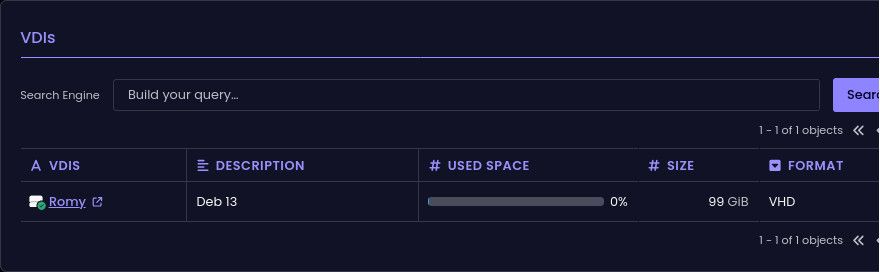
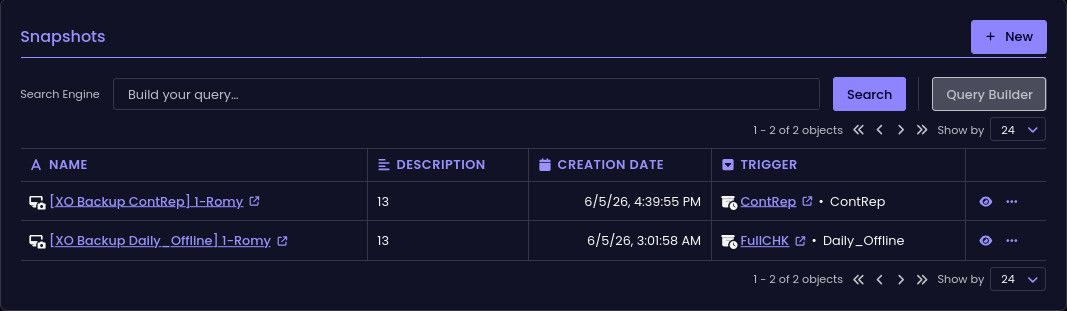
ph@romy:~$ df -h
Filsystem      Storlek Använt Ledigt Anv% Monterat på
udev              1,9G      0   1,9G   0% /dev
tmpfs             392M   916K   391M   1% /run
/dev/xvda2         93G   6,3G    82G   8% /
tmpfs             2,0G      0   2,0G   0% /dev/shm
efivarfs          128K    52K    72K  42% /sys/firmware/efi/efivars
tmpfs             5,0M      0   5,0M   0% /run/lock
tmpfs             1,0M      0   1,0M   0% /run/credentials/systemd-journald.service
tmpfs             2,0G   4,0K   2,0G   1% /tmp
/dev/xvda1        975M   8,8M   966M   1% /boot/efi
tmpfs             1,0M      0   1,0M   0% /run/credentials/getty@tty1.service
tmpfs             1,0M      0   1,0M   0% /run/credentials/serial-getty@hvc0.service
tmpfs             392M    68K   392M   1% /run/user/105
tmpfs             392M    68K   392M   1% /run/user/1000
seems more like 8% to me
-
same in my XOA 6.5.1
-
OK, we'll have another look at it, sorry for this !
-
@julienXOvates
The faulty ones are on local SR
If I take a manual snapshot on a NFS VM, I see the correct valueWill test a scheduled one
-
Local VMs vith scheduled
Incremental or full BackupandCRare affected
NFS VMs vith scheduledIncremental or full Backupare affected
NFS VMs withCRnot affected -
@ph7 Thanks for those details, very helpful. We'll have a look.
-
ph7 said:
Local VMs vith scheduled
IncrementalBackup and CR are affected
NFS VMs vith scheduledIncrementalBackup are affectedIncremental -> Incremental OR full
-
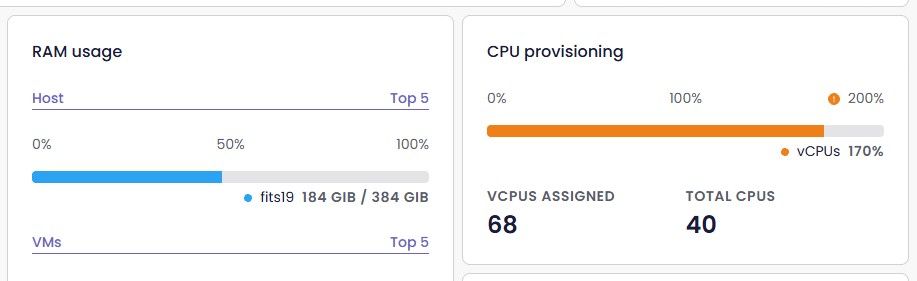
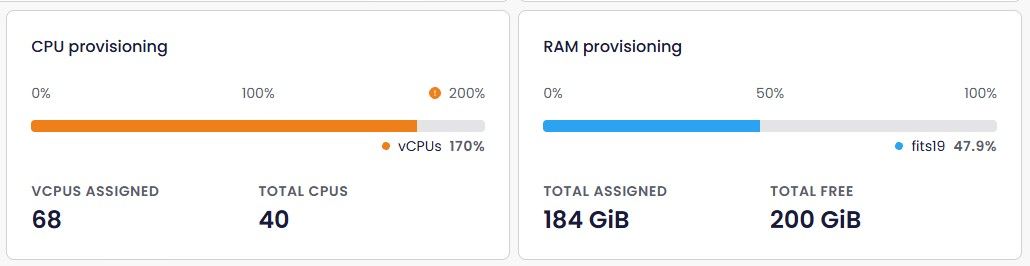
Here is a small usability suggestion. In the Resources dashboard, in Pool view and Host view, positions of CPU and RAM are swapped. I occasionally get a brain freeze when switching between Host and Pool dashboard.
-
-
Just updated to latest commit - 93909
Glade to see more progress on v6.
-
-
I still haven't set any of that stuff up, still just local accounts. Never enough time!
-
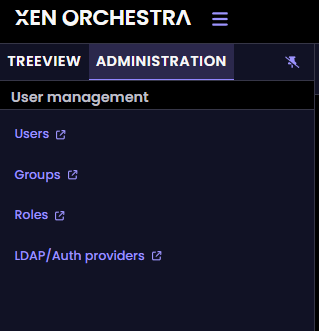
@Greg_E well, UI is not ready yet (while REST API is), above screen is just the base !
-
@pdonias @julienxovates I’ve made an issue and PR to update the documentation so it’s in sync with the current status of XCP-ng release version 8.3.0. Namely that it’s now a Long Term Support (LTS) release following being a semi rolling or standard release with new features being added.
-
@john.c your PR landed on the 15th and the live page now reads "XCP-ng 8.3 LTS", so the table matches the advice sitting right above it again: https://github.com/vatesfr/xen-orchestra/pull/10092.
You spotted it and then wrote the fix yourself, which is the part that saved the next person the trouble.
-
Ah sorry I read it too quickly. This panel is only there in some occasions, but I see the point of only displaying it when we click on a relevant element. Feedback for you @julienxovates
While on the topic of the tree-view panel.
Have you noticed that the indentation changes if there is a chevron indicating that there are VMs on a host? Making it so that the hosts no longer are alinged vertically
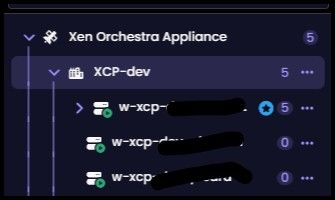
Hi @jr-m4, it took some time but we corrected the identation in 6.7 (latest)

-
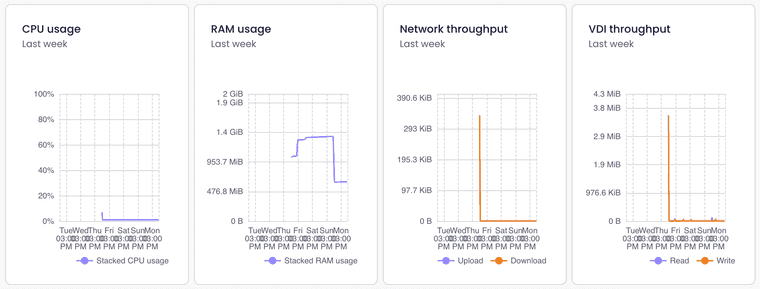
Will XO6 implement chart resize feature? The chart view is break on device with small screen, can't drag drop or resize the chart
-
Yes, charts rendering is not optimal yet. IIRC, it's planned to get better card organization in the future. Stay tuned!
-
I made it through the whole year's updates on this thread. Took me a while
I never saw if the VM UEFI issue was resolved in a patch to XO? (I'm on "sources")
Also, I scrolled around my XO6 UI...saw several changes since my last logon. You all are making progress! Glad to see. Would like to see some of the Pool ("Cluster") configs make it to XO6 sooner than later if possible (i.e. Load Balancing, HA, etc). Also, would like a "cleaner" config interface for those things than what's shown in XO5. BTW...if I'm missing those configs in XO6, apologies, but I hadn't seen them yet.
Appreciate all your efforts thus far!
Oh, and for those who are not aware, Veeam now officially supports XCP-ng for backup. Looking forward to them also enabling Replication like they just did for Proxmox.
Thanks!
-
Depends which one you mean, because there are two different problems tangled together in this stretch of the thread and they have opposite answers.
If you mean @escape222's report at #177, where a VM cloned from XO 6 sits at the TianoCore screen for a couple of minutes, then yes, that was an XO bug and it is fixed. PR #9867, merged 26 May, shipped in XO 6.5.0 on 28 May. The boot order was being rewritten whenever no new disk needed provisioning, so an HVM VM created from a template that already had a disk got network pushed to the front whether or not anyone asked for a network install, and the VM burned the PXE timeout before falling through to the disk. It now follows the install method only. Since you are on sources, anything past 6.5.0 has it.
If you mean the slow UEFI boot @MajorP93 described at #182, with the
installing Xen timerand spinlock lines, that one is not an XO bug and no XO patch will touch it. It is a regression in the Linux guest kernel introduced in 6.12.5. The cost lands per secondary vCPU, so the wider the VM, the worse it looks. There is a separate thread with the per-vCPU numbers: Ubuntu cloud images on XCP-ng 8.3 UEFI. Worth noting its title blamesconsole=ttyS0, which we now think amplifies the same bug rather than being a second one.I measured that one here this week on a single host, changing only the guest kernel between runs and leaving everything else alone. Ubuntu 7.0.0-30 came in at 50 and 59 seconds across two runs. 7.0.0-31 came in at 0.4. Wall clock reboot to sshd went from 78 seconds to 31.
The awkward part is the timing. The upstream fix is
f24df84cbe05, in stable 6.12.97 and later, 6.18.y, 7.1.4 and later, and 7.2, but no default channel carries it yet. I re-checked the archives this evening: Debian trixie still ships 6.12.94-1, with 6.12.100-1 sitting in proposed-updates for the next point release, and Ubuntu 26.04 still ships 7.0.0-30 in updates, published today, while 7.0.0-31 has been in proposed since 10 August. Rocky and el10 I could not confirm either way. So keep whatever workaround you are on until a named version lands for your distro.There is arguably a third one at #183, where @Greg_E had Debian 13 and Windows Server 2022 refusing to boot at all when created through XO-lite with UEFI. As far as I know nobody has retested that since.
If it is the kernel one you are hitting, this says which version you are waiting for:
uname -r
dmesg -T | grep -iE "installing Xen timer|spinlock event"





Hello! It looks like you're interested in this conversation, but you don't have an account yet.
Getting fed up of having to scroll through the same posts each visit? When you register for an account, you'll always come back to exactly where you were before, and choose to be notified of new replies (either via email, or push notification). You'll also be able to save bookmarks and upvote posts to show your appreciation to other community members.
With your input, this post could be even better 💗
Register Login