@poddingue I'm using XOA 6.2.2. Unfortunately not able to update at the moment.
Which reminds me of another thing. Where is there release information for the XOA XVA itself? When I login to my account, there is only the download button but no information on what version it is.
[image: image.jpeg] I would like to know when a new version is published and a changelog for it.
When I import the current XVA it is tagged with 2025.12
[image: image.jpeg]
@bug-meister Ah. That's cloud-init's support for templating user-data. The issue is that with these templates you only have access to the info available inside the VM itself. No outside data can be used for templating unless it is somehow passed to the VM (inject a file, set xenstore values...)
@fred974 Gotcha, yeah this is their built in speed test which IMO isn't that accurate since it uses a very small amount of data to determine speeds, I've seen wild fluctations in it.
There isn't a huge diff: stable is just release-1. "release" is "latest". So for example, our next XO release (5.83) will be in latest while your current latest code will land in stable. So if next week (June the 1st) you decide to get back on stable, you will be in 5.82 (the current latest of today).
@kent
You can ask for a trial so you can do it the time you need
If you use XO from the sources, you will have the feature for free (but without support/updater and such)
At first glance, it does not seem so easy.
First, we will implement this feature in XO Lite (soon). We will then see if there is a trivial way to adapt the changes in XO5
This was ultimately traced to a currupted metadata on the VHD and to a stuck tapdisk process on the host where the VM was running.
Solved thanks to a very persistent member of support. Thanks Jon!
@sluflyer06 the warning on XO is to discourage the mass. But you can really try
you can make a config.toml file in ~/.config/xo-server/config.*.toml , it should be loaded , and won't be changed by an XO update . https://github.com/JsCommunity/app-conf
@HeMaN this may have actually worked...
In etc/network/interfaces
The primary network interface
allow-hotplug eth0
iface eth0 inet dhcp
This is an autoconfigured IPv6 interface
iface eth0 inet6 auto
post-up route add default via 10.10.10.1 dev eth0
auto eth1
iface eth1 inet static
address 10.10.5.188
post-up route del default dev eth1
Then I don't see why it would be a XO problem
FYI, we use JSON-RPC over websockets. Hopefully, someone at Teleport community would be able to pinpoint the problem
Hi,
In XO Hub, you already have a Debian 11 which is Cloudinit ready This is more a Cloudinit question BTW, you should ask their community. Frankly, Cloudinit doc isn't great and many things changed a lot
@mauzilla There is no easy way to achieve that, it requires updating a number of other_config entries manually.
If you have a paid subscription, open a support ticket and I'll take care of it for you
@MrNaz It merges the past delta backup into the past full backup. Then it does a delta backup..... then you repeat.... Since you only keep one copy it just keeps merging the delta into the full backup. The delta backup depends on the old full backup existing and being correct.
When it does a "full backup", it does a full backup of the data not just a delta (the changes). That way it does not merge the new full backup into the old full backup (or depend upon any old backups). Doing a full backup is a good checkpoint in case the old data (full or deltas) is corrupted.
So having the retention set to 1 basically means you only have the most current backup saved. With backups every 12 hours you might want to set the retention to 20 so you have about 10 days of backups and every 5 days (10 backups) it will do a full backup. Or set it higher if you have more backup space.
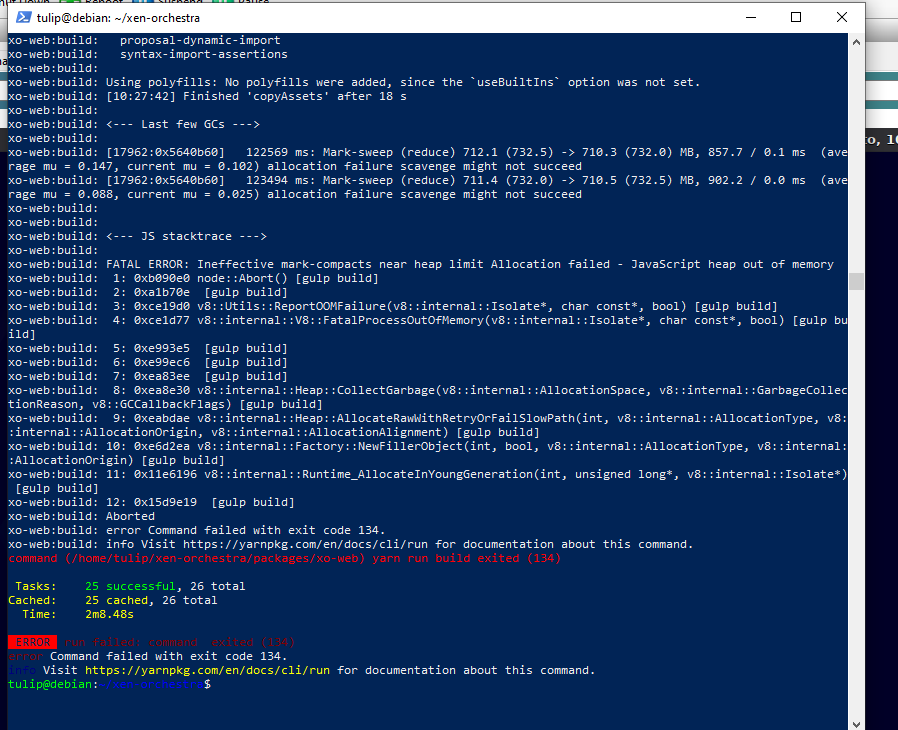
@Danp Thanks RAM was problem. There was only 1.5GB, which was default value with XCP-ng center. Now it compiled successfully with 4GB.
[image: 28e1c460-9d67-44b4-b018-96d1b9531bc7-obraz.png]