XCP-ng
    • Categories
    • Recent
    • Tags
    • Popular
    • Users
    • Groups
    • Register
    • Login
    1. Home
    2. Popular
    Log in to post
    • All Time
    • Day
    • Week
    • Month
    • All Topics
    • New Topics
    • Watched Topics
    • Unreplied Topics

    • All categories
    • A

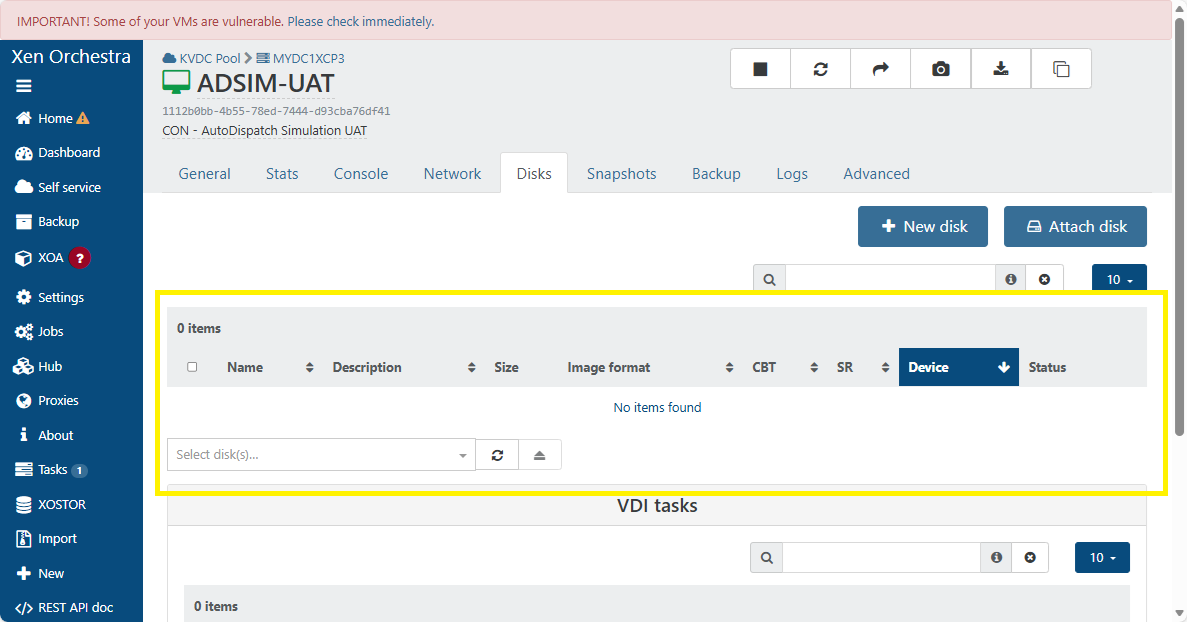
      XenOrchestra not showing VM Disks on Pool (on single Server working) - XCP-ng Center is showing them

      Watching Ignoring Scheduled Pinned Locked Moved Xen Orchestra
      26
      2
      0 Votes
      26 Posts
      3k Views
      K
      @john.c See this post - https://xcp-ng.org/forum/post/105564
    • T

      Xen 8.2 isos

      Watching Ignoring Scheduled Pinned Locked Moved Off topic
      10
      0 Votes
      10 Posts
      882 Views
      J
      @TrapoSAMA said: @john.c I have this iso but how to know what is de package? Thx It’s going to be an msi installer package or on the guest tools iso, which is on the XCP-ng or Xen Server your running likely in Local Storage SR or Shared Storage SR (if moved). Named the same as the file linked to above, likely. Anyway did you know that the UEFI SecureBoot certificates (at least one of them from 2011) issued by Microsoft are expiring fully during October 2026. Around that time likely at sometime after then those certificates will be placed into dbx. This means the Windows Server 2012 R2 if operating as a UEFI SecureBoot VM, will if restarted (or reboot following a crash), fail to boot. So your client will go from having a working app that they can use, but not upgrade at the moment to one which won’t work and can’t be used! They really need to upgrade or migrate from Windows to Linux (released during 2025 or 2026) along with the app if needed. Alternatively upgrade to Windows Server 2022 or 2025 and the app!
    • S

      Change default SSH port

      Watching Ignoring Scheduled Pinned Locked Moved XO Lite
      7
      0 Votes
      7 Posts
      134 Views
      tjkreidlT
      More options: to Prevent overwriting the file: Method 1: Probably the best option. Use a Configuration Directory. Modern OpenSSH versions (8.2+) support an include directive. This is the cleanest approach. Create a drop-in file: Put your custom settings in a separate file, such as /etc/ssh/sshd_config.d/custom.conf. The rule: Package updates will not touch files inside this directory. Verification: Ensure the line Include /etc/ssh/sshd_config.d/*.conf is active at the top of your main /etc/ssh/sshd_config file. Method 2: Lock the File (Alternative) You can force the filesystem to make the file immutable so nothing can change it. Lock the file: Run sudo chattr +i /etc/ssh/sshd_config Unlock for edits: Run sudo chattr -i /etc/ssh/sshd_config when you need to make intentional changes. Method 3: Tell Apt to Ignore Updates. If you are on a Debian-based system, you can force the package manager to always keep your local version. Add this line to /etc/apt/apt.conf.d/local: UCF_FORCE_CONFFOLD=true
    • J

      VIDs are showing up as snapshot, but they are not.

      Watching Ignoring Scheduled Pinned Locked Moved Unsolved XOSTOR
      6
      1
      0 Votes
      6 Posts
      105 Views
      olivierlambertO
      Great, thanks for the feedback!
    • PoloGTIJauneP

      Recommandations about NFS Remotes maintenance ?

      Watching Ignoring Scheduled Pinned Locked Moved Solved Backup
      6
      0 Votes
      6 Posts
      94 Views
      olivierlambertO
      A remote is not the same thing as a SR. For a remote, it's simple: disconnect it (click on "Enabled" so it's disabled then), do whatever you need on the NFS server, re-enable.
    • johnnezeroJ

      pure-plugin for Xen Orchestra

      Watching Ignoring Scheduled Pinned Locked Moved Management
      6
      0 Votes
      6 Posts
      378 Views
      johnnezeroJ
      @poddingue Oh yes (dumb me). Very good, we'll see if they respond (as now there's two @ refferences). Happy Day
    • T

      Backup status reporting failure when retry was successful

      Watching Ignoring Scheduled Pinned Locked Moved Backup
      6
      2
      1 Votes
      6 Posts
      437 Views
      T
      @Bastien-Nollet Perfect, thanks Bastien! Thanks for looking into this, I really appreciate how responsive everyone at Vates is on this forum.
    • itservicesI

      XO Backup Error: VDI_IN_USE(OpaqueRef:.., destroy)

      Watching Ignoring Scheduled Pinned Locked Moved Backup
      27
      2
      0 Votes
      27 Posts
      3k Views
      itservicesI
      @simonp , thank you very much and all of your team ! ! ! Keep up the outstanding work. Regards, Marc
    • I

      Xenorchestra V6 issue

      Watching Ignoring Scheduled Pinned Locked Moved Xen Orchestra
      6
      1
      0 Votes
      6 Posts
      478 Views
      pdoniasP
      @acebmxer I can confirm that, we'll fix it, thanks
    • P

      ASUS NUC NUC14MNK-B LAN problems

      Watching Ignoring Scheduled Pinned Locked Moved Hardware
      12
      0 Votes
      12 Posts
      720 Views
      yannY
      Drivers are actually in @Team-Hypervisor-Kernel scope nowadays
    • A

      XO 6.7 REST API - full coverage for MCP agents, updated same day (267 tools, open source)

      Watching Ignoring Scheduled Pinned Locked Moved REST API xoa mcp
      5
      2 Votes
      5 Posts
      175 Views
      A
      @poddingue Borrow away - "smoke alarm" is a better name for it than anything we had, so we might borrow it right back. Since you mentioned reading the matrix - here is the classification you would be reading, straight from the file: grep access: dadl/xen-orchestra.dadl | sort | uniq -c 49 access: admin 21 access: dangerous 122 access: read 75 access: write 122 of the 267 tools are plain read - that is the entire surface a review-capped agent gets. The other 145 exist in the same file, but for that agent they might as well not. The whole security taxonomy is greppable plaintext - which is rather the point of a declarative format. And if anything in the matrix looks wrong or missing, this thread is exactly the right place - real-world corrections are how it improves.
    • O

      VM autostart stopped working

      Watching Ignoring Scheduled Pinned Locked Moved Unsolved XCP-ng
      5
      0 Votes
      5 Posts
      161 Views
      poddingueP
      My earlier wording was the problem here, not your reading of it. There are two official descriptions and they do not say the same thing. The CLI reference calls start-delay "the delay to wait before a call to start up the VM returns", which is the one I quoted. The XenAPI field description calls it "the delay to wait before proceeding to the next order in the startup sequence". That second one is exactly what you saw: the delay lands on the next VM to start, not on the one you set it on. I quoted the confusing one and then said it explained your behaviour, which it does not really. What I still cannot explain is why a start-delay would stop a VM autostarting altogether. Neither wording predicts that, so I would rather say I do not know than invent a reason. On auto_poweron_delay, I went looking and could not find it anywhere in the XCP-ng or XO docs, so I think your instinct about that search result was right. I have updated the docs PR I had open so it leads with the XenAPI wording and cites both, since the CLI reference phrasing is what sent me wrong in the first place.
    • henri9813H

      Unable to live migrate VM between 2 local storages SR

      Watching Ignoring Scheduled Pinned Locked Moved Solved XCP-ng
      5
      0 Votes
      5 Posts
      405 Views
      poddingueP
      I converted the topic to a question, then marked it solved. Thanks!
    • J

      Not able to create new vdi with linstor at the moment

      Watching Ignoring Scheduled Pinned Locked Moved XOSTOR
      5
      2
      0 Votes
      5 Posts
      272 Views
      J
      OK so that resource was a pain and did not want to give up, so I restarted the host. Migration is running good now.
    • F

      Pool metadata Restore RESTORE_INCOMPATIBLE_VERSION

      Watching Ignoring Scheduled Pinned Locked Moved Unsolved Backup
      4
      0 Votes
      4 Posts
      97 Views
      DanpD
      Actually, isn't XAPI 24.19.2 what is shipped with the original XCP-ng 8.3 release? If so, then you could just do this -- Reinstall XCP-ng on the new host Restore the pool metadata Patch the host
    • D

      Autostart behaviour after upgrade 8.2 -> 8.3

      Watching Ignoring Scheduled Pinned Locked Moved Unsolved XCP-ng
      4
      1
      0 Votes
      4 Posts
      101 Views
      poddingueP
      Thanks for coming back with the actual cause instead of leaving it hanging. To me, a permissions reset on /etc/rc.d/rc.local would explain it completely, and it fails in the worst way, since nothing complains at boot and the VMs just never start. It also looks worth documenting, because our own troubleshooting page tells people to append a clocksource workaround to /etc/rc.local without mentioning the executable bit either, so anyone following that could end up with a workaround that quietly does nothing. I haven't tested whether the 8.2 to 8.3 upgrade resets that bit every time or just happened to in your case, so that half stays your finding, not mine. I'm curious what you turn up on the colon versus equals behaviour.
    • T

      Feature request - VM folders

      Watching Ignoring Scheduled Pinned Locked Moved Xen Orchestra feature request
      21
      3 Votes
      21 Posts
      5k Views
      olivierlambertO
      Perfect, thanks for your feedback!
    • B

      [SHARE][PACKER] Exemple d'utilisations de Packer pour déployer un template sur XCP-ng

      Watching Ignoring Scheduled Pinned Locked Moved French (Français)
      4
      3 Votes
      4 Posts
      536 Views
      B
      Merci beaucoup pour vos retours ! @nathanael-h : C'est l'étape suivante !!! J'ai découvert cluster API le mois dernier et j'ai déja testé sur d'autres plateforme ! ça déchire !!! Je ne savais pas qu'il y avait un support de XCP-ng ! Je finis ma série d'article pour une installation classique et je bascule sur cluster API ! @ataxyanetwork Merci pour ton repo. Je vais regarder ça
    • RN0R

      Installation fails on MINISFORUM MS-A2 , AMD Ryzen 7 7745HX (8C/16T up to 5,1 GHz), 32 Go DDR5, 1 to SSD, PCIe x16, 2X 10G SFP+, 2X 2,5G LAN

      Watching Ignoring Scheduled Pinned Locked Moved Hardware
      3
      1
      0 Votes
      3 Posts
      57 Views
      RN0R
      @poddingue, that is true, my first post here. I'll try to play with these BIOS settings again. and keep you posted. Cheers
    • olivierlambertO

      🛰️ XO 6: dedicated thread for all your feedback!

      Watching Ignoring Scheduled Pinned Locked Moved Xen Orchestra
      245
      7 Votes
      245 Posts
      88k Views
      julienXOvatesJ
      @jr-m4 said: @olivierlambert said: Ah sorry I read it too quickly. This panel is only there in some occasions, but I see the point of only displaying it when we click on a relevant element. Feedback for you @julienxovates While on the topic of the tree-view panel. Have you noticed that the indentation changes if there is a chevron indicating that there are VMs on a host? Making it so that the hosts no longer are alinged vertically [image: 1778653312982-6de7d690-7da3-4471-ba4a-e7ff4bf5b152-image.jpeg] Hi @jr-m4, it took some time but we corrected the identation in 6.7 (latest)