• Distibuted backups doesn't clean up the deltas in the BRs

    11
    8
    0 Votes
    11 Posts
    568 Views
    P
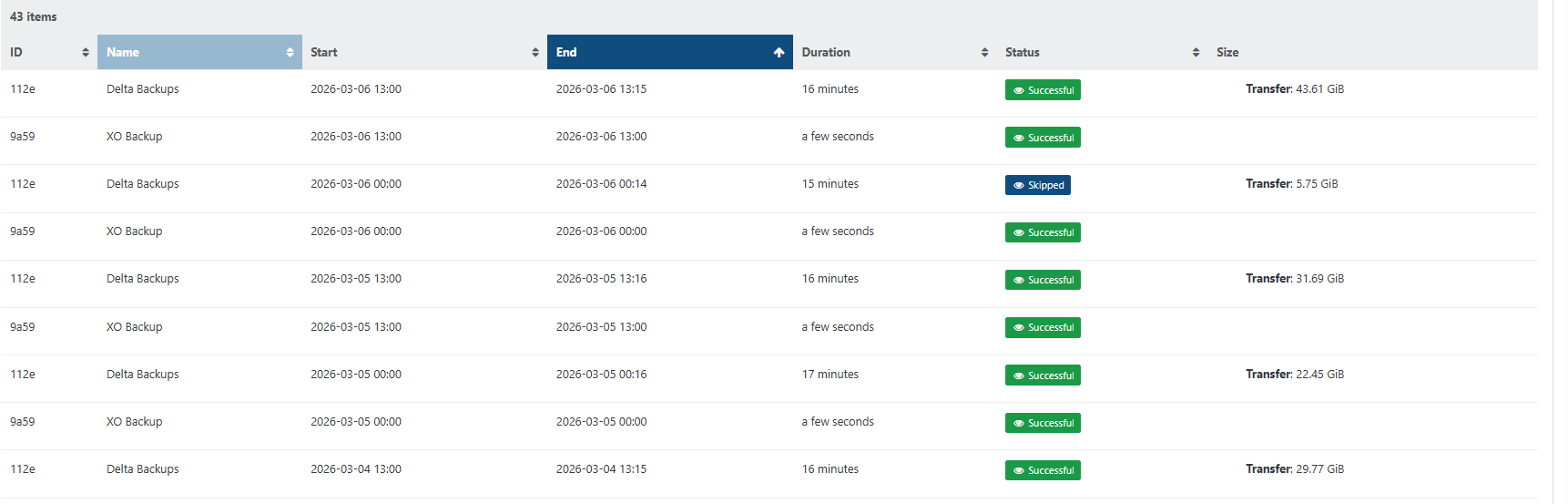
    @Pilow said: @ph7 try to put RETENTION to 1 in the schedule, as you are using LTR parameters I was running the shedule with 20 mins backup retention and it is running fine together with the LTR And here is the manual I ran at 14:56 removed [image: 1775140196713-screenshot-2026-04-02-at-16-28-13-backup.png]
  • 1 Votes
    13 Posts
    804 Views
    P
    @Pilow perfect!
  • Every VM in a CR backup job creates an "Unhealthy VDI"

    20
    1
    0 Votes
    20 Posts
    2k Views
    J
    This issue appears to have been resolved by a recent change.
  • fell back to full and cannot delete snapshot

    1
    1
    0 Votes
    1 Posts
    105 Views
    No one has replied
  • Backing up from Replica triggers full backup

    14
    6
    1 Votes
    14 Posts
    895 Views
    florentF
    @Pilow open a dedicated topic on this . I will ping the relevant team there is it iscsi + CBT ?
  • Backup Suddenly Failing

    28
    0 Votes
    28 Posts
    3k Views
    tjkreidlT
    @JSylvia007 Sorry, I'm really late to this thread, but note that backups can become problematic if the SR is something like 90% or more full. There needs to be some buffer for storage as part of the process. The fact you could copy/clone VMs means your SR is working OK, but backups are a different situation. If need be, you can always migrate VMs to other storage which is evidently what you ended up doing, which frees up extra disk space. Also backups are pretty intensive so make sure you have both enough CPU capacity and memory to handle the load. Finally. a defective SR will definitely cause issues if there are I/O errors, so watch your /var/log/SMlog for any such entries.
  • Backup strategy

    4
    0 Votes
    4 Posts
    284 Views
    P
    And this is the result [image: 1774531386302-screenshot-2026-03-21-at-09-31-45-backup.png]
  • Best pratice : Add dedicated host for CR or DR.

    5
    0 Votes
    5 Posts
    300 Views
    P
    @Dezerd you just have to start-copy the Replica VM it permits the original job to keep replicating on the VM. there is no failover/failback mecanism AFAIK if you work on replica started VM, you will have to put up in place a replica going to original hosts
  • Failed backup jobs since updating

    7
    1
    0 Votes
    7 Posts
    507 Views
    olivierlambertO
    png @florent
  • "NOT_SUPPORTED_DURING_UPGRADE()" error after yesterday's update

    24
    0 Votes
    24 Posts
    3k Views
    M
    @MajorP93 said: -disable HA on pool level -disable load balancer plugin -upgrade master -upgrade all other nodes -restart toolstack on master -restart toolstack on all other nodes -live migrate all VMs running on master to other node(s) -reboot master -reboot next node (live migrate all VMs running on that particular node away before doing so) -repeat until all nodes have been rebooted (one node at a time) -re-enable HA on pool level -re-enable load balancer plugin Never had any issues with that. No downtime for none of the VMs. update time again. and same issue I followed these steps -upgrade master -upgrade all other nodes -restart toolstack on master -restart toolstack on all other nodes -live migrate all VMs running on master to other node(s) -reboot master now cant migrate anything else. live migration : NOT_SUPPORTED_DURING_UPGRADE warm migration: fails and VM shuts down immediately and needs to be forced back to life CR backup to another server : NOT_SUPPORTED_DURING_UPGRADE
  • 0 Votes
    3 Posts
    229 Views
    K
    @olivierlambert done.
  • Delta Backup not deleting old snapshots

    7
    1
    0 Votes
    7 Posts
    566 Views
    A
    @florent XO also can't migrate a VM to a new pool with a CD in the drive... It does generate an error, but the error is unclear.
  • 0 Votes
    1 Posts
    140 Views
    No one has replied
  • Backup: ERR_OUT_OF_RANGE in RemoteVhdDisk.mergeBlock

    14
    1
    0 Votes
    14 Posts
    930 Views
    W
    @florent One last update. I reverted to Master branch (6699b) yesterday evening and the backup ran without issues overnight.
  • S3 Chunk Size

    16
    0 Votes
    16 Posts
    2k Views
    olivierlambertO
    502 is an answer coming from your S3, telling the server is having an issue. Adding @florent in the loop
  • 0 Votes
    4 Posts
    303 Views
    W
    @simonp I'm not sure which one as I can see 2 config.tom file. 1st is under "/root/.config/xo-server/" config.toml.txt 2nd is under "/opt/xo/xo-server/" config.toml2.txt Both config.toml attached. Thank you. Best regards, Azren
  • Backup and the replication - Functioning/Scale

    20
    0 Votes
    20 Posts
    2k Views
    florentF
    thanks Andryi We us round robin when using NBD , but to be fair, it does not change the performance a lot in most of the case. The concurrency settings ( multiple connection to the same file ) is helping when there is a high latency between XO and the host. SO , @fcgo if you have thousand of VMs , you should enable NBD it will consume less resource on the DOM0 and XO , and it will be spread on all the possible hosts.
  • Backups routinely get stuck on the health check

    Unsolved
    10
    1
    0 Votes
    10 Posts
    1k Views
    D
    Hello @Austin.Payne, I wanted to share my experience. I had similar issues through multiple XO versions. However, after learning that health checks rely on the management port I did some more digging. TL;DR it was a network configuration, and not an XO or XCPNG problem. If you have a multi-nic setup and you have XO as a VM on your XCPNG host, I would recommend that whatever network you use for management is on the same NIC. Setup: XO is a VM on XCPNG Host (only one host in pool). Network setup: eth0 = 1GB NIC = Management interface for XCPNG host (192.168.0.0/24 network) eth1 = 10GB DAC = NIC for 192.168.0.0/24 network to pass through VMs (XO uses this NIC) eth1.200 = 10GB DAC = VLAN 200 on eth1 NIC for storage network (10.10.200.0/28). Both the XCPNG host and VMs (including XO VM) use this. IP setup: XCPNG host = 192.168.0.201 on eth0; 10.10.200.1 on eth1.200 XO VM = 192.168.0.202 on eth1; 10.10.200.2 on eth1.200 Remote NAS for backups = Different computer on 10.10.200.0/28 network In this setup, backups would always finish, but health checks would hang indefinitely. However, after changing the XCPNG host to use eth1 for the management interface instead of eth0, health checks starting passing flawlessly. I am not sure if the problem was having the XCPNG host connecting to the same network with two different NICs or if eth1 was the better NIC thus was more reliable during the health check (could also explain why backups would always succeed). It's also possible it was switch related. In this setup, eth0 was connected to a Cisco switch and eth1/eth1.200 was connected to a MIkroTIk switch. Again, not sure what actually solved it, but consolidating everything to a single NIC solved the issue for me (and physically unplugging eth0 after the eth1 consolidation). Hopefully sharing my experience helps solve this issue for you.
  • XOA 6.2 parent VHD is missing followed by full Backup

    7
    1
    0 Votes
    7 Posts
    452 Views
    F
    @florent Awesome, i have patched a second location's XOA and am not experiencing the issue anymore there either.
  • VM export failing with Unix.Unix_error(Unix.EIO, "read"..)

    7
    0 Votes
    7 Posts
    527 Views
    V
    Hello, I have hardware issues, specially on the disks. Unfortunately I don't have fully access to the machine to be able to confirm if is effectively disks( more likely ) or back-plane. Interestingly some of those VMs does work, I can boot them and work with them but cannot copy the disks. Since those are Windows server VM I have also tried the Windows backup tool and this failed as well to perform to finish the backup. So I'm closing this investigation as hardware issue.