Subcategories

  • VMs, hosts, pools, networks and all other usual management tasks.

    481 Topics
    4k Posts
    olivierlambertO
    No problem, this is always good to have feedback and cases showing an error and the explanation
  • ACLs, Self-service, Cloud-init, Load balancing...

    106 Topics
    867 Posts
    olivierlambertO
    Question for @Team-XO-Backend
  • All XO backup features: full and incremental, replication, mirrors...

    525 Topics
    6k Posts
    acebmxerA
    @msupport - Looks like veeam is still working with your on your issues. While veeam has pushed me off to vates / xen. @poddingue - Any updates from Vates about these issues? Is it possible the least patches just pushed might help with either mine or @msupport's issue? Update - Just got a reply back from veeam ... As per internal testing, I’m escalation this to the next tier Regards
  • Everything related to Xen Orchestra's REST API

    87 Topics
    650 Posts
    A
    @poddingue Borrow away - "smoke alarm" is a better name for it than anything we had, so we might borrow it right back. Since you mentioned reading the matrix - here is the classification you would be reading, straight from the file: grep access: dadl/xen-orchestra.dadl | sort | uniq -c 49 access: admin 21 access: dangerous 122 access: read 75 access: write 122 of the 267 tools are plain read - that is the entire surface a review-capped agent gets. The other 145 exist in the same file, but for that agent they might as well not. The whole security taxonomy is greppable plaintext - which is rather the point of a declarative format. And if anything in the matrix looks wrong or missing, this thread is exactly the right place - real-world corrections are how it improves.
  • Terraform, Packer or any tool to do IaC

    51 Topics
    472 Posts
    JeremyLARDENOISJ
    New releases! Terraform Provider Xen Orchestra v0.40.0 This new release allows users to import VMs directly from Xen Orchestra into Terraform without recreating it or modifying manually the Terraform state. There is still some drift when importing it, but nothing that changes the real state of VM and we are currently on it! https://github.com/vatesfr/terraform-provider-xenorchestra/releases/tag/v0.40.0 Golang SDK for Xen Orchestra v1.17.0 v2 The network service is now available from the v2 client! You can now create, get and delete your network directly from it! v1 & v2 The template value in VM struct params has been fixed, We can now get the template id directly from it. https://github.com/vatesfr/xenorchestra-go-sdk/releases/tag/v1.17.0
  • 0 Votes
    3 Posts
    2k Views
    A
    @Darkbeldin I totally missed that.... I know I have used it before. It must be a long week already. Thanks.
  • Netdata plugin

    12
    0 Votes
    12 Posts
    3k Views
    olivierlambertO
    That would be nice if you open a support ticket with a support tunnel so we can take a look remotely
  • No Hosts Available When Creating New VM

    5
    0 Votes
    5 Posts
    6k Views
    K
    @olivierlambert Thanks for that information, will use it next time I run into the issue. Before I read your above reply, I was poking around and noticed that the only SR I had added was disconnected, somehow. So I researched into it and discovered that this was my own doing. Without going into too much detail, I had converted my Active Directory environment from a Zentyal server to a Windows Server and I was hosting the SMB share on the old domain controller. So I had made a DNS error which was causing the SR to not be reachable from the XCP-ng host. So I deleted the SR and recreated it and viola I was able to create the VM. Honestly, I'm not sure how the two are connected since I'm not storing any disks on this SR; I only use it for ISOs which I mount into the newly created VM to install an OS and then I eject it. Long story short, my problem is solved but I'm still confused as to how it happened.

  • Pool Metadata Backup in XO throwing a Redis Configuration Error

    Solved
    5
    0 Votes
    5 Posts
    2k Views
    olivierlambertO
    As stated in the big warning yellow box here in the official doc: https://xen-orchestra.com/docs/community.html#report-a-bug Closing then
  • Rolling Snapshot not work on xo-server 5.103 and xo-web 5.104

    Solved
    3
    3
    0 Votes
    3 Posts
    534 Views
    L
    @olivierlambert I'm rebuild to xo-server 5.103.1, It's working now ,thanks [image: 1665913661236-9e807578-8296-4fc9-aa81-8afaf1e4f52b-image-resized.png]
  • Editing a Remote always fails

    7
    0 Votes
    7 Posts
    2k Views
    florentF
    @mjtbrady compression is used ( brotli, fastest mode by default) There is a problem on the size reported especially with encryption. I will add a task to the backlog to fix it (there is padding with encryption, that complexify the maths)
  • 0 Votes
    14 Posts
    7k Views
    olivierlambertO
    Indeed, if your other hosts are somehow dead/unresponsive from XAPI perspective, ejecting them from the pool is an option to get your master booting those VMs
  • Restore File - Long filenames not displayed correctly

    8
    1
    0 Votes
    8 Posts
    2k Views
    M
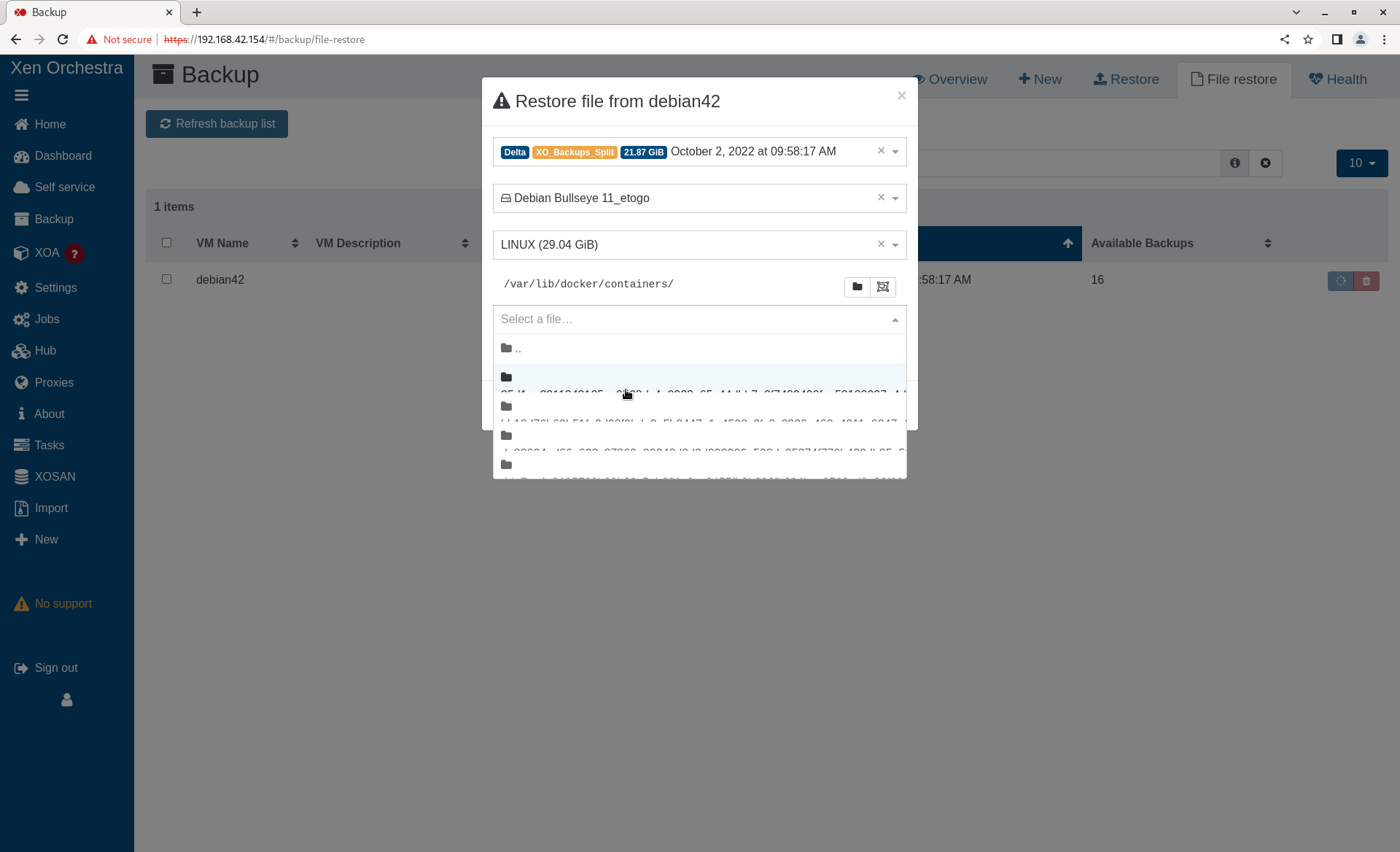
    @pdonias I am puzzled. What do you see? To be clear there are two problems. The selected directory truncates the directory name at around 46 characters ("/var/lib/docker/containers" in my original screen shot isn't truncated because it isn't that long). "Long" file/directory names in the "Select a file" drop down do not display correctly. Once a file has been selected, the "Selected files/folders" does show it in a scrollable "widget" that can then be used to see the full file name. My screen shots are from Chrome on Fedora. I normally use Fedora/Firefox which has the same issues. I set up the following as a test. Filename lengths are 10-80 characters long. root@debian42:~/testdir# pwd /root/testdir root@debian42:~/testdir# ls -l total 0 -rw-r--r-- 1 root root 0 Oct 7 09:50 1234567890 -rw-r--r-- 1 root root 0 Oct 7 09:50 12345678901234567890 -rw-r--r-- 1 root root 0 Oct 7 09:50 123456789012345678901234567890 -rw-r--r-- 1 root root 0 Oct 7 09:50 1234567890123456789012345678901234567890 -rw-r--r-- 1 root root 0 Oct 7 09:50 12345678901234567890123456789012345678901234567890 -rw-r--r-- 1 root root 0 Oct 7 09:51 123456789012345678901234567890123456789012345678901234567890 -rw-r--r-- 1 root root 0 Oct 7 09:51 1234567890123456789012345678901234567890123456789012345678901234567890 -rw-r--r-- 1 root root 0 Oct 7 09:51 12345678901234567890123456789012345678901234567890123456789012345678901234567890 Filename lengths 10-50 display. Filename lengths 60-80 do not. [image: 1665091374720-screenshot-from-2022-10-07-10-22-26.png]
  • Exports OVA Timeout...

    37
    0 Votes
    37 Posts
    17k Views
    S
    @olivierlambert i did update xoa again but no dice, i was wanting to export a couple VM's and do a head to head iscsi I/O test between vmware and xcp on identical hardware but not having much luck trying to get my VM's out of xcp. Guess I'll have to wait for this to work possibly.
  • Email Notification Alerts

    8
    0 Votes
    8 Posts
    2k Views
    olivierlambertO
    You can open an issue on XCP-ng repo here: https://github.com/xcp-ng/xcp/issues Just check before if you can already have the temps from the dom0
  • Error: couldn't instantiate any remote

    33
    0 Votes
    33 Posts
    13k Views
    olivierlambertO
    Oh wow, you were lucky indeed! Happy to know you are safe
  • Restore fails with import_error

    9
    0 Votes
    9 Posts
    2k Views
    H
    @olivierlambert Thank you Olivier, posting it here can maybe help somebody else who does the same mistake
  • XO Backup Failing - Possibly to due Local Disks and loopback issues?

    7
    0 Votes
    7 Posts
    2k Views
    DanpD
    @MichaelCropper said in XO Backup Failing - Possibly to due Local Disks and loopback issues?: Job canceled to protect the VDI chain This usually indicates that there are VDIs that haven't coalesced. Check the "unhealthy VDIs" section of Dashboard > Health.
  • XO Remote mount.nfs: access denied by server while mounting

    26
    0 Votes
    26 Posts
    15k Views
    P
    @daninmanchester Thanks so much - this is the exact same problem I had, which was further complicated by running XO in Docker running on the OMV host exporting the NFS shares. So basically you just built a small XO VM instead of running it in Docker? I had originally been thinking of making a small VM to run XO in a container there - just because Docker containers are super easy to keep updated and I could run some other orchestration-y stuff there too, like Rancher - but if you're saying that's a non-starter I'll just bite the bullet and build a tiny VM dedicated to XO and be very grateful to you for having saved me a lot of frustration.
  • Wrong paths at pool's storage

    1
    1
    0 Votes
    1 Posts
    174 Views
    No one has replied
  • Remove xocloudconfig disk with xo-cli

    6
    0 Votes
    6 Posts
    1k Views
    olivierlambertO
    @slax we might get this upstream in few weeks
  • XO Contentious Replication no longer working (commit 3d3b6)

    4
    0 Votes
    4 Posts
    566 Views
    A
    Fixed on master (commit d8721). Thanks @florent !
  • VM, missing disk

    26
    4
    0 Votes
    26 Posts
    11k Views
    M
    @Danp Thanks, yes of course. I got excited about fixing my problems and reported too early Well, the VM has been working fine since the export / import. I can see both drives. Although the VM running fine, since the last post I had to address two related VDIs that had been connected to the Control Domain. One being million_D and the other million_D (with a camera icon). These probably ended up here because of a aborted / faulty snapshot or backup. I disconnected them .. checked a few things ... and then forgot them. Everything is running fine now. For future googlers: During the problem solving, I found out some pretty helpful info using tail -f /var/log/SMlog. To me, this issue is solved. Thank you all for the feedback.
  • S3 backup not retrying after error

    22
    0 Votes
    22 Posts
    5k Views
    A
    @florent No, I did not see that in the logs. I did see this problem is bigger than I thought. It happens more often than just causing a VM backup failure. It happens during the merge or other checks which causes the backup process to destroy (remove) parts of other VM backups. Clean VM directory parent VHD is missing parent VHD is missing parent VHD is missing some VHDs linked to the backup are missing some VHDs linked to the backup are missing some VHDs linked to the backup are missing some VHDs linked to the backup are missing and Clean VM directory VHD check error some VHDs linked to the backup are missing
  • This topic is deleted!

    1
    0 Votes
    1 Posts
    4 Views
    No one has replied