Subcategories

  • VMs, hosts, pools, networks and all other usual management tasks.

    473 Topics
    4k Posts
    olivierlambertO
    Hi, IP conflict?
  • ACLs, Self-service, Cloud-init, Load balancing...

    104 Topics
    863 Posts
    laszlobortelL
    @florent Thanks for your reply! We have started to migrate thousands of VMs, so disk transfer speed is important for us.. We will also do our detailed tests soon with different threads setting and publish it here. I think threads=1 is a good and logical default, but not efficient. Others might complain if you set it to a higher value. Configuration option would be a real good solution.
  • All XO backup features: full and incremental, replication, mirrors...

    511 Topics
    5k Posts
    itservicesI
    Evening @pierrebrunet My bad. I am now on commit b440f and the issue persist. I have written you a message with the link to the file. Regards, Marc
  • Everything related to Xen Orchestra's REST API

    86 Topics
    645 Posts
    J
    Hello I'm pulling stats for all VMs to understand CPU usage. We're a bit behind the curve in terms of XO versions, but these questions hopefully are still relevant. If using a granularity of days, the interval is set to 86400 (understandably) but the endTimestamp varies. Running this on June 9th @ ~1740 we get timestamps for both Mon Jun 8 01:00:00 AM BST 2026 and Tues Jun 9 01:00:00 AM BST 2026. Does this average across the day? Why is the timestamp 0100? Why would there be different timestamps between VMs (all are running) and does that mean that the figures are misaligned in the results? These are retrieved via curl and a bash script, a bit hacky, but for clarity the request is: ++ curl -X GET -s -H accept:application/json -b authenticationToken=[[REDACTED]] -o [[REDACTED]] 'https://[[REDACTED]]/rest/v0/vms/[[REDACTED]]/stats?granularity=days' Really keen to know if we can control the start and endtime, as well as provide a manual interval, as well as the aggregation strategy (min, max, average). Are any of these possible? Lastly, is cpuUsage the percentage as per the dashboard, but averaged over all CPUs? Thanks so much in advance. James
  • Terraform, Packer or any tool to do IaC

    51 Topics
    471 Posts
    poddingueP
    The Kubernetes CSI driver for Xen Orchestra just hit v0.4.0, and we want it on more real clusters before it reaches a stable release candidate. If you run Kubernetes on XCP-ng VMs, this is a good time to give it a proper workout. What's new in v0.4.0: Local-storage support Automatic pool-discovery fallback Kubernetes metadata now lives in Xen Orchestra VDI tags instead of the deprecated other_config. That change also drops the old requirement for Xen Orchestra 6.4 or newer, so the driver runs on more deployments now. ️ Read this before you upgrade. v0.4.0 is a breaking change. The Kubernetes metadata moved from other_config to VDI tags, so you must migrate before upgrading from v0.3.0. Do not upgrade in place: follow the v0.3.0 to v0.4.0 migration guide in the release notes, then move to v0.4.0. What helps us most is hearing how it behaves on your own setup: what works, what breaks, which storage backend you use, and which flavour of Kubernetes you run (k3s, full k8s, or something else). Edge cases on real clusters are the ones we don't see in our own testing. Where to report: start right here in this thread. It keeps everything visible to the community and lets others on the same setup jump in. If something turns out to be a reproducible bug, we'll move it to a GitHub issue on the repo so the team can track it to a fix. Release notes and migration guide: https://github.com/vatesfr/xenorchestra-csi-driver/releases/tag/v0.4.0
  • Clear stuck task

    4
    0 Votes
    4 Posts
    2k Views
    stormiS
    Tasks have a timeout limit of 24 hours.
  • SENDING Special keys to guest via xo-web

    6
    2 Votes
    6 Posts
    3k Views
    R
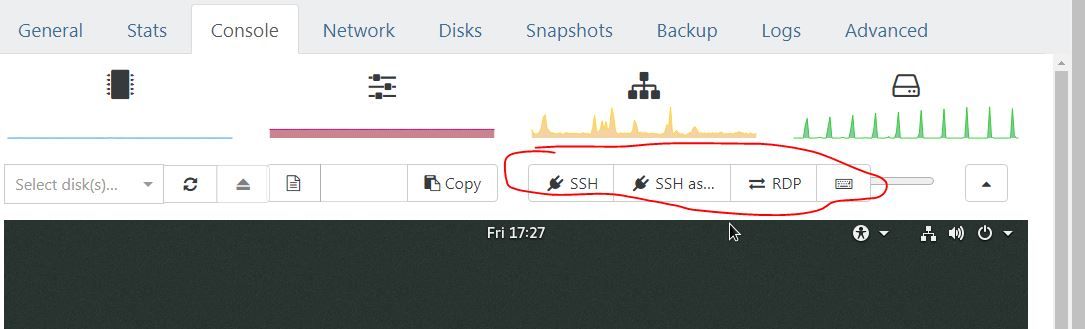
    @tony ssh is not always an option especially for premade ISOs from vendors. DellOpenManage VM for instance was vmware only and ssh was not enabled.
  • How to enable dvd drive on Xo?

    3
    1
    0 Votes
    3 Posts
    1k Views
    cairotiC
    @AtaxyaNetwork Thanks for your guidance. I can create a lightweight Debian VM with an NFS share for the ISOs. But even so it is strange that the drive is not known by the XO. Maybe other people can comment on this later.
  • Windows 10 Audit mode

    4
    0 Votes
    4 Posts
    1k Views
    P
    @olivierlambert thanks for your answer i didn't see the accessibility button. I can click on the virtual keyboard sorry for the post. Pierre
  • 0 Votes
    8 Posts
    4k Views
    fohdeeshaF
    @furyflash777 I'm assuming you're on Ubuntu? Indeed as Olivier said this is tested on Debian and doesn't cause issues, but it seems on the newer Ubuntu versions with cloud-init, the new Netplan based network manager and how it interacts with cloud-init breaks/gets wiped if no cloud-init drive is found. Yet another cloud-init bug to track down
  • Scaling Xen Orchestra Host

    2
    0 Votes
    2 Posts
    579 Views
    olivierlambertO
    Hi, "It depends" is the answer here Depends on: the number of concurrent users on your XO instance the size/frequency/number of backup jobs you have the number of hosts and VMs managed by XO Frankly, for a small setup (less than 4/5 hosts) with one users and few backup jobs, the default 2vCPU/2GiB RAM is enough. Especially since we improved various process to happen in a dedicated worker
  • Delta Backup Fails for a Single VM - ENOTDIR (.vhd/chunk-filters.json)

    4
    0 Votes
    4 Posts
    651 Views
    olivierlambertO
    That's why a XOA will be helpful, so a simple support tunnel will do the trick
  • Restoring Full Backup Error: Stream_vdi.Invalid_checksum

    10
    0 Votes
    10 Posts
    2k Views
    florentF
    @lawrencesystems We added the healthcheck for full backup (here : https://github.com/vatesfr/xen-orchestra/pull/6401 ) Also we removed our js smb implementation ( https://github.com/vatesfr/xen-orchestra/commit/b50e95802c6a876d4e6ffd0c62c209a187b1bfb2 ) to try to circumvent the strange samba comportment fbeauchamp opened this pull request in vatesfr/xen-orchestra closed fix(backups): add healthcheck to full backup #6401 0 julien-f committed to vatesfr/xen-orchestra feat(fs): remove JS based SMB handler It's not well tested nor maintained.
  • Why does df -h produce a different disk size than in XO / XOA?

    4
    0 Votes
    4 Posts
    1k Views
    olivierlambertO
    There's no black magic As @ronivay said, you need to tell the filesystem inside your VM that the disk grew. On Cloudinit-enabled VM, there's an auto-grow parameter that is checking at each boot if the disk was extended, and will automatically do it for you. But again, that's inside the VM. Keep in mind: it's not the job of the virtualization system to deal with what's inside the VM
  • how to see which user created a vm snapshot?

    2
    0 Votes
    2 Posts
    519 Views
    ronivayR
    Settings -> audit. Assuming you have it enabled. If not, nowhere afaik.
  • 0 Votes
    3 Posts
    2k Views
    A
    @Darkbeldin I totally missed that.... I know I have used it before. It must be a long week already. Thanks.
  • Netdata plugin

    12
    0 Votes
    12 Posts
    2k Views
    olivierlambertO
    That would be nice if you open a support ticket with a support tunnel so we can take a look remotely
  • No Hosts Available When Creating New VM

    5
    0 Votes
    5 Posts
    6k Views
    K
    @olivierlambert Thanks for that information, will use it next time I run into the issue. Before I read your above reply, I was poking around and noticed that the only SR I had added was disconnected, somehow. So I researched into it and discovered that this was my own doing. Without going into too much detail, I had converted my Active Directory environment from a Zentyal server to a Windows Server and I was hosting the SMB share on the old domain controller. So I had made a DNS error which was causing the SR to not be reachable from the XCP-ng host. So I deleted the SR and recreated it and viola I was able to create the VM. Honestly, I'm not sure how the two are connected since I'm not storing any disks on this SR; I only use it for ISOs which I mount into the newly created VM to install an OS and then I eject it. Long story short, my problem is solved but I'm still confused as to how it happened.
  • Pool Metadata Backup in XO throwing a Redis Configuration Error

    Solved
    5
    0 Votes
    5 Posts
    2k Views
    olivierlambertO
    As stated in the big warning yellow box here in the official doc: https://xen-orchestra.com/docs/community.html#report-a-bug Closing then
  • Rolling Snapshot not work on xo-server 5.103 and xo-web 5.104

    Solved
    3
    3
    0 Votes
    3 Posts
    452 Views
    L
    @olivierlambert I'm rebuild to xo-server 5.103.1, It's working now ,thanks [image: 1665913661236-9e807578-8296-4fc9-aa81-8afaf1e4f52b-image-resized.png]
  • Editing a Remote always fails

    7
    0 Votes
    7 Posts
    1k Views
    florentF
    @mjtbrady compression is used ( brotli, fastest mode by default) There is a problem on the size reported especially with encryption. I will add a task to the backlog to fix it (there is padding with encryption, that complexify the maths)
  • Storage not connecting, VMs stuck in state and unable to get back.

    14
    2
    0 Votes
    14 Posts
    6k Views
    olivierlambertO
    Indeed, if your other hosts are somehow dead/unresponsive from XAPI perspective, ejecting them from the pool is an option to get your master booting those VMs
  • Restore File - Long filenames not displayed correctly

    8
    1
    0 Votes
    8 Posts
    2k Views
    M
    @pdonias I am puzzled. What do you see? To be clear there are two problems. The selected directory truncates the directory name at around 46 characters ("/var/lib/docker/containers" in my original screen shot isn't truncated because it isn't that long). "Long" file/directory names in the "Select a file" drop down do not display correctly. Once a file has been selected, the "Selected files/folders" does show it in a scrollable "widget" that can then be used to see the full file name. My screen shots are from Chrome on Fedora. I normally use Fedora/Firefox which has the same issues. I set up the following as a test. Filename lengths are 10-80 characters long. root@debian42:~/testdir# pwd /root/testdir root@debian42:~/testdir# ls -l total 0 -rw-r--r-- 1 root root 0 Oct 7 09:50 1234567890 -rw-r--r-- 1 root root 0 Oct 7 09:50 12345678901234567890 -rw-r--r-- 1 root root 0 Oct 7 09:50 123456789012345678901234567890 -rw-r--r-- 1 root root 0 Oct 7 09:50 1234567890123456789012345678901234567890 -rw-r--r-- 1 root root 0 Oct 7 09:50 12345678901234567890123456789012345678901234567890 -rw-r--r-- 1 root root 0 Oct 7 09:51 123456789012345678901234567890123456789012345678901234567890 -rw-r--r-- 1 root root 0 Oct 7 09:51 1234567890123456789012345678901234567890123456789012345678901234567890 -rw-r--r-- 1 root root 0 Oct 7 09:51 12345678901234567890123456789012345678901234567890123456789012345678901234567890 Filename lengths 10-50 display. Filename lengths 60-80 do not. [image: 1665091374720-screenshot-from-2022-10-07-10-22-26.png]
  • Exports OVA Timeout...

    37
    0 Votes
    37 Posts
    15k Views
    S
    @olivierlambert i did update xoa again but no dice, i was wanting to export a couple VM's and do a head to head iscsi I/O test between vmware and xcp on identical hardware but not having much luck trying to get my VM's out of xcp. Guess I'll have to wait for this to work possibly.
  • Email Notification Alerts

    8
    0 Votes
    8 Posts
    2k Views
    olivierlambertO
    You can open an issue on XCP-ng repo here: https://github.com/xcp-ng/xcp/issues Just check before if you can already have the temps from the dom0