Subcategories

  • VMs, hosts, pools, networks and all other usual management tasks.

    446 Topics
    3k Posts
    gskgerG
    I am running NVIDIA P40s on a DELL R720/R730 and a NVIDIA A2000 12GB on a DELL Optiplex 9010 in my playlab. Getting the GPUs to be accessible for VMs was quite easy: shutdown the XCP-ng host, install the GPUs, start the host again, activate the GPU in the advanced settings of the host in the PCI Devices section (“Passthrough enabled”). The host will restart at this point after displaying a warning. That's it – the GPU can now be assigned to a VM in the VMs advanced settings. I do use the GPUs for AI workloads under Debian though, so your use case might vary.
  • ACLs, Self-service, Cloud-init, Load balancing...

    98 Topics
    825 Posts
    D
    @bleader Hopefully the palm print on my forehead isn't visible from where you are sitting. Of course the interface needs an IP address. In my defense, normally for something like this, I wouldn't put it on the bonded interface with all the trunked VLAN's for guest traffic (we don't give that one an IP) and it would go on the other bonded interface that isn't trunked and does get an IP, but these are test hosts and I didn't set up the other bond, so it is pulling double duty. I was able to set the IP's and get SDN working. Thanks!
  • All XO backup features: full and incremental, replication, mirrors...

    459 Topics
    5k Posts
    olivierlambertO
    Yes, we'll update the doc
  • Everything related to Xen Orchestra's REST API

    76 Topics
    578 Posts
    R
    @Pilow tags can work and the path to them is much more succinct. Thanks!
  • Terraform, Packer or any tool to do IaC

    48 Topics
    444 Posts
    CyrilleC
    Kubernetes CCM for Xen Orchestra v1.0.0-rc.1 We’re shipping v1.0.0-rc.1, our first release candidate on the road to a stable 1.0.0! This RC is feature-complete and ready for real-world use. Please try it out and share any feedback—bugs, regressions, or usability notes—so we can polish the final release. Thank you for testing and helping us! https://github.com/vatesfr/xenorchestra-cloud-controller-manager/releases/tag/v1.0.0-rc.1 Golang SDK for Xen Orchestra v1.11.0 SDK v2: VM and Task services now match the latest REST API. Host service has been added for host data retrieval. Integration tests have also been strengthened to boost reliability. The v2 SDK is gradually becoming our main library for all the other DevOps tools (Kubernetes drivers, Terraform provider…). There are BREAKING CAHNGES in the v2 SDK, so please read the release notes carefully. Remember that the v2 SDK is a beta version and can be subject to significant changes. The current semantic versioning we use is mostly for the v1 SDK. When the v2 SDK becomes stable, the major version number will increase. https://github.com/vatesfr/xenorchestra-go-sdk/releases/tag/v1.11.0
  • No Hosts Available When Creating New VM

    5
    0 Votes
    5 Posts
    6k Views
    K
    @olivierlambert Thanks for that information, will use it next time I run into the issue. Before I read your above reply, I was poking around and noticed that the only SR I had added was disconnected, somehow. So I researched into it and discovered that this was my own doing. Without going into too much detail, I had converted my Active Directory environment from a Zentyal server to a Windows Server and I was hosting the SMB share on the old domain controller. So I had made a DNS error which was causing the SR to not be reachable from the XCP-ng host. So I deleted the SR and recreated it and viola I was able to create the VM. Honestly, I'm not sure how the two are connected since I'm not storing any disks on this SR; I only use it for ISOs which I mount into the newly created VM to install an OS and then I eject it. Long story short, my problem is solved but I'm still confused as to how it happened.
  • Pool Metadata Backup in XO throwing a Redis Configuration Error

    Solved
    5
    0 Votes
    5 Posts
    2k Views
    olivierlambertO
    As stated in the big warning yellow box here in the official doc: https://xen-orchestra.com/docs/community.html#report-a-bug Closing then
  • Rolling Snapshot not work on xo-server 5.103 and xo-web 5.104

    Solved
    3
    3
    0 Votes
    3 Posts
    363 Views
    L
    @olivierlambert I'm rebuild to xo-server 5.103.1, It's working now ,thanks [image: 1665913661236-9e807578-8296-4fc9-aa81-8afaf1e4f52b-image-resized.png]
  • Editing a Remote always fails

    7
    0 Votes
    7 Posts
    1k Views
    florentF
    @mjtbrady compression is used ( brotli, fastest mode by default) There is a problem on the size reported especially with encryption. I will add a task to the backlog to fix it (there is padding with encryption, that complexify the maths)
  • Storage not connecting, VMs stuck in state and unable to get back.

    14
    2
    0 Votes
    14 Posts
    5k Views
    olivierlambertO
    Indeed, if your other hosts are somehow dead/unresponsive from XAPI perspective, ejecting them from the pool is an option to get your master booting those VMs
  • Restore File - Long filenames not displayed correctly

    8
    1
    0 Votes
    8 Posts
    1k Views
    M
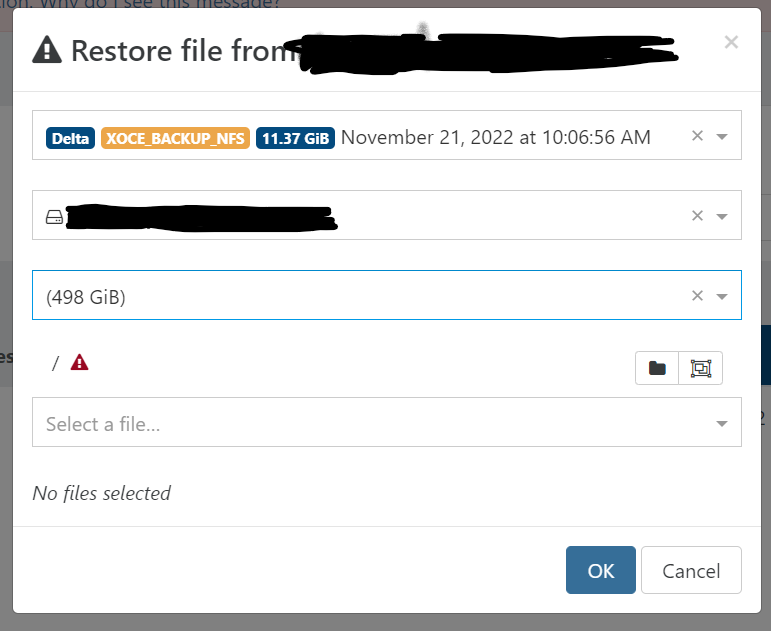
    @pdonias I am puzzled. What do you see? To be clear there are two problems. The selected directory truncates the directory name at around 46 characters ("/var/lib/docker/containers" in my original screen shot isn't truncated because it isn't that long). "Long" file/directory names in the "Select a file" drop down do not display correctly. Once a file has been selected, the "Selected files/folders" does show it in a scrollable "widget" that can then be used to see the full file name. My screen shots are from Chrome on Fedora. I normally use Fedora/Firefox which has the same issues. I set up the following as a test. Filename lengths are 10-80 characters long. root@debian42:~/testdir# pwd /root/testdir root@debian42:~/testdir# ls -l total 0 -rw-r--r-- 1 root root 0 Oct 7 09:50 1234567890 -rw-r--r-- 1 root root 0 Oct 7 09:50 12345678901234567890 -rw-r--r-- 1 root root 0 Oct 7 09:50 123456789012345678901234567890 -rw-r--r-- 1 root root 0 Oct 7 09:50 1234567890123456789012345678901234567890 -rw-r--r-- 1 root root 0 Oct 7 09:50 12345678901234567890123456789012345678901234567890 -rw-r--r-- 1 root root 0 Oct 7 09:51 123456789012345678901234567890123456789012345678901234567890 -rw-r--r-- 1 root root 0 Oct 7 09:51 1234567890123456789012345678901234567890123456789012345678901234567890 -rw-r--r-- 1 root root 0 Oct 7 09:51 12345678901234567890123456789012345678901234567890123456789012345678901234567890 Filename lengths 10-50 display. Filename lengths 60-80 do not. [image: 1665091374720-screenshot-from-2022-10-07-10-22-26.png]
  • Exports OVA Timeout...

    37
    0 Votes
    37 Posts
    13k Views
    S
    @olivierlambert i did update xoa again but no dice, i was wanting to export a couple VM's and do a head to head iscsi I/O test between vmware and xcp on identical hardware but not having much luck trying to get my VM's out of xcp. Guess I'll have to wait for this to work possibly.
  • Email Notification Alerts

    8
    0 Votes
    8 Posts
    2k Views
    olivierlambertO
    You can open an issue on XCP-ng repo here: https://github.com/xcp-ng/xcp/issues Just check before if you can already have the temps from the dom0
  • Error: couldn't instantiate any remote

    33
    0 Votes
    33 Posts
    10k Views
    olivierlambertO
    Oh wow, you were lucky indeed! Happy to know you are safe
  • Restore fails with import_error

    9
    0 Votes
    9 Posts
    1k Views
    H
    @olivierlambert Thank you Olivier, posting it here can maybe help somebody else who does the same mistake
  • XO Backup Failing - Possibly to due Local Disks and loopback issues?

    7
    0 Votes
    7 Posts
    1k Views
    DanpD
    @MichaelCropper said in XO Backup Failing - Possibly to due Local Disks and loopback issues?: Job canceled to protect the VDI chain This usually indicates that there are VDIs that haven't coalesced. Check the "unhealthy VDIs" section of Dashboard > Health.
  • XO Remote mount.nfs: access denied by server while mounting

    26
    0 Votes
    26 Posts
    11k Views
    P
    @daninmanchester Thanks so much - this is the exact same problem I had, which was further complicated by running XO in Docker running on the OMV host exporting the NFS shares. So basically you just built a small XO VM instead of running it in Docker? I had originally been thinking of making a small VM to run XO in a container there - just because Docker containers are super easy to keep updated and I could run some other orchestration-y stuff there too, like Rancher - but if you're saying that's a non-starter I'll just bite the bullet and build a tiny VM dedicated to XO and be very grateful to you for having saved me a lot of frustration.
  • Wrong paths at pool's storage

    1
    1
    0 Votes
    1 Posts
    124 Views
    No one has replied
  • Remove xocloudconfig disk with xo-cli

    6
    0 Votes
    6 Posts
    1k Views
    olivierlambertO
    @slax we might get this upstream in few weeks
  • XO Contentious Replication no longer working (commit 3d3b6)

    4
    0 Votes
    4 Posts
    412 Views
    A
    Fixed on master (commit d8721). Thanks @florent !
  • VM, missing disk

    26
    4
    0 Votes
    26 Posts
    9k Views
    M
    @Danp Thanks, yes of course. I got excited about fixing my problems and reported too early Well, the VM has been working fine since the export / import. I can see both drives. Although the VM running fine, since the last post I had to address two related VDIs that had been connected to the Control Domain. One being million_D and the other million_D (with a camera icon). These probably ended up here because of a aborted / faulty snapshot or backup. I disconnected them .. checked a few things ... and then forgot them. Everything is running fine now. For future googlers: During the problem solving, I found out some pretty helpful info using tail -f /var/log/SMlog. To me, this issue is solved. Thank you all for the feedback.
  • S3 backup not retrying after error

    22
    0 Votes
    22 Posts
    3k Views
    A
    @florent No, I did not see that in the logs. I did see this problem is bigger than I thought. It happens more often than just causing a VM backup failure. It happens during the merge or other checks which causes the backup process to destroy (remove) parts of other VM backups. Clean VM directory parent VHD is missing parent VHD is missing parent VHD is missing some VHDs linked to the backup are missing some VHDs linked to the backup are missing some VHDs linked to the backup are missing some VHDs linked to the backup are missing and Clean VM directory VHD check error some VHDs linked to the backup are missing
  • This topic is deleted!

    1
    0 Votes
    1 Posts
    4 Views
    No one has replied
  • Great new feature: Restore file from S3 delta backup!

    Locked
    24
    2 Votes
    24 Posts
    7k Views
    olivierlambertO
    If I felt that way and we never had issues in the past, it's maybe for a reason. I'm a very patient person (as you can read since years here). So you shouldn't be saddened but more trying to understand something you provoked (it's still not clear that you understand it). I think it's important to know when not to push too far, and you were clearly too far Next time you are frustrated on an open source software you use for free (likely in production otherwise you wouldn't have been that frustrated), remember that being kind will be more productive in the end. This will be better for everyone. Also I hope it's more clear for you that using things on master was never meant to be under our internal QA since it's not a controlled environment (but it's documented with big warnings. Maybe I'll make it even more clear in the doc, I don't know, I'm surprised you didn't get it since you are using it since a while. Maybe this misunderstanding explained part of your frustration).
  • Coalesce not showing anymore

    Solved
    13
    2
    0 Votes
    13 Posts
    2k Views
    olivierlambertO
    Yay! Thanks both @Gheppy for the report and @errellion for the feedback