• Minisforum MS-01 unstable and hangs running Xcp-ng 8.3

    24
    0 Votes
    24 Posts
    19k Views
    W
    @olivierlambert Wow really nice unit makes me want to jump on those lighter fanless unit as i have lots of those 1L unit that works perfectly but has a small fans that i can hear if i really focus. I just like fanless unit to avoid dust getting in lol.
  • Dell PERC H710 and SMART Warnings on Boot

    1
    0 Votes
    1 Posts
    408 Views
    No one has replied
  • 0 Votes
    1 Posts
    2k Views
    No one has replied
  • Threadripper TRX50 7960x....yaay/nay?

    7
    0 Votes
    7 Posts
    2k Views
    S
    @planedrop thank you for the input.
  • PCIe NIC passing through - dropped packets, no communication

    8
    0 Votes
    8 Posts
    4k Views
    olivierlambertO
    I quickly discussed with Xen developers and they are curious about your issue. Can you do a lspci -vvvv in your Dom0, first while you have still the option pci=realloc, and once without it, and see if we can spot any difference regarding your NIC. This might be helpful (you can provide both outputs at https://paste.vates.tech)
  • how to identifi that server is not overloaded by VMs?

    9
    3
    0 Votes
    9 Posts
    2k Views
    gudge25G
    please advice is there a way to check that RAID1 read speed can be a bottleneck ? like 3 VMs are more than NVME Raid can give and that's why VMs are slow in responce
  • 0 Votes
    8 Posts
    2k Views
    M
    @manilx Got this from ChatGPT, so I think I got this. Would be great to just get these values from a cli command but I'm not up to the task The output from smartctl you provided contains information about the Wear Leveling Count attribute of an SSD. This attribute is used to indicate the wear and tear of the NAND flash memory cells in the SSD. Let's break down the relevant parts of the output: "Wear_Leveling_Count": This is the attribute being measured. "value": 98: This is the normalized value of the Wear Leveling Count. Normalized values typically start at 100 for new drives and decrease as the drive ages and wears out. "raw": { "string": "11", "value": 11 }: The raw value is the actual measurement from the SSD's controller. In this case, it is 11. Interpretation Normalized Value (98): This indicates the relative health of the SSD. A value of 98 means the SSD is still in good health, as it is close to the initial value of 100. Raw Value (11): This typically represents the number of cycles or the wear level. In this case, it likely indicates the number of times the cells have been erased and written. Wear Level SSDs generally have a threshold for when they are considered worn out, often around a normalized value of 10 or lower. With a normalized value of 98, your SSD is in very good health and shows minimal wear. The raw value of 11 suggests the SSD has gone through 11 cycles of wear leveling, which is quite low."

  • 0 Votes
    3 Posts
    811 Views
    G
    @olivierlambert Thank you, that's what I thought and why I was willing to buy the lower end CPU in order to get the project through. At the time going for the larger Gold would have doubled the cost of each server.
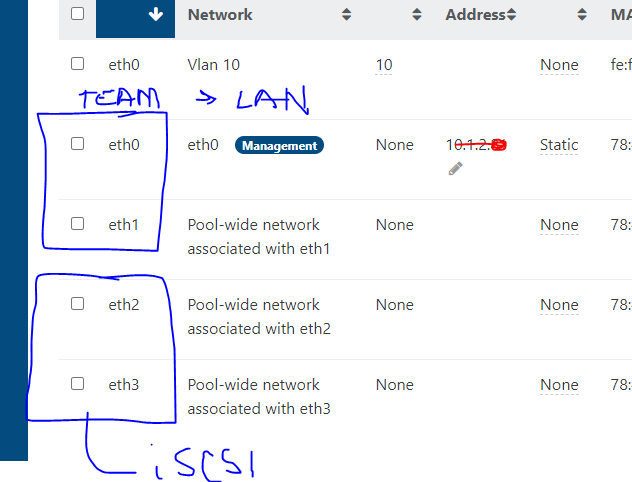
  • Dell R610 TEAMED NICS in XCP-NG for LAN and iSCSI

    3
    1
    0 Votes
    3 Posts
    665 Views
    W
    @Danp DANP THANK YOU! You are the man. Just click on that interface and tried to find documentation. Thank you for your help - I am sure I will have a few more on this..
  • Passthru GPUs disappearing

    1
    0 Votes
    1 Posts
    471 Views
    No one has replied
  • AMD Radeon S7150x2 - Not being seen by VMs

    16
    0 Votes
    16 Posts
    6k Views
    T
    @cunrun @jorge-gbs any init errors in dom0 /var/log/kern.log re. GIM driver? Also, if you search some topics here covering this specific GPU, there were mixed results booting dom0 with pci=realloc,assign-busses. Maybe it worth a try.
  • Upgrading XCP-ng host hardware

    11
    0 Votes
    11 Posts
    4k Views
    M
    @sshughes My understanding of the system so far (but take that with a grain of salt, in real life I'm sort of an accountant who's only larp'ing as a sysadmin here): the system is not meant to 'run on a single host and when it dies we replace it'. It's meant to run on three identical hosts which never all die at the same time (except for some GBU hitting their building). Therefore there is no focus on 'let's reconnect new hardware to existing SR and fire up the VMs stored on that SR'. After planning accordingly, I can live with that. Planning accordingly in my case means: 'well, if my single host dies (running two or three isn't worth it for me), I'll take a day of down time to restore from backups.'
  • Wyse 5070 VM won't booting after update bios 1.27

    21
    0 Votes
    21 Posts
    13k Views
    T
    @andyhhp giving this a shot now.
  • Always display video output even if nothing connected.

    1
    0 Votes
    1 Posts
    366 Views
    No one has replied
  • This topic is deleted!

    1
    2
    0 Votes
    1 Posts
    31 Views
    No one has replied
  • Question on Sata pass through to Windows VM

    8
    0 Votes
    8 Posts
    2k Views
    olivierlambertO
    Anyone else in the community with experience on this? I'm afraid my Windows knowledge isn't great to know where to dig to understand the issue.
  • 0 Votes
    5 Posts
    1k Views
    tjkreidlT
    @olivierlambert said in Same CPU XEON 4309Y but migration failed because some CPU features missing !: It could be microcode update and BIOS update making that change. Since they are not in the same pool, this can be expected. Indeed, migrate to the more recent, upgrade the old one/reboot and that should do the trick. Yes, the BIOS/microcode differences do sometimes change the CPU mask. They need to be identical in many cases on all hosts within a pool.
  • Dell EqualLogic PS4100

    7
    0 Votes
    7 Posts
    3k Views
    nikadeN
    Yea, I dont think you'll have any luck im afraid. But for testing those 15K drives will be enough
  • Hosts compatibility

    6
    0 Votes
    6 Posts
    3k Views
    J
    @bufanda @wtdrisco What I mean by suppression of "instruction sets" is different generations of CPUs, have different extensions to the standard 64bit ones. As the generations change you can get sometimes some of the extensions, being dropped physically from the CPU, but also new ones being added. Since pools are supposed to all be the same, in order to cope with this the hypervisor software stack suppresses (removes or hides), the extensions to instruction sets which aren't common across other pool members. So for instance if the majority of the pool has this https://www.intel.com/content/www/us/en/products/sku/237569/intel-xeon-gold-6544y-processor-45m-cache-3-60-ghz/specifications.html, while others of the same pool has https://www.intel.com/content/www/us/en/products/sku/139940/intel-xeon-gold-6138p-processor-27-5m-cache-2-00-ghz/specifications.html. If you look at the instruction set extensions see which ones are, on both (these will be preserved and usable). Then which ones are not, these will be suppressed.
  • Passing Though a GPU

    Solved
    26
    3
    0 Votes
    26 Posts
    14k Views
    olivierlambertO
    \o/ perfect!!