Subcategories

  • VMs, hosts, pools, networks and all other usual management tasks.

    476 Topics
    4k Posts
    acebmxerA
    So if i set VMs to Best-effort or disabled for HA i get not enough memory. @pkgw Do you have Twinstore configured and/or HA enabled? If no I will continue my issues at the twinstore post. If i set to restart i get this.... host.setMaintenanceMode { "id": "35233210-4e37-4703-9bf6-9e8a9c24df9f", "maintenance": true } { "code": "HA_OPERATION_WOULD_BREAK_FAILOVER_PLAN", "params": [], "call": { "duration": 5, "method": "host.disable", "params": [ "* session id *", "OpaqueRef:d9bd976f-445c-8244-1b56-879f446efc12" ] }, "message": "HA_OPERATION_WOULD_BREAK_FAILOVER_PLAN()", "name": "XapiError", "stack": "XapiError: HA_OPERATION_WOULD_BREAK_FAILOVER_PLAN() at XapiError.wrap (file:///opt/xen-orchestra/packages/xen-api/_XapiError.mjs:16:12) at file:///opt/xen-orchestra/packages/xen-api/transports/json-rpc.mjs:38:21 at runNextTicks (node:internal/process/task_queues:65:5) at processImmediate (node:internal/timers:472:9)" }
  • ACLs, Self-service, Cloud-init, Load balancing...

    105 Topics
    864 Posts
    M
    Is a centralized XOA server "managing" two remote Proxy-fronted XCP clusters supported with the SDN Controller Plugin? We are looking to deploy an architecture similar to this blog post from 2022: https://xen-orchestra.com/blog/xo-proxy-a-concrete-guide/
  • All XO backup features: full and incremental, replication, mirrors...

    515 Topics
    5k Posts
    itservicesI
    Hi @simonp The host was restarted regularly. After every update I restart the host and consequently all VMs running on it. The XOA VM is also running on that host. Regards, Marc
  • Everything related to Xen Orchestra's REST API

    86 Topics
    645 Posts
    J
    Hello I'm pulling stats for all VMs to understand CPU usage. We're a bit behind the curve in terms of XO versions, but these questions hopefully are still relevant. If using a granularity of days, the interval is set to 86400 (understandably) but the endTimestamp varies. Running this on June 9th @ ~1740 we get timestamps for both Mon Jun 8 01:00:00 AM BST 2026 and Tues Jun 9 01:00:00 AM BST 2026. Does this average across the day? Why is the timestamp 0100? Why would there be different timestamps between VMs (all are running) and does that mean that the figures are misaligned in the results? These are retrieved via curl and a bash script, a bit hacky, but for clarity the request is: ++ curl -X GET -s -H accept:application/json -b authenticationToken=[[REDACTED]] -o [[REDACTED]] 'https://[[REDACTED]]/rest/v0/vms/[[REDACTED]]/stats?granularity=days' Really keen to know if we can control the start and endtime, as well as provide a manual interval, as well as the aggregation strategy (min, max, average). Are any of these possible? Lastly, is cpuUsage the percentage as per the dashboard, but averaged over all CPUs? Thanks so much in advance. James
  • Terraform, Packer or any tool to do IaC

    51 Topics
    471 Posts
    poddingueP
    The Kubernetes CSI driver for Xen Orchestra just hit v0.4.0, and we want it on more real clusters before it reaches a stable release candidate. If you run Kubernetes on XCP-ng VMs, this is a good time to give it a proper workout. What's new in v0.4.0: Local-storage support Automatic pool-discovery fallback Kubernetes metadata now lives in Xen Orchestra VDI tags instead of the deprecated other_config. That change also drops the old requirement for Xen Orchestra 6.4 or newer, so the driver runs on more deployments now. ️ Read this before you upgrade. v0.4.0 is a breaking change. The Kubernetes metadata moved from other_config to VDI tags, so you must migrate before upgrading from v0.3.0. Do not upgrade in place: follow the v0.3.0 to v0.4.0 migration guide in the release notes, then move to v0.4.0. What helps us most is hearing how it behaves on your own setup: what works, what breaks, which storage backend you use, and which flavour of Kubernetes you run (k3s, full k8s, or something else). Edge cases on real clusters are the ones we don't see in our own testing. Where to report: start right here in this thread. It keeps everything visible to the community and lets others on the same setup jump in. If something turns out to be a reproducible bug, we'll move it to a GitHub issue on the repo so the team can track it to a fix. Release notes and migration guide: https://github.com/vatesfr/xenorchestra-csi-driver/releases/tag/v0.4.0
  • 0 Votes
    14 Posts
    6k Views
    olivierlambertO
    Indeed, if your other hosts are somehow dead/unresponsive from XAPI perspective, ejecting them from the pool is an option to get your master booting those VMs
  • Restore File - Long filenames not displayed correctly

    8
    1
    0 Votes
    8 Posts
    2k Views
    M
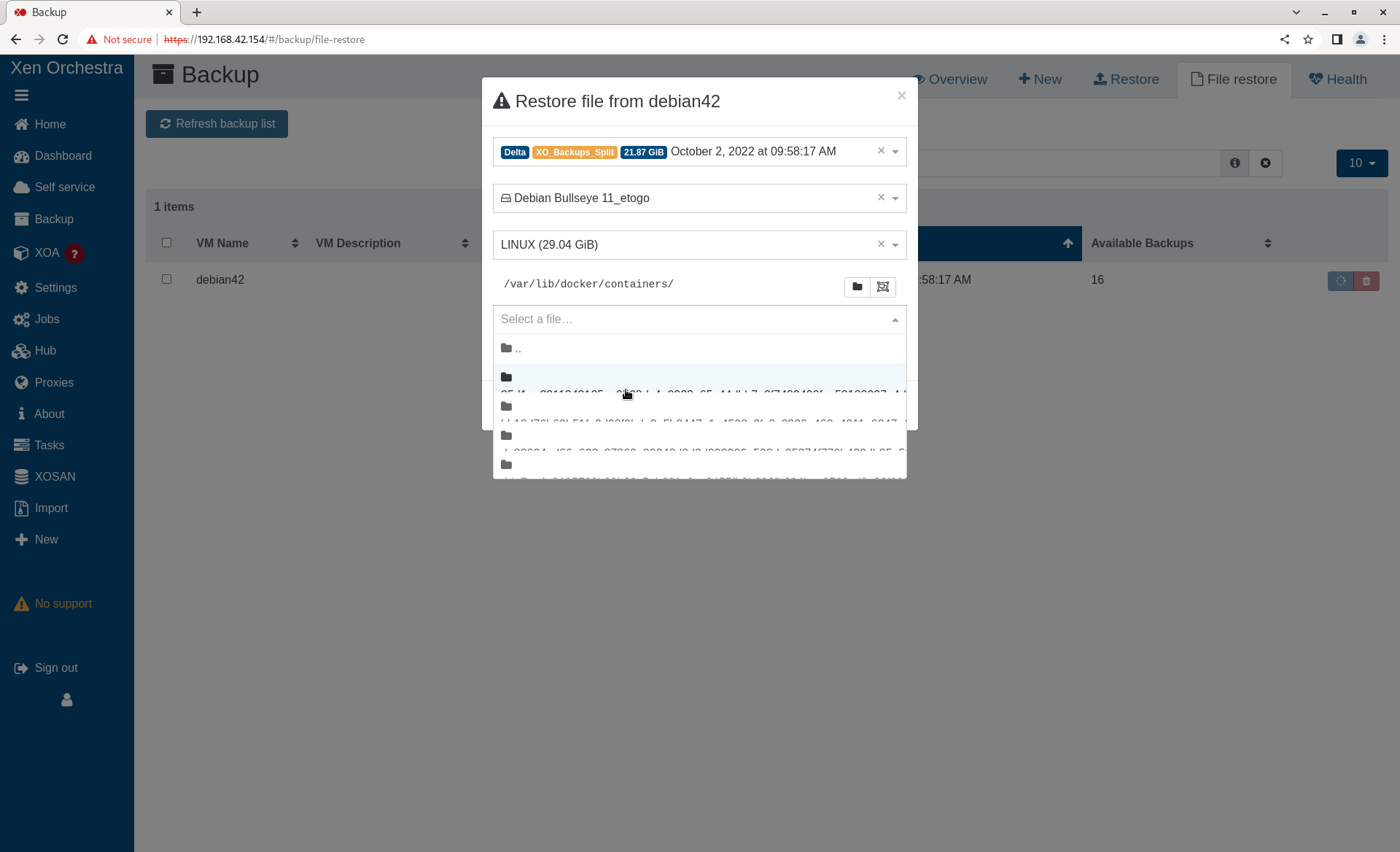
    @pdonias I am puzzled. What do you see? To be clear there are two problems. The selected directory truncates the directory name at around 46 characters ("/var/lib/docker/containers" in my original screen shot isn't truncated because it isn't that long). "Long" file/directory names in the "Select a file" drop down do not display correctly. Once a file has been selected, the "Selected files/folders" does show it in a scrollable "widget" that can then be used to see the full file name. My screen shots are from Chrome on Fedora. I normally use Fedora/Firefox which has the same issues. I set up the following as a test. Filename lengths are 10-80 characters long. root@debian42:~/testdir# pwd /root/testdir root@debian42:~/testdir# ls -l total 0 -rw-r--r-- 1 root root 0 Oct 7 09:50 1234567890 -rw-r--r-- 1 root root 0 Oct 7 09:50 12345678901234567890 -rw-r--r-- 1 root root 0 Oct 7 09:50 123456789012345678901234567890 -rw-r--r-- 1 root root 0 Oct 7 09:50 1234567890123456789012345678901234567890 -rw-r--r-- 1 root root 0 Oct 7 09:50 12345678901234567890123456789012345678901234567890 -rw-r--r-- 1 root root 0 Oct 7 09:51 123456789012345678901234567890123456789012345678901234567890 -rw-r--r-- 1 root root 0 Oct 7 09:51 1234567890123456789012345678901234567890123456789012345678901234567890 -rw-r--r-- 1 root root 0 Oct 7 09:51 12345678901234567890123456789012345678901234567890123456789012345678901234567890 Filename lengths 10-50 display. Filename lengths 60-80 do not. [image: 1665091374720-screenshot-from-2022-10-07-10-22-26.png]
  • Exports OVA Timeout...

    37
    0 Votes
    37 Posts
    16k Views
    S
    @olivierlambert i did update xoa again but no dice, i was wanting to export a couple VM's and do a head to head iscsi I/O test between vmware and xcp on identical hardware but not having much luck trying to get my VM's out of xcp. Guess I'll have to wait for this to work possibly.
  • Email Notification Alerts

    8
    0 Votes
    8 Posts
    2k Views
    olivierlambertO
    You can open an issue on XCP-ng repo here: https://github.com/xcp-ng/xcp/issues Just check before if you can already have the temps from the dom0
  • Error: couldn't instantiate any remote

    33
    0 Votes
    33 Posts
    12k Views
    olivierlambertO
    Oh wow, you were lucky indeed! Happy to know you are safe
  • Restore fails with import_error

    9
    0 Votes
    9 Posts
    2k Views
    H
    @olivierlambert Thank you Olivier, posting it here can maybe help somebody else who does the same mistake
  • XO Backup Failing - Possibly to due Local Disks and loopback issues?

    7
    0 Votes
    7 Posts
    2k Views
    DanpD
    @MichaelCropper said in XO Backup Failing - Possibly to due Local Disks and loopback issues?: Job canceled to protect the VDI chain This usually indicates that there are VDIs that haven't coalesced. Check the "unhealthy VDIs" section of Dashboard > Health.
  • XO Remote mount.nfs: access denied by server while mounting

    26
    0 Votes
    26 Posts
    14k Views
    P
    @daninmanchester Thanks so much - this is the exact same problem I had, which was further complicated by running XO in Docker running on the OMV host exporting the NFS shares. So basically you just built a small XO VM instead of running it in Docker? I had originally been thinking of making a small VM to run XO in a container there - just because Docker containers are super easy to keep updated and I could run some other orchestration-y stuff there too, like Rancher - but if you're saying that's a non-starter I'll just bite the bullet and build a tiny VM dedicated to XO and be very grateful to you for having saved me a lot of frustration.
  • Wrong paths at pool's storage

    1
    1
    0 Votes
    1 Posts
    162 Views
    No one has replied
  • Remove xocloudconfig disk with xo-cli

    6
    0 Votes
    6 Posts
    1k Views
    olivierlambertO
    @slax we might get this upstream in few weeks
  • XO Contentious Replication no longer working (commit 3d3b6)

    4
    0 Votes
    4 Posts
    523 Views
    A
    Fixed on master (commit d8721). Thanks @florent !
  • VM, missing disk

    26
    4
    0 Votes
    26 Posts
    10k Views
    M
    @Danp Thanks, yes of course. I got excited about fixing my problems and reported too early Well, the VM has been working fine since the export / import. I can see both drives. Although the VM running fine, since the last post I had to address two related VDIs that had been connected to the Control Domain. One being million_D and the other million_D (with a camera icon). These probably ended up here because of a aborted / faulty snapshot or backup. I disconnected them .. checked a few things ... and then forgot them. Everything is running fine now. For future googlers: During the problem solving, I found out some pretty helpful info using tail -f /var/log/SMlog. To me, this issue is solved. Thank you all for the feedback.
  • S3 backup not retrying after error

    22
    0 Votes
    22 Posts
    4k Views
    A
    @florent No, I did not see that in the logs. I did see this problem is bigger than I thought. It happens more often than just causing a VM backup failure. It happens during the merge or other checks which causes the backup process to destroy (remove) parts of other VM backups. Clean VM directory parent VHD is missing parent VHD is missing parent VHD is missing some VHDs linked to the backup are missing some VHDs linked to the backup are missing some VHDs linked to the backup are missing some VHDs linked to the backup are missing and Clean VM directory VHD check error some VHDs linked to the backup are missing
  • This topic is deleted!

    1
    0 Votes
    1 Posts
    4 Views
    No one has replied
  • Great new feature: Restore file from S3 delta backup!

    Locked
    24
    2 Votes
    24 Posts
    9k Views
    olivierlambertO
    If I felt that way and we never had issues in the past, it's maybe for a reason. I'm a very patient person (as you can read since years here). So you shouldn't be saddened but more trying to understand something you provoked (it's still not clear that you understand it). I think it's important to know when not to push too far, and you were clearly too far Next time you are frustrated on an open source software you use for free (likely in production otherwise you wouldn't have been that frustrated), remember that being kind will be more productive in the end. This will be better for everyone. Also I hope it's more clear for you that using things on master was never meant to be under our internal QA since it's not a controlled environment (but it's documented with big warnings. Maybe I'll make it even more clear in the doc, I don't know, I'm surprised you didn't get it since you are using it since a while. Maybe this misunderstanding explained part of your frustration).
  • Coalesce not showing anymore

    Solved
    13
    2
    0 Votes
    13 Posts
    2k Views
    olivierlambertO
    Yay! Thanks both @Gheppy for the report and @errellion for the feedback
  • XCP-ng Authentication to AD (2019)

    6
    0 Votes
    6 Posts
    3k Views
    M
    @olivierlambert Thanks for the link , seems i will go the XOA route as suggested by @Darkbeldin
  • Networking disparity between guest OS and XO

    5
    4
    0 Votes
    5 Posts
    1k Views
    fohdeeshaF
    @jcdick1 I run opnsense on xcp-ng personally as well and use their packaged tools without issue, the only time I've gotten this behavior is when I hot-added interfaces and it changed the order of interfaces. If that's not it, I'm really not sure what would be causing this One last thing you can try in case it's a weird cash issue is (inside XOA) go to settings > servers, click the green connected button next to your xcp-ng server to disconnect it from xoa - then wait a couple seconds and click it again to reconnect it
  • Backup to shared storage

    7
    0 Votes
    7 Posts
    1k Views
    T
    @Darkbeldin In my network NFS and Samba shares would be a VM also on the same host so I would be in the same boat as before
  • Can't make new VM

    13
    0 Votes
    13 Posts
    3k Views
    olivierlambertO
    Same message than the other thread: https://xen-orchestra.com/docs/community.html Read this carefully.