Subcategories

  • VMs, hosts, pools, networks and all other usual management tasks.

    427 Topics
    3k Posts
    P
    In case anyone wonders how this played out. At the end of the day, I shutdown the host with the running workloads on it, kept it at BIOS boot so the 8.3 installer would upgrade it cleanly, and then booted it back up. For reasons related to my particular setup, the down time was more than 60 minutes. But that's not related to XCP-ng. The XCP-ng installer was maybe 10 of that. 20 of that was 3 reboots on a server that takes ages to boot. One thing that is a bit difficult is that the 8.3 installer doesn't notice ZFS volumes or help with ZFS. So after the upgrade, I have to follow a modified set of these instructions (modified because the package names have changed over time) to install ZFS and its components into the system. So the sequence is: Shutdown Install via ISO Reboot to single user mode Run yum update to pull in all the updates Run the ZFS commands to install ZFS on the host Reboot again Run normally Of course, I ended up rebooting more than just those 2 times, because I forgot that I would need to install ZFS (even though I did it on 2 different hosts already ) So now the pool is fully upgraded, everybody is happy. I'm now working on creating shared storage across the nodes. It's amateur hour over here. I appreciate all the help.
  • ACLs, Self-service, Cloud-init, Load balancing...

    97 Topics
    818 Posts
    olivierlambertO
    October release fixed it
  • All XO backup features: full and incremental, replication, mirrors...

    438 Topics
    4k Posts
    florentF
    @Pilow I will take a look in deep later, but the key/delta and disk usage is set during backup, even if they are merged during LTR retention
  • Everything related to Xen Orchestra's REST API

    74 Topics
    567 Posts
    olivierlambertO
    But giving your feedback on how you solved it might help many people in the future Thanks!
  • Terraform, Packer or any tool to do IaC

    45 Topics
    425 Posts
    M
    @probain Your role seems to neither install or pin node js itself so it does not fully follow the official steps from Xen Orchestra docs. Xen Orchestra docs state to use LTS node js - installing it is something that the the ronivay XO script does. Due to this part missing in your role it can not be executed on a freshly provisioned VM, something that is not really best practice. A role that was made for the purpose of deploying a software should also install / manage it's dependencies. Other than that, thanks for sharing your role. Every contribution towards this community is great IMO.
  • XOA from Source Limitation

    11
    0 Votes
    11 Posts
    2k Views
    J
    @harajukakei I dont use it but it does work for me (XO build from Source), although not from my android phone (the hosts don't move across to the Available list), so could it be browser related?
  • Cannot add ip or edit to existing network

    Solved
    4
    1
    0 Votes
    4 Posts
    691 Views
    M
    @andy you're welcome!
  • XO tree view

    8
    1 Votes
    8 Posts
    2k Views
    ForzaF
    @julien-f Thank you for explaining your plans. I am very eager to see the new XO 6! Perhaps a Christmas present for all of us? I just realised I have one more "peeve" with XOA. That is the console view which does not work well with Swedish keyboard layout. For example pressing Alt-Gr+2 to get at-sign '@' doesn't work. It also crashes the keyboard input so it doesn't release the alt-key. This always works correctly in XCP-ng center. The problem is in both Linux and Windows guests.
  • Switch to XOA free

    5
    0 Votes
    5 Posts
    6k Views
    olivierlambertO
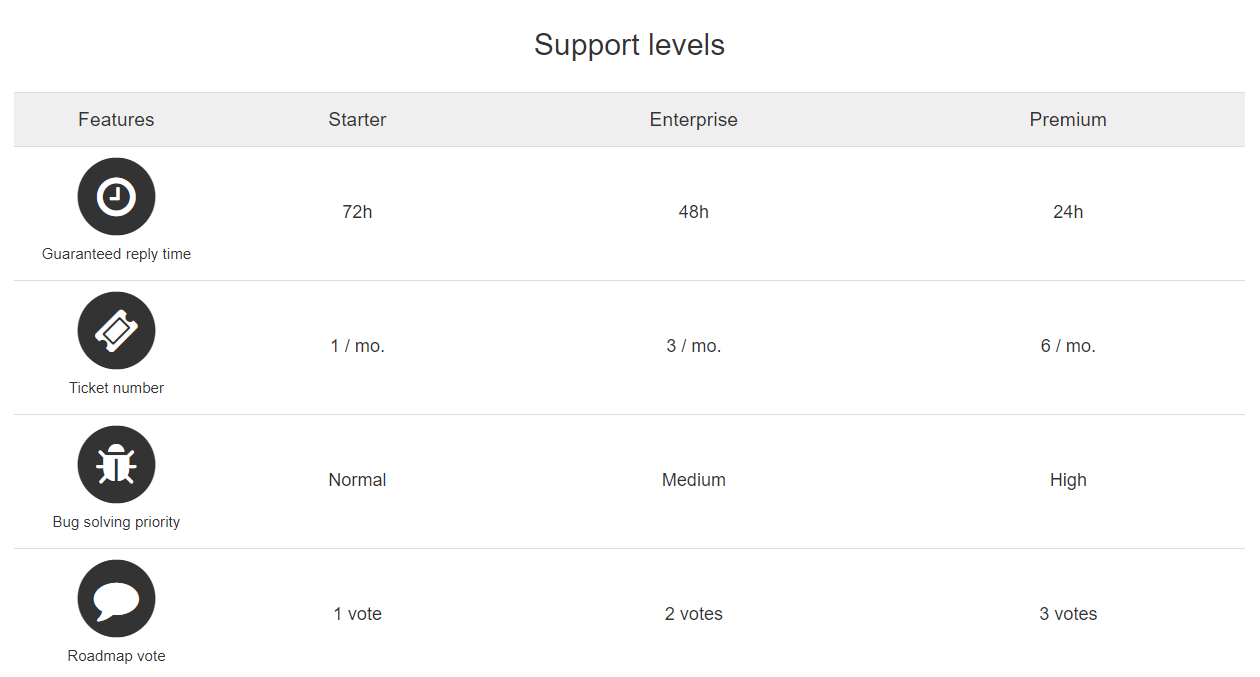
    Have you checked our guide to install Windows drivers? Check https://xcp-ng.org/docs/guests.html#windows If you still have issues, with your current XOA account in trial, you can open support tickets already so we can take a look remotely (https://support.vates.fr)
  • Xen Motion Network

    3
    3
    0 Votes
    3 Posts
    1k Views
    brezlordB
    Feature request oped https://github.com/vatesfr/xen-orchestra/issues/5391 brezlord created this issue in vatesfr/xen-orchestra closed Set pool wide Xen Motion Network #5391
  • 1 Votes
    2 Posts
    456 Views
    BenjiReisB
    @naeemarsalan Good catch, It will be added to the cloudinit script creating the master and the nodes. This will save one reboot to everyone.
  • How to set ip for storage on each server?

    2
    1
    0 Votes
    2 Posts
    2k Views
    jedimarcusJ
    It's a little different, but if in Xen Orchestra you go: Home => Hosts => <host> => Network there I can see my storage IP addresses comparable to that "IP Address Configuration" part. Except that here, all the networks are listed in the same list. Can you see if that's what you are looking for?
  • Import VM from VirtualBox to XO

    4
    0 Votes
    4 Posts
    1k Views
    olivierlambertO
    Is there a way to access your OVA so we can try to reproduce?
  • XCP-ng high availability & xoSAN basic quesstions

    2
    0 Votes
    2 Posts
    2k Views
    olivierlambertO
    Existing HA level is at VM level. It means, if the VM is down (or the host on the VM is running is down), it will be booted on a working host in that pool. For hyperconvergence, it's far from being a miracle solution. It costs a lot of thinking, planning and maintenance (and careful usage of it). Like HA in the end. So before asking for advanced features, it's good to think about what you really need.
  • XOA import issue

    4
    0 Votes
    4 Posts
    862 Views
    olivierlambertO
    He also said there's a fix coming for the next release.
  • Delta Backups & Continous Replication of Empty Drives

    14
    4
    0 Votes
    14 Posts
    2k Views
    S
    @olivierlambert Thanks, I tried running fstrim but it returned "the discard operation is not supported" on this NFS SR mount. I also tried running on SSD mounts which do support TRIM and they all returned the same message about "discard...not supported." The VM OS (CentOS 7.8) does support TRIM in kernel so not sure if xcp-ng or xenserver is the reason why the VM can't issue fstrim on the NFS SR mount or the SSD SR mounts. [image: 1605283613178-85b94dd0-b129-45ec-9ee2-bc4b7dd92b5e-image.png]
  • XOA always does a full backup if VDI was moved between storage

    2
    0 Votes
    2 Posts
    270 Views
    olivierlambertO
    When you migrate a VDI to another SR, its UUID is changed. So it's like a "new VDI". However, there's an issue opened a while ago: https://github.com/vatesfr/xen-orchestra/issues/2896 We did not have a priority on this because not a lot of people asked for it. I think it could be a good optional feature in a job. snimmerjahn created this issue in vatesfr/xen-orchestra closed [Delta Backup] Avoid full export after VDI migrate #2896
  • XO disconnects regularly, freezing the console

    6
    0 Votes
    6 Posts
    1k Views
    olivierlambertO
    It's in our documentation, please read https://xen-orchestra.com/docs/configuration.html#https
  • Problem with ZSTD compressed backup

    7
    0 Votes
    7 Posts
    1k Views
    M
    So far, I noticed this problem for three VMs. Each time I am trying to perform a backup with zstd compression through XO, the backup is marked as successful, but output XVA file is damaged (incomplete). The backup works fine for all other VMs, and I cannot pinpoint what is special about these faulty VMs.
  • xoa-updater --upgrade fails and configuration questions

    2
    0 Votes
    2 Posts
    769 Views
    olivierlambertO
    Hi, It failed because you changed the npm version manually. You can indeed re-deploy a fresh XOA, export the configuration and import it on the new one.
  • XO - change control domain memory?

    4
    0 Votes
    4 Posts
    2k Views
    olivierlambertO
    I'm not against exposing this in the UI, it might be not that difficult. However, more traction will obviously make it possible
  • XOA VM Export Fail

    4
    0 Votes
    4 Posts
    687 Views
    olivierlambertO
    No it's even better to have XOA. So I assume you are on latest and fully up to date? Ping @julien-f
  • [solved] NFS on XO failing, on Center has no issues

    24
    0 Votes
    24 Posts
    14k Views
    olivierlambertO
    No problem, it happens.
  • XO from sources - plugins

    3
    1
    0 Votes
    3 Posts
    1k Views
    M
    @Danp super! lol that was exactly it... and funny cause its the same plugin i was looking to have working! Cheers!!!
  • 0 Votes
    8 Posts
    2k Views
    olivierlambertO
    In fact, there's 2 different things: Downloading and unpacking the updates (yum process). This won't change anything right now, because your current updated programs are likely running in memory (Xen, Linux, XAPI…) so only a reboot will make things changed: it's the current update button on the pool view. Evacuating the host, rebooting it to get all the new versions, and migrate back VMs to it (starting by the master) Right now, 1. need to be triggered manually (you must do it otherwise it won't happen: bad if you forgot) but everything else is managed at all hosts of the pool at the same time (good). And 2 is entirely manual. So that's why I wrote this, to get 1. and 2. entirely automated while being safe and giving you reports: https://github.com/vatesfr/xen-orchestra/issues/5286 I have hopes we can deliver a first version (at least from the CLI) for this month release olivierlambert created this issue in vatesfr/xen-orchestra open Scheduled Rolling pool updates (with reports) for XCP-ng #5286