XCP-ng
    • Categories
    • Recent
    • Tags
    • Popular
    • Users
    • Groups
    • Register
    • Login
    1. Home
    2. Popular
    Log in to post
    • All Time
    • Day
    • Week
    • Month
    • All Topics
    • New Topics
    • Watched Topics
    • Unreplied Topics

    • All categories
    • henri9813H

      Slow boot on rocky linux 10 latest kernel

      Watching Ignoring Scheduled Pinned Locked Moved Compute
      23
      2
      0 Votes
      23 Posts
      318 Views
      olivierlambertO
      2 paths we are doing in parallel: We are doing our best to make it upstream in Linux, it's a regression after all. We know how to fix it, so hopefully this will be fixed quickly. Then, we'll have to wait for a Linux kernel update in main distros. Invariant TSC in Xen is also a way to fix it, because we want to improve that anyway. But as Teddy said, it's more work and it will take more time.
    • stormiS

      XCP-ng 8.3 updates announcements and testing

      Watching Ignoring Scheduled Pinned Locked Moved News
      582
      1 Votes
      582 Posts
      283k Views
      F
      Installed on my usual test hosts. No issues so far.
    • itservicesI

      XO Backup Error: VDI_IN_USE(OpaqueRef:.., destroy)

      Watching Ignoring Scheduled Pinned Locked Moved Backup
      12
      2
      0 Votes
      12 Posts
      275 Views
      itservicesI
      I am giving a short "report", when there is new version out and I have tested it. Nice weekend @y'all Regards, Marc
    • florentF

      Need FeedBack: New version of the File level restore

      Watching Ignoring Scheduled Pinned Locked Moved Backup
      12
      2 Votes
      12 Posts
      365 Views
      florentF
      the new code is now in master
    • S

      How to Setup IPMI in XO

      Watching Ignoring Scheduled Pinned Locked Moved Management
      41
      0 Votes
      41 Posts
      4k Views
      A
      @All-Ki Thanks for your work! ProLiant DL360p Gen8 UID Light | 0x01 | ok Sys. Health LED | no reading | ns 01-Inlet Ambient | 33 degrees C | ok 02-CPU 1 | 55 degrees C | ok 03-CPU 2 | 50 degrees C | ok 04-P1 DIMM 1-6 | 45 degrees C | ok 05-P1 DIMM 7-12 | 44 degrees C | ok 06-P2 DIMM 1-6 | 38 degrees C | ok 07-P2 DIMM 7-12 | 43 degrees C | ok 08-P1 Mem Zone | 42 degrees C | ok 09-P1 Mem Zone | 45 degrees C | ok 10-P2 Mem Zone | 39 degrees C | ok 11-P2 Mem Zone | 40 degrees C | ok 12-HD Max | 35 degrees C | ok 13-Chipset 1 | 52 degrees C | ok 14-Chipset1 Zone | 45 degrees C | ok 15-P/S 1 Inlet | 34 degrees C | ok 16-P/S 1 Zone | 40 degrees C | ok 17-P/S 2 Inlet | 42 degrees C | ok 18-P/S 2 Zone | 43 degrees C | ok 19-PCI #1 | disabled | ns 20-PCI #2 | disabled | ns 21-VR P1 | 60 degrees C | ok 22-VR P2 | 56 degrees C | ok 23-VR P1 Mem | 39 degrees C | ok 24-VR P1 Mem | 36 degrees C | ok 25-VR P2 Mem | 32 degrees C | ok 26-VR P2 Mem | 36 degrees C | ok 27-VR P1Mem Zone | 38 degrees C | ok 28-VR P1Mem Zone | 36 degrees C | ok 29-VR P2Mem Zone | 31 degrees C | ok 30-VR P2Mem Zone | 33 degrees C | ok 31-HD Controller | 71 degrees C | ok 32-HD Cntlr Zone | 52 degrees C | ok 33-PCI 1 Zone | 43 degrees C | ok 34-PCI 1 Zone | 46 degrees C | ok 35-LOM Card | 70 degrees C | ok 36-PCI 2 Zone | 50 degrees C | ok 37-System Board | 52 degrees C | ok 38-System Board | 45 degrees C | ok 39-Sys Exhaust | 43 degrees C | ok 40-Sys Exhaust | 46 degrees C | ok 41-Sys Exhaust | 46 degrees C | ok 42-SuperCAP Max | 33 degrees C | ok Fan Block 1 | 94.86 percent | ok Fan Block 2 | 94.86 percent | ok Fan Block 3 | 94.86 percent | ok Fan Block 4 | 94.86 percent | ok Fan Block 5 | 94.86 percent | ok Fan Block 6 | 94.86 percent | ok Fan Block 7 | 94.86 percent | ok Fan Block 8 | 94.86 percent | ok Power Supply 1 | 205 Watts | ok Power Supply 2 | 210 Watts | ok Power Meter | 430 Watts | ok Power Supplies | 0x01 | ok Fans | 0x02 | ok Memory | 0x40 | ok C1 P1I Bay 1 | 0x01 | ok C1 P1I Bay 2 | 0x01 | ok C1 P1I Bay 3 | 0x01 | ok C1 P1I Bay 4 | 0x01 | ok C1 P2I Bay 5 | 0x01 | ok C1 P2I Bay 6 | 0x01 | ok C1 P2I Bay 7 | 0x01 | ok C1 P2I Bay 8 | 0x01 | ok ProLiant DL360 Gen10 UID | 0x01 | ok SysHealth_Stat | 0x01 | ok 01-Inlet Ambient | 19 degrees C | ok 02-CPU 1 | 52 degrees C | ok 03-CPU 2 | 63 degrees C | ok 04-P1 DIMM 1-6 | disabled | ns 05-PMM 1-6 | disabled | ns 06-P1 DIMM 7-12 | 44 degrees C | ok 07-PMM 7-12 | disabled | ns 08-P2 DIMM 1-6 | disabled | ns 09-PMM 1-6 | disabled | ns 10-P2 DIMM 7-12 | 48 degrees C | ok 11-PMM 7-12 | disabled | ns 12-HD Max | 35 degrees C | ok 13-Exp Bay Drive | disabled | ns 14-Stor Batt 1 | 18 degrees C | ok 15-Front Ambient | 24 degrees C | ok 16-VR P1 | 48 degrees C | ok 17-VR P2 | 54 degrees C | ok 18-VR P1 Mem 1 | 31 degrees C | ok 19-VR P1 Mem 2 | 29 degrees C | ok 20-VR P2 Mem 1 | 35 degrees C | ok 21-VR P2 Mem 2 | 36 degrees C | ok 22-Chipset | 42 degrees C | ok 23-BMC | 79 degrees C | ok 24-BMC Zone | 49 degrees C | ok 26-HD Cntlr Zone | 40 degrees C | ok 29-I/O Zone | 37 degrees C | ok 30-PCI 1 | disabled | ns 31-PCI 1 Zone | 45 degrees C | ok 32-PCI 2 | disabled | ns 33-PCI 2 Zone | 44 degrees C | ok 34-PCI 3 | disabled | ns 35-PCI 3 Zone | disabled | ns 37-Rear HD Max | disabled | ns 38-Battery Zone | 43 degrees C | ok 39-P/S 1 Inlet | 42 degrees C | ok 40-P/S 2 Inlet | 48 degrees C | ok 41-P/S 1 | 46 degrees C | ok 42-P/S 2 | 55 degrees C | ok 43-E-Fuse | 45 degrees C | ok 44-P/S 2 Zone | 53 degrees C | ok 49-CPU 1 PkgTmp | 84 degrees C | ok 50-CPU 2 PkgTmp | 94 degrees C | ok 61-AHCI HD Max | disabled | ns 69-PCI 1 M2 | disabled | ns 70-PCI 1 M2 Zn | disabled | ns 71-PCI 2 M2 | disabled | ns 72-PCI 2 M2 Zn | disabled | ns 73-PCI 3 M2 | disabled | ns 74-PCI 3 M2 Zn | disabled | ns Fan 1 | 0x01 | ok Fan 1 DutyCycle | 26.26 percent | ok Fan 1 Presence | 0x02 | ok Fan 2 | 0x01 | ok Fan 2 DutyCycle | 23.52 percent | ok Fan 2 Presence | 0x02 | ok Fan 3 | 0x01 | ok Fan 3 DutyCycle | 23.52 percent | ok Fan 3 Presence | 0x02 | ok Fan 4 | 0x01 | ok Fan 4 DutyCycle | 23.52 percent | ok Fan 4 Presence | 0x02 | ok Fan 5 | 0x01 | ok Fan 5 DutyCycle | 23.52 percent | ok Fan 5 Presence | 0x02 | ok Fan 6 | 0x01 | ok Fan 6 DutyCycle | 24.30 percent | ok Fan 6 Presence | 0x02 | ok Fan 7 | 0x01 | ok Fan 7 DutyCycle | 24.30 percent | ok Fan 7 Presence | 0x02 | ok Power Supply 1 | 0x01 | ok PS 1 Input | 200 Watts | ok Power Supply 2 | 0x01 | ok PS 2 Input | 190 Watts | ok Power Meter | 400 Watts | ok Fans | 0x01 | ok Power Supplies | 0x01 | ok Memory Status | 0x40 | ok Megacell Status | 0x04 | ok Intrusion | Not Readable | ns CPU Utilization | 252 unspecified | ok PS 1 Output | 190 Watts | ok PS_Volt_Out_01 | 12 Volts | ok PS_Volt_In_01 | 205 Volts | ok PS_Curr_Out_01 | 15.80 Amps | ok PS_Curr_In_01 | 1 Amps | ok PS 2 Output | 180 Watts | ok PS_Volt_Out_02 | 12 Volts | ok PS_Volt_In_02 | 204 Volts | ok PS_Curr_Out_02 | 15.10 Amps | ok PS_Curr_In_02 | 0.90 Amps | ok 27.1-LOM-Communi | 68 degrees C | ok 28.1-LOM Card-I/ | 84 degrees C | ok 25.1-HD Controll | 39 degrees C | ok 25.2-HD Controll | 45 degrees C | ok 25.3-HD Controll | 41 degrees C | ok LOM_Link_P1 | 0x02 | ok LOM_Link_P2 | Not Readable | ns LOM_Link_P3 | Not Readable | ns LOM_Link_P4 | Not Readable | ns ALOM_Link_P1 | 0x02 | ok ALOM_Link_P2 | 0x02 | ok Dr_Stat_1I1_B001 | 0x01 | ok Dr_Stat_2I1_B005 | 0x01 | ok CPU_Stat_C1 | 0x80 | ok CPU_Stat_C2 | 0x80 | ok
    • johnnezeroJ

      Tag-Based Automation Plugin: Tag-Based VM Performance & Permission Management via assigned tag(s)

      Watching Ignoring Scheduled Pinned Locked Moved Management
      9
      1
      0 Votes
      9 Posts
      192 Views
      johnnezeroJ
      @julienXOvates Noted, thank you!
    • olivierlambertO

      🛰️ XO 6: dedicated thread for all your feedback!

      Watching Ignoring Scheduled Pinned Locked Moved Xen Orchestra
      238
      7 Votes
      238 Posts
      48k Views
      julienXOvatesJ
      @Hex said: [image: 1780979702139-4f23a269-6c1c-4563-ac54-080cd3faa4b7-image.jpeg] [image: 1780979729251-f1630b43-4a94-49dd-b962-9b709f4bb2da-image.jpeg] Here is a small usability suggestion. In the Resources dashboard, in Pool view and Host view, positions of CPU and RAM are swapped. I occasionally get a brain freeze when switching between Host and Pool dashboard. Right, thanks! We'll change this !
    • jgraftonJ

      CPU pegged at 100% in several Rocky Linux 8 VMs without workload in guest

      Watching Ignoring Scheduled Pinned Locked Moved Compute
      17
      0 Votes
      17 Posts
      4k Views
      A
      @laszlobortel we've seen far less of this issue since my last message, not sure what made it better and when. But we're still making sure to reboot monthly (during patching, as we normally do anyways) + after live migration, and that helps. We don't use load balancing, so once a VM is staying put on one hypervisor, there is no issue. Live migration and time triggers the issue for us. What changed in our infra is upgrade to XCP-NG 8.3 and moving to XOSTOR as shared storage. We've seen no issue with AlmaLinux 9 and CloudLinux 9 at all. They also perform better I/O wise.
    • SuperDuckGuyS

      Unable to create XOSTOR volume

      Watching Ignoring Scheduled Pinned Locked Moved XOSTOR
      9
      1 Votes
      9 Posts
      550 Views
      poddingueP
      Thanks for coming back to close it out. That's useful to know. So I was plenty wrong, as it was the XOSTOR licensing backend rather than the repo side I guessed at; those -32000 errors really don't give much away. For anyone landing here later: sounds like -32000 on XOSTOR creation can come from either end, a licensing/entitlement issue that support sorts, or a host not reaching the package repo, so both are worth checking. @alcoralcor, did support get yours sorted too, or is yours still the repodata / repo-reachability one? Glad you're unblocked either way.
    • E

      xo-server executable not found

      Watching Ignoring Scheduled Pinned Locked Moved Xen Orchestra
      3
      0 Votes
      3 Posts
      83 Views
      E
      @poddingue said: usually looks like an update that got interrupted or only half-applied Thinking back on it, I think that may be the issue. in that I was too quick off the mark rebooting after the base upgrades. @poddingue said: I think the gentler recovery before rebuilding would have been re-running the updater from the CLI Kinda tried that, but: [18:47 09] xoa@xoa:~$ xoa check -bash: xoa: command not found [18:47 09] xoa@xoa:~$ sudo xoa-updater --upgrade [sudo] password for xoa: sudo: xoa-updater: command not found [18:48 09] xoa@xoa:~$ But regardless, I'm all good now. Cheers.
    • lkniteL

      (kubernetes) Add 'xcp-ng' provider to clusterapi

      Watching Ignoring Scheduled Pinned Locked Moved Development
      6
      0 Votes
      6 Posts
      1k Views
      nathanael-hN
      @pszelestey Hi, yes, we've pushed an initial commit and a few more here https://github.com/vatesfr/cluster-api-provider-vates/ it is moging every day. Ping us in Matrix/Discord devops if you want to chat live while trying
    • A

      Replication is leaving VDIs attached to Control Domain, again

      Watching Ignoring Scheduled Pinned Locked Moved Backup
      11
      0 Votes
      11 Posts
      774 Views
      A
      @poddingue Since setting NBD=1, I have not seen the problem. SR is NFS on dual 40G ethernet with a TrueNAS scale 25.10 server using all NVMe SSD, so storage performance is as good as I can make it. I'll have to enable NBD=2 again to see if it still happens and if I can find the relevant part of the logs. As this is a random problem I can't recreate it on a normal test environment.
    • H

      Potential bug with Windows VM backup: "Body Timeout Error"

      Watching Ignoring Scheduled Pinned Locked Moved Backup
      61
      3
      2 Votes
      61 Posts
      10k Views
      G
      @poddingue I need to update a few things and then I plan on trying to see if this was fixed for me. I think I only had 2 Windows machines that were a problem, and only on machines that had a larger disk and were basically empty. The counting zeros seemed to lead to a time out. Just haven't had the time to look at much of anything lately.
    • S

      XOA host got disconnected and cannot re-add with error connect ECONNREFUSED x.x.x.x:443

      Watching Ignoring Scheduled Pinned Locked Moved Management
      2
      0 Votes
      2 Posts
      45 Views
      olivierlambertO
      Hi, IP conflict?
    • bvitnikB

      How to reliably determine VDI format (vhd, qcow2, raw) via XAPI across versions

      Watching Ignoring Scheduled Pinned Locked Moved Development
      6
      1 Votes
      6 Posts
      248 Views
      bvitnikB
      @dthenot Thanks a lot for the information. I did some more testing on my end and I've now noticed differences in handling VDI format across different SR types (local LVM and EXT). Should I expect even more differences across remote SR types like LVMoHBA or NFS or are these differences more like block based vs file system based SRs? Any way, it looks like I have to consult the following keys: image-format vdi_type type In my tests, local EXT SRs tend to have only one of them, while local LVM SRs tend to have first two or all three, depends which one was used when creating the VDI.
    • S

      cleanVm: incorrect backup size in metadata

      Watching Ignoring Scheduled Pinned Locked Moved Xen Orchestra
      20
      1
      0 Votes
      20 Posts
      5k Views
      M
      @poddingue Not seeing it anymore
    • DAYELAD

      XOA loses connection to hosts during VM migration / creation on XOSTOR SR

      Watching Ignoring Scheduled Pinned Locked Moved XOSTOR
      8
      0 Votes
      8 Posts
      425 Views
      olivierlambertO
      Yes, there's a weird issue when using both XOSTOR and HA, probably due to the HA mechanism itself. @Team-Storage is on it
    • J

      Ghost PCI device - how to remove?

      Watching Ignoring Scheduled Pinned Locked Moved Hardware
      4
      0 Votes
      4 Posts
      103 Views
      poddingueP
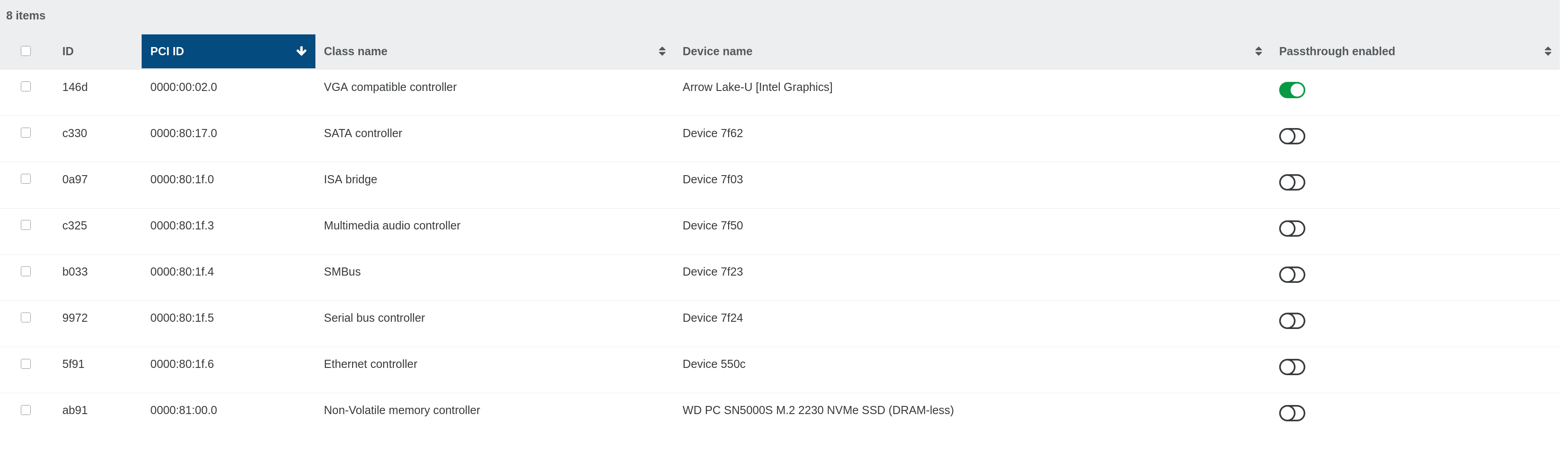
      That leftover NIC is probably a stale PIF that XAPI is still holding, even though the card is physically gone, and the Refresh button re-scans rather than removing it. The docs have proper "remove a physical NIC" steps that end in forgetting the old PIF with xe pif-forget: https://docs.xcp-ng.org/networking/#remove-a-physical-nic. For the GPU side, the PCI passthrough flow (hiding the device from dom0, then assigning it) is here: https://docs.xcp-ng.org/compute#detaching-a-pci-device. If the GPU still won't show up as assignable once the stale PIF is gone, it might be worth a mention to @Team-Hypervisor-Kernel.
    • R

      cifs-utils LPE (CVE-2026-46243) / 8.3 dom0 vulnerability inquiry

      Watching Ignoring Scheduled Pinned Locked Moved XCP-ng
      5
      0 Votes
      5 Posts
      349 Views
      R
      Closing the loop on this one — VSA-2026-021 went up yesterday (June 10) covering CIFSwitch / CVE-2026-46243: https://docs.vates.tech/security/advisories/2026/vates-sa-2026-021 A few things worth flagging for anyone following along: Severity landed at Moderate 🟠 — same ballpark as CopyFail/DirtyFrag, as Lucien anticipated. XCP-ng 8.3 and XOA both confirmed affected. XCP-ng 8.3 fix isn't in the main repo yet. The advisory notes there's a publicly available package with the fix, but it's not in the standard channel — Vates is asking people to reach out for the install procedure so you don't break future Rolling Pool Updates. So don't go hand-rolling the kernel commit yourself if you want to stay on the RPU path. XOA is already handled — fixed in Debian kernel 6.1.174-1, pushed via the unattended update mechanism. Just note the XOA VM needs a restart for it to take effect, and anything older than Debian 11/12 won't get the update and needs an OS upgrade first. Mitigation is unchanged from what we discussed: blacklist the cifs module if you're not using SMB-based SRs (which breaks SMB SRs, so only if you don't rely on them). Good turnaround given the disclosure-to-advisory window. Thanks again @LucienLassalle and the security team.
    • acebmxerA

      VHD Check Error

      Watching Ignoring Scheduled Pinned Locked Moved Backup
      13
      1
      0 Votes
      13 Posts
      683 Views
      poddingueP
      Pilow's right that moving a VM to another SR forces one full pass while the CBT bitmap is rebuilt; that part is expected. But your screenshot actually shows the likely culprit for the all-VMs-fall-back-to-full pattern: you have Purge snapshot data when using CBT enabled, and XO's incremental backup docs flag exactly that combination as a known issue where you can occasionally get unexpected fulls: https://docs.xen-orchestra.com/xo5/incremental_backups#known-issues. It might be worth running a few jobs with that toggle off to see if the deltas hold. It is a known rough edge on the CBT side, so following the central CBT feedback thread and maybe a nudge to @Team-XO-Backend wouldn't hurt.